
What Is an AI API Gateway? A Beginner Guide to AI Model Access
Artificial intelligence models have become an important part of modern software development. Developers are now using advanced AI models such as Claude, Codex, GPT, and GLM to build applications, improve coding workflows, automate repetitive tasks, and create new AI-powered products.
However, accessing these models is not always simple.
Each AI provider usually has its own API system, authentication method, billing structure, and usage limitations. Developers who want to combine multiple models often need to manage different accounts, API keys, and technical configurations. For individual developers and small teams, this creates unnecessary complexity.
This is why AI API gateways and AI API proxy platforms have become increasingly popular. They provide a simpler connection layer between developers and AI models, making it easier to access, manage, and optimize different AI services.
DDS Hub is one example of this type of platform, focusing on practical AI development workflows around Claude, Codex, and GLM models.
This article explains:
- What an AI API gateway is
- What problems it solves
- Why developers use API gateway platforms
- How DDS Hub works
- How DDS Hub compares with OpenRouter, Fal, and Replicate
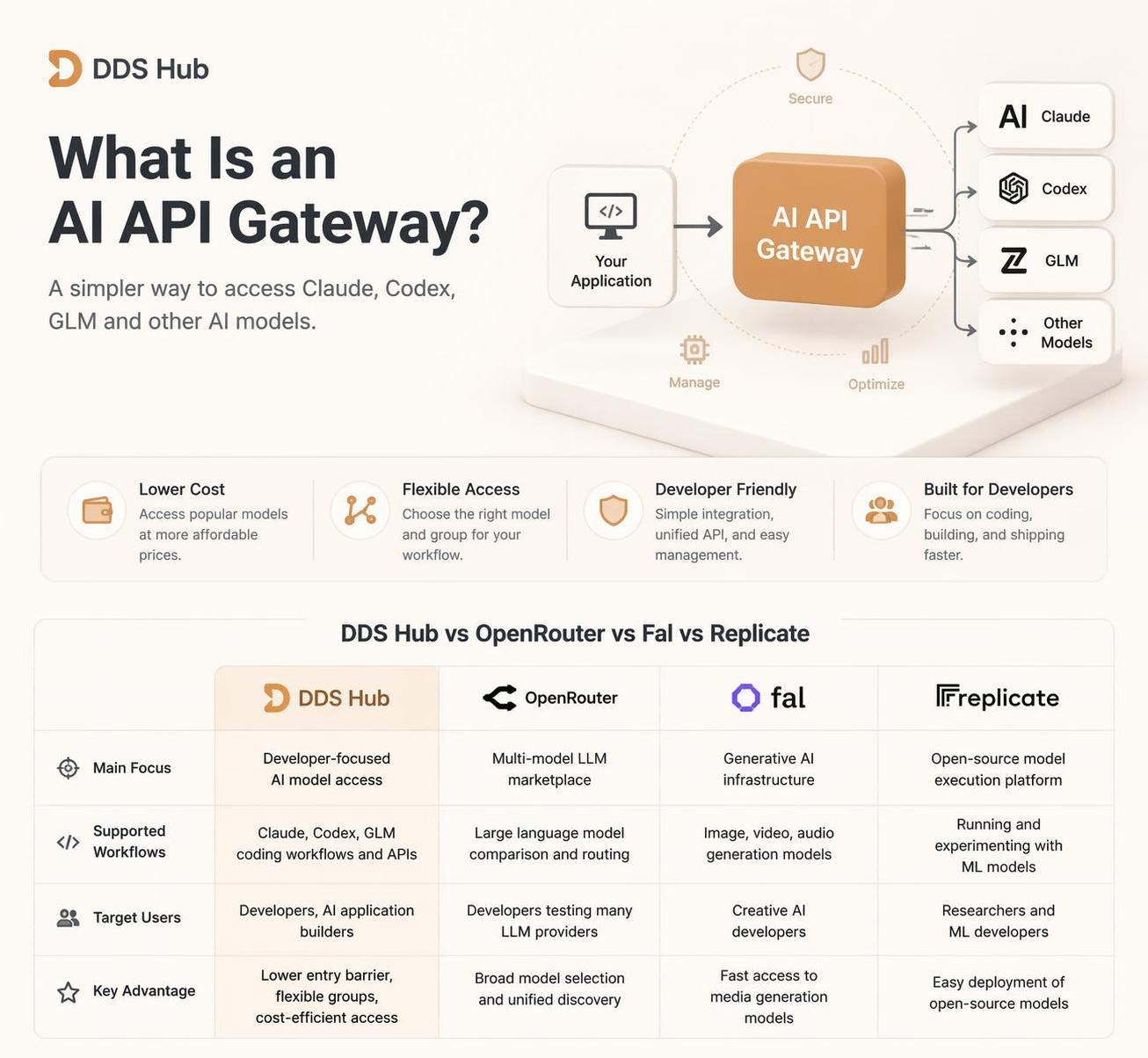
What Is an AI API Gateway?
An AI API gateway is a service that works as a connection layer between users and AI model providers.
Instead of every application directly connecting to different AI providers, developers can connect their applications to an API gateway and manage model access through a single technical workflow.
The basic architecture looks like this:
Developer Application
↓
AI API Gateway
↓
AI Model Provider
↓
Response
The gateway layer can handle:
- API authentication
- Request forwarding
- Model access management
- Usage control
- Developer configuration
The purpose of an AI API gateway is not to replace AI models. Instead, it simplifies how developers use different models.
What Problems Does an AI API Gateway Solve?
Managing Multiple AI Providers
The AI ecosystem is becoming increasingly diverse. Different models are optimized for different tasks.
For example:
| Model Type | Common Usage |
|---|---|
| Claude | Long-context reasoning, AI coding, architecture analysis |
| Codex | Programming assistance and coding workflows |
| GLM | Cost-efficient AI applications |
| GPT Models | General AI applications |
A developer building an AI product may need more than one model.
Without a gateway solution, developers need to manage:
- Different API formats
- Different authentication systems
- Different billing methods
An AI API gateway reduces this complexity by providing a more consistent development experience.
Reducing AI Development Costs
Advanced AI models can become expensive when used frequently. This is especially true for:
- AI coding agents
- Automated development tools
- Large-context conversations
- Production AI applications
Many developers need flexibility:
- Lower-cost options for testing
- Stable options for production
- Different models for different tasks
A model access platform allows developers to select solutions based on their actual requirements.
Lowering Technical Barriers
Many users want to try AI development but are blocked by configuration complexity.
Common questions include:
- How do I connect an AI model to my application?
- Which API endpoint should I use?
- Which model is suitable for coding?
- How can I control costs?
A well-designed AI API platform simplifies this process.
What Is DDS Hub?
DDS Hub is an AI model access platform that helps developers connect with popular AI models including Claude, Codex, and GLM. If you are new to the platform, start with What Is DDS Hub? for a beginner-friendly overview.
Unlike a traditional single-provider API, DDS Hub organizes access through different model groups.
The core concept is:
API Key
↓
Selected Group
↓
Available Model Family
Each API key belongs to a specific group. A user does not create one universal API key for every model. Instead, users select the appropriate group based on their workflow.
How the DDS Hub Group System Works
The group-based system allows users to choose different access methods depending on their needs.
For example:
Claude Groups
Claude groups provide access to Claude model workflows.
| Group | Access Method | Suitable For |
|---|---|---|
| Claude Max Pool Group | Claude Code CLI only | Personal AI coding workflows |
| Claude Stable Group | API access | Development and production |
| Claude Discount Group | API access | Lower-cost experiments |
Codex Groups
Codex groups focus on coding workflows.
| Group | Access Method | Suitable For |
|---|---|---|
| Codex Basic Group | Codex Client | Standard Codex usage |
| Codex CC Group | Claude Code integration | AI coding workflows |
| Codex External Group | API access | Applications and automation |
GLM Groups
GLM groups provide flexible API access.
| Group | Protocol | Suitable For |
|---|---|---|
| GLM Group | OpenAI Compatible API | Application development |
| GLM CC Group | Claude Code compatible | AI coding |
DDS Hub vs OpenRouter vs Fal vs Replicate
Different AI platforms focus on different markets. Some platforms focus on broad model discovery, while others focus on specific AI workloads such as image generation or open-source model deployment.
The following table summarizes the differences:
| Platform | Main Focus | Supported Workflows | Target Users | Key Advantage |
|---|---|---|---|---|
| DDS Hub | Developer-focused AI model access | Claude, Codex, GLM coding workflows and APIs | Developers, AI application builders | Lower entry barrier, flexible groups, cost-efficient model access |
| OpenRouter | Multi-model LLM marketplace | Large language model comparison and routing | Developers testing many LLM providers | Broad model selection and unified discovery |
| Fal | Generative AI infrastructure | Image, video, audio generation models | Creative AI developers | Fast access to media generation models |
| Replicate | Open-source model execution platform | Running and experimenting with ML models | Researchers and ML developers | Easy deployment of open-source models |
DDS Hub Compared with OpenRouter
OpenRouter focuses on providing access to a wide range of language models from different providers. It is useful for developers who want to compare many models or experiment with different LLM options.
DDS Hub focuses more specifically on practical developer workflows, especially around:
- Claude Code usage
- Codex development workflows
- GLM API integration
- Cost-efficient coding scenarios
For developers who primarily need coding-focused AI models, a specialized workflow-oriented platform can reduce complexity.
DDS Hub Compared with Fal
Fal mainly focuses on generative media infrastructure. Its common use cases include:
- AI image generation
- AI video generation
- Creative media applications
DDS Hub focuses on language models and developer productivity scenarios, including:
- AI coding
- Software development
- API-based applications
The two platforms solve different problems.
DDS Hub Compared with Replicate
Replicate provides a convenient way to run many open-source machine learning models. It is commonly used for:
- Model experiments
- Research projects
- Custom AI deployment
DDS Hub focuses more on ready-to-use AI models for developers who want practical integration with coding tools and applications.
Why Developers Choose DDS Hub
Lower Entry Barrier
Many developers want to use advanced AI models but do not want to handle complicated infrastructure.
DDS Hub simplifies the process:
Create Account
↓
Choose Group
↓
Create API Key
↓
Configure Application
↓
Start Using AI Models
Step-by-step setup instructions are available in the DDS Hub documentation.
Flexible Pricing Options
Different developers have different priorities. Some users want maximum stability. Others prefer lower cost for experiments.
DDS Hub provides different groups to support different usage scenarios.
For example:
| Requirement | Suitable Option |
|---|---|
| Lowest cost testing | Discount Group |
| Stable development | Stable Group |
| Claude Code usage | Claude compatible groups |
| API integration | External API groups |
Flexible Multi-Model Workflow
Modern AI development is rarely based on one model. Different models have different strengths.
A practical workflow may look like:
| Task | Recommended Model Type |
|---|---|
| Complex reasoning | Claude |
| Coding assistance | Codex |
| Cost-efficient generation | GLM |
DDS Hub allows developers to organize these workflows through different groups. You can compare the available options on the DDS Hub models page.
Who Should Use DDS Hub?
DDS Hub is suitable for:
- Developers who use AI coding assistants and want easier access to Claude or Codex workflows.
- Small teams building AI applications that need flexible model access.
- AI enthusiasts who want to experiment with different AI models without managing multiple complicated integrations.
The Future of AI Development: Flexible Model Access
The AI industry is moving toward a multi-model future. Developers will increasingly combine different models depending on:
- Performance requirements
- Cost limitations
- Application scenarios
The future question is not only "Which AI model is the best?" It is "How can developers access the right model efficiently?"
AI API gateways help answer this question by connecting developers with the models they need.
Conclusion
An AI API gateway provides a practical bridge between developers and modern AI models.
It helps solve common problems such as:
- Complicated integrations
- Expensive API usage
- Managing multiple AI providers
DDS Hub provides a developer-focused approach with:
- Claude support
- Codex workflows
- GLM API access
- Flexible group-based management
- Lower entry barriers
For developers exploring AI coding, automation, and AI applications, understanding how AI API gateways work is becoming an important skill. When you're ready to start, activate API access on DDS Hub and create your first group-based key.