
What Is DDS Hub? A Beginner's Guide to Using Claude, Codex and GLM AI Models
AI models are becoming an important part of modern software development.
Developers use models such as Claude, Codex, and GLM for:
- Code generation
- Debugging
- AI coding assistants
- Automation workflows
- Software engineering tasks
However, accessing and managing different AI models can be complicated. Different models may require different APIs, different clients, and different configurations.
DDS Hub provides a simpler way for developers to manage AI model access through a group-based API system.
This guide explains:
- What DDS Hub is
- How DDS Hub works
- How to create and use API keys
- How model groups work
- How to choose the right group for Claude, Codex, and GLM workflows
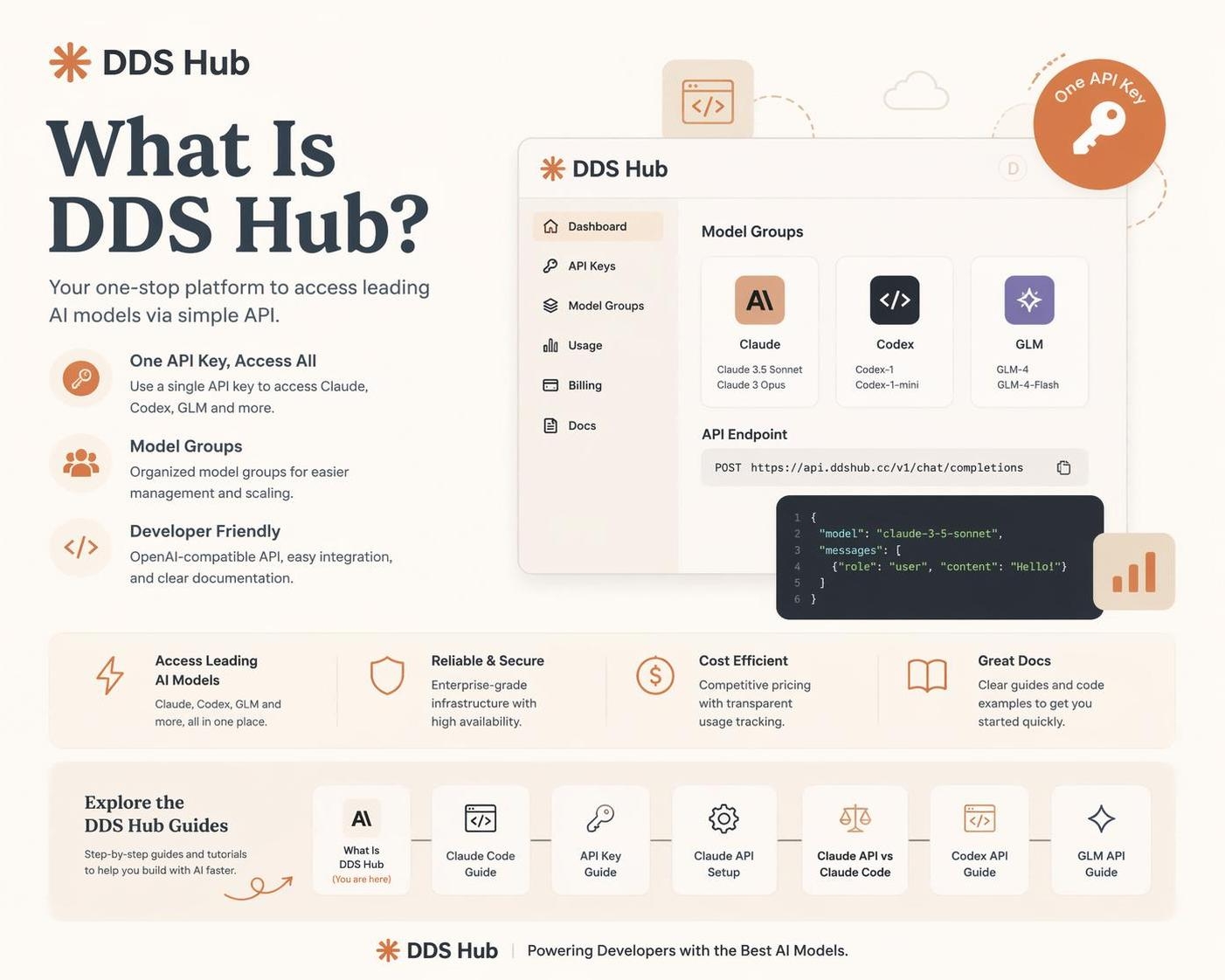
What Is DDS Hub?
DDS Hub is an AI model access platform that provides developers with access to multiple AI model ecosystems through dedicated API groups.
Instead of connecting every application directly to different AI providers, developers can configure their tools with DDS Hub's API endpoint and use the appropriate model group.
The basic workflow is:
Developer
↓
AI Client / Application
↓
DDS Hub API Gateway
↓
Selected Model Group
↓
AI Model
DDS Hub supports different AI workflows, including:
- Claude Code development
- Codex coding workflows
- GLM API applications
- AI automation projects
How Does DDS Hub Work?
DDS Hub uses a group-based API key system.
A common misunderstanding is that one API key can access all AI models. This is not how DDS Hub works.
Each API key belongs to a specific group. The relationship is:
API Key
↓
Model Group
↓
Available Models
Example 1: Claude Group
Create:
API Key A
↓
Claude Group
This key can access Claude models included in the Claude group. It cannot access:
- Codex models
- GLM models
Example 2: Codex Group
Create:
API Key B
↓
Codex Group
This key is used for Codex-related workflows. It cannot access:
- Claude models
- GLM models
This design provides better control over:
- Model access
- Pricing
- Stability
- Usage scenarios
Understanding DDS Hub Model Groups
Different users have different needs.
- Some developers need stable API access.
- Some prefer lower-cost options.
- Some only need AI coding assistants.
DDS Hub separates these requirements into different groups.
Claude Groups
Claude models are widely used for:
- AI coding
- Software architecture
- Debugging
- Long-context reasoning
DDS Hub provides different Claude-related groups.
| Group | Access Method | Features | Best For |
|---|---|---|---|
| Claude Max Pool Group | Claude Code CLI only | Optimized for Claude Code usage | Individual developers |
| Claude Stable Group | API access | Higher stability | Development and production |
| Claude Discount Group | API access | Lower cost, possible stability/cache fluctuation | Testing and lightweight workloads |
Claude Max Pool Group
This group is designed for users who mainly use:
- Claude Code CLI
- AI programming assistants
Example workflow:
Claude Code CLI
↓
DDS Hub Claude Group
↓
Claude Models
It is suitable for developers who want a Claude Code experience.
Claude Stable Group
The stable group focuses on API-based applications. Suitable for:
- SaaS products
- Backend integration
- Automation systems
- Development environments
Claude Discount Group
The discount group focuses on cost efficiency. It is suitable for:
- Experiments
- Personal projects
- Lightweight coding tasks
Because it focuses on lower cost, users may experience:
- Availability changes
- Cache differences
- Performance fluctuations
Codex Groups
Codex is designed for coding-focused workflows. DDS Hub provides multiple Codex access methods.
| Group | Access Method | Best For |
|---|---|---|
| Codex Basic Group | Codex Client | Standard Codex usage |
| Codex CC Group | Claude Code integration | AI coding workflows |
| Codex External Group | API access | Applications and automation |
Codex Basic Group
Designed for users who mainly work with Codex clients. Typical use cases:
- Code generation
- Programming assistance
- Daily development
Codex CC Group
This group allows developers to use Codex capabilities inside Claude Code workflows. Useful for users who want:
- Claude Code interface
- Codex model capability
Codex External Group
Designed for API integration. Suitable for:
- Software products
- Developer tools
- Automated coding systems
GLM Groups
GLM models are popular for cost-efficient AI applications. DDS Hub provides:
| Group | Protocol | Usage |
|---|---|---|
| GLM Group | OpenAI Compatible API | Application development |
| GLM CC Group | Claude Code compatible | AI coding |
GLM OpenAI Compatible API
Developers can use standard OpenAI-compatible SDKs.
Example:
Application
↓
OpenAI SDK
↓
DDS Hub GLM Group
↓
GLM Model
Suitable for:
- AI applications
- Backend services
- Experiments
How To Use DDS Hub
The basic setup process is simple.
Step 1: Create a DDS Hub Account
Register an account and access the dashboard.
Step 2: Select the Correct Group
Choose based on your usage:
| Your Goal | Recommended Group |
|---|---|
| Claude Code | Claude Max / Claude CC compatible group |
| Claude API | Claude Stable or Discount |
| Codex Client | Codex Basic |
| Codex API | Codex External |
| GLM Application | GLM API |
Step 3: Create an API Key
Create an API key under your selected group.
Example:
sk-xxxxxxxxRemember: one API key belongs to one group.
Step 4: Configure Your Application
For Claude Code:
export ANTHROPIC_AUTH_TOKEN="your_api_key"
export ANTHROPIC_BASE_URL="https://www.ddshub.cc"
For OpenAI-compatible applications, configure the DDS Hub endpoint and API key.
You can find step-by-step setup instructions in the DDS Hub documentation.
How To Choose The Right Group
Different workflows require different choices.
Personal Coding
Recommended:
- Claude Max Pool
- Codex Basic
Reason: simple setup and optimized for client usage.
Software Development
Recommended:
- Claude Stable
- Codex External
- GLM API
Reason: more suitable for applications and testing.
Cost Optimization
Recommended:
- Claude Discount
- GLM Group
Reason: lower cost for experiments and lightweight tasks.
Why Use a Group-Based System?
A group-based architecture provides several advantages.
Better Control
Each key has clear permissions. Developers know:
- Which model they are using
- Which resources they access
- What pricing applies
Easier Management
Teams can separate:
- Development keys
- Production keys
- Testing environments
Flexible AI Workflow
Different tasks can use different models.
Example:
Complex reasoning
↓
Claude Group

Fast coding
↓
Codex Group

Cost-efficient tasks
↓
GLM Group
DDS Hub for Modern AI Development
Modern developers rarely use only one AI model. Different models have different strengths.
A practical workflow may combine:
| Task | Model Type |
|---|---|
| Architecture analysis | Claude |
| Fast coding | Codex |
| Cost-efficient generation | GLM |
DDS Hub allows developers to organize these workflows through different groups. You can compare the available options on the DDS Hub models page.
Conclusion
DDS Hub is a flexible AI model access platform built around a group-based API system.
Instead of managing multiple complex integrations, developers can:
- Choose the right model group
- Create a dedicated API key
- Configure their development tools
- Start using AI models
Whether you are using Claude Code, Codex workflows, or GLM applications, choosing the correct group helps balance:
- Performance
- Stability
- Cost
Understanding the relationship between API Key → Group → Model is the first step to using DDS Hub effectively. When you're ready, activate API access on DDS Hub and create your first group-based key.