
GPT-5.5 API Guide: Best Use Cases and Cheap Access
GPT-5.5 is one of the most capable general-purpose models available through an API today. It's fast, fluent across dozens of languages, and strong at the everyday tasks that power real products: translation, customer support, and business writing.
This guide is a practical walkthrough: what GPT-5.5 is good at, how to call it through an OpenAI-compatible API, which use cases it fits best, how it compares to Claude and GLM, and how to access it affordably through DDS Hub.
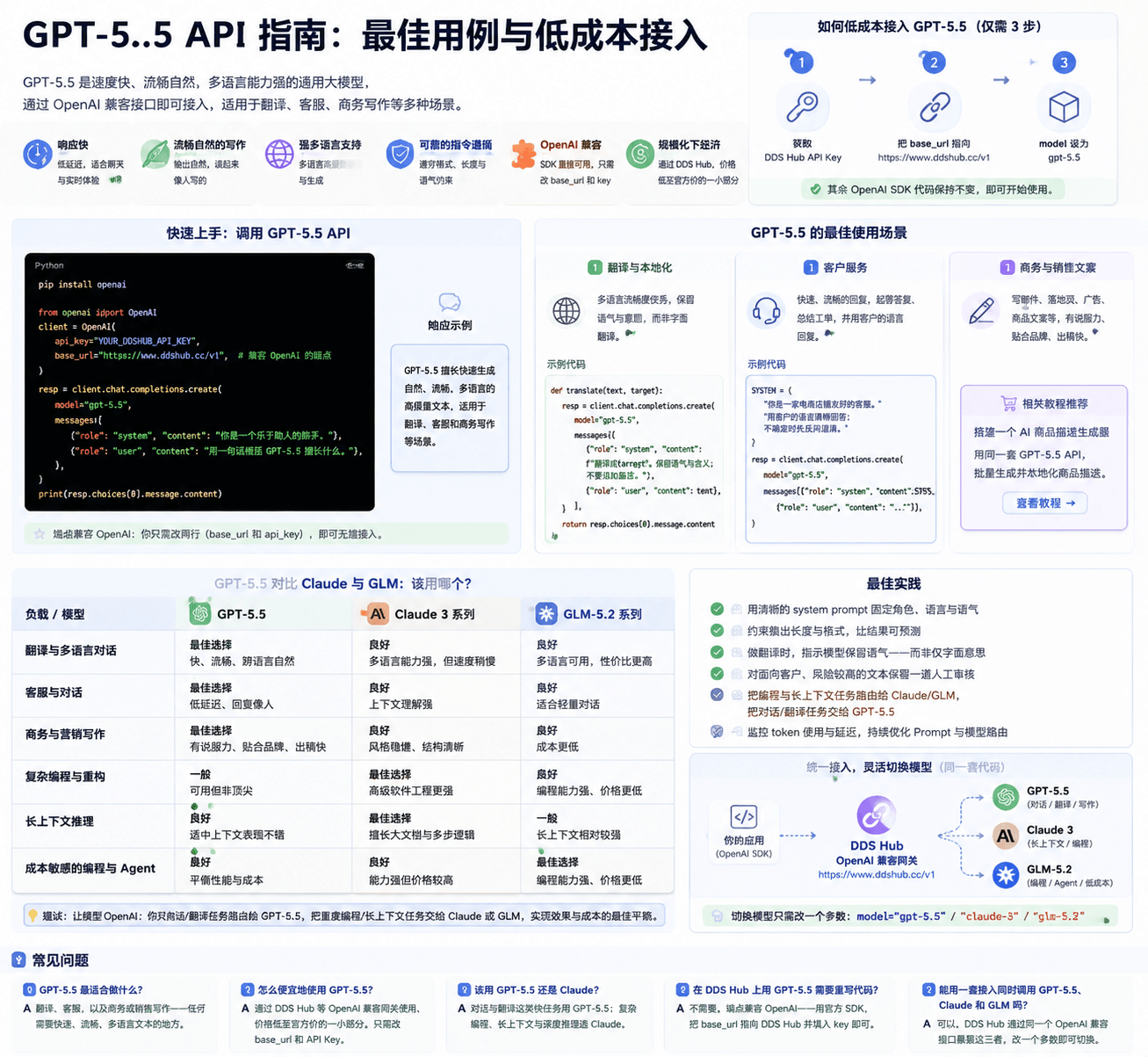
What Is GPT-5.5?
GPT-5.5 is a general-purpose large language model exposed through a standard chat-completions API. You send it a list of messages and it returns generated text, so it slots into almost any application that needs natural language: chatbots, translation pipelines, support automation, content generation, and data extraction.
Its standout traits are speed and fluency. GPT-5.5 produces natural, human-sounding text quickly and across many languages, which makes it a strong default for conversational and writing-heavy workloads.
Why Developers Choose GPT-5.5
Teams evaluate models on fluency, latency, multilingual quality, instruction-following and cost. GPT-5.5 scores well across all of them.
Key Advantages
- Fast responses — low latency suits chat and real-time experiences
- Fluent, natural writing — output reads like a person wrote it
- Strong multilingual support — high-quality translation and generation in many languages
- Reliable instruction-following — respects format, length and tone constraints
- OpenAI-compatible — works with the official OpenAI SDK; you only change the base URL and key
- Affordable at scale — through DDS Hub you access GPT-5.5 at a fraction of list price
Getting Started: Calling the GPT-5.5 API
Because the endpoint is OpenAI-compatible, you can use the official SDK and simply point it at DDS Hub.
pip install openaifrom openai import OpenAI
client = OpenAI(
api_key="YOUR_DDSHUB_API_KEY",
base_url="https://www.ddshub.cc/v1", # OpenAI-compatible endpoint
)
resp = client.chat.completions.create(
model="gpt-5.5",
messages=[
{"role": "system", "content": "You are a helpful assistant."},
{"role": "user", "content": "Summarize what GPT-5.5 is good at in one sentence."},
],
)
print(resp.choices[0].message.content)That's the entire integration. If you already use the OpenAI SDK, switching to GPT-5.5 through DDS Hub is a two-line change: the base_url and the api_key.
Best Use Cases for GPT-5.5
GPT-5.5 shines on language-heavy, latency-sensitive work. Three use cases stand out.
Translation and Localization
GPT-5.5's multilingual fluency makes it excellent for translation that preserves tone and intent, not just literal meaning.
def translate(text: str, target: str) -> str:
    resp = client.chat.completions.create(
        model="gpt-5.5",
        messages=[
            {"role": "system", "content": f"Translate into {target}. Keep the tone and meaning; do not add notes."},
            {"role": "user", "content": text},
        ],
    )
    return resp.choices[0].message.content
Customer Support
Fast, fluent replies make GPT-5.5 a strong fit for support automation — drafting answers, summarizing tickets, and replying in the customer's own language.
SYSTEM = (
    "You are a friendly support agent for an e-commerce store. "
    "Answer clearly in the customer's language. If unsure, ask a clarifying question."
)
Business and Sales Writing
GPT-5.5 is a capable copywriter for emails, landing pages, ads and product copy. If you sell online, see our dedicated walkthrough on building an AI product description generator — it uses the same GPT-5.5 API to generate and localize product descriptions at scale.
GPT-5.5 vs Claude vs GLM: Which Should You Use?
No single model wins every task. The practical approach is to match the model to the workload — and through DDS Hub you can access all three behind one OpenAI-compatible integration.
| Workload | Best fit | Why |
|---|---|---|
| Translation & multilingual chat | GPT-5.5 | Fast, fluent, natural across languages |
| Customer support & conversation | GPT-5.5 | Low latency, human-sounding replies |
| Business & marketing writing | GPT-5.5 | Persuasive, on-brand copy at speed |
| Complex coding & refactoring | Claude / Codex | Stronger on advanced software engineering |
| Long-context reasoning | Claude | Handles large documents and multi-step logic |
| Cost-sensitive coding & agents | GLM 5.2 | Strong coding at a lower price point |
The most efficient teams don't pick one model — they route each workload to the model that fits, and optimize for cost. A single gateway makes that switch a one-line change.
How to Access GPT-5.5 Affordably
Official model pricing adds up quickly at production volume. DDS Hub provides GPT-5.5 (alongside Claude, Codex and GLM) through an OpenAI-compatible gateway at up to a fraction of list price — so you keep your existing code and cut your bill.
To get started:
- Get a DDS Hub API key
- Point
base_urlathttps://www.ddshub.cc/v1 - Set
modeltogpt-5.5 - Keep the rest of your OpenAI SDK code unchanged
Best Practices
- Use a clear system prompt to fix role, language and tone
- Constrain output length and format for predictable results
- For translation, instruct the model to preserve tone — not just literal meaning
- Keep a human review step for customer-facing, high-stakes text
- Route coding and long-context tasks to Claude/GLM, and conversational/translation tasks to GPT-5.5
Final Thoughts
GPT-5.5 is a fast, fluent, multilingual workhorse — ideal for translation, support and business writing. Because it's OpenAI-compatible, adopting it is a two-line change, and routing through DDS Hub makes it affordable at scale.
Start with one use case, refine your system prompt, then expand. And when a task calls for heavy coding or long-context reasoning, switch the model name and let the same integration reach Claude or GLM instead.
FAQ
What is GPT-5.5 best for?
Translation, customer support, and business or sales writing — anywhere you need fast, fluent, multilingual text.
How do I use GPT-5.5 cheaply?
Access it through an OpenAI-compatible gateway like DDS Hub at a fraction of list price. You only change the base_url and API key.
Should I use GPT-5.5 or Claude?
Use GPT-5.5 for fast conversational and translation work; choose Claude for complex coding, long context and deep reasoning.
Do I need to rewrite my code to use GPT-5.5 on DDS Hub?
No. The endpoint is OpenAI-compatible — use the official OpenAI SDK and point base_url at DDS Hub with your key.
Can I access GPT-5.5, Claude and GLM through one integration?
Yes. DDS Hub exposes all of them through the same OpenAI-compatible API, so you switch models by changing one parameter.