
Build an AI Product Description Generator for E-commerce with GPT-5.5
Writing product descriptions is one of the most repetitive tasks in e-commerce. Every new SKU needs a title, a set of bullet points, and a paragraph that sounds persuasive without misstating the specs. Multiply that by hundreds of products — and then by every language you sell in — and copywriting quickly becomes a bottleneck.
An AI product description generator removes that bottleneck. With a single API call, you can turn raw product attributes into clean, on-brand, conversion-focused copy, and localize it for every market you serve. In this guide, you'll build one from scratch using the GPT-5.5 API through DDS Hub.
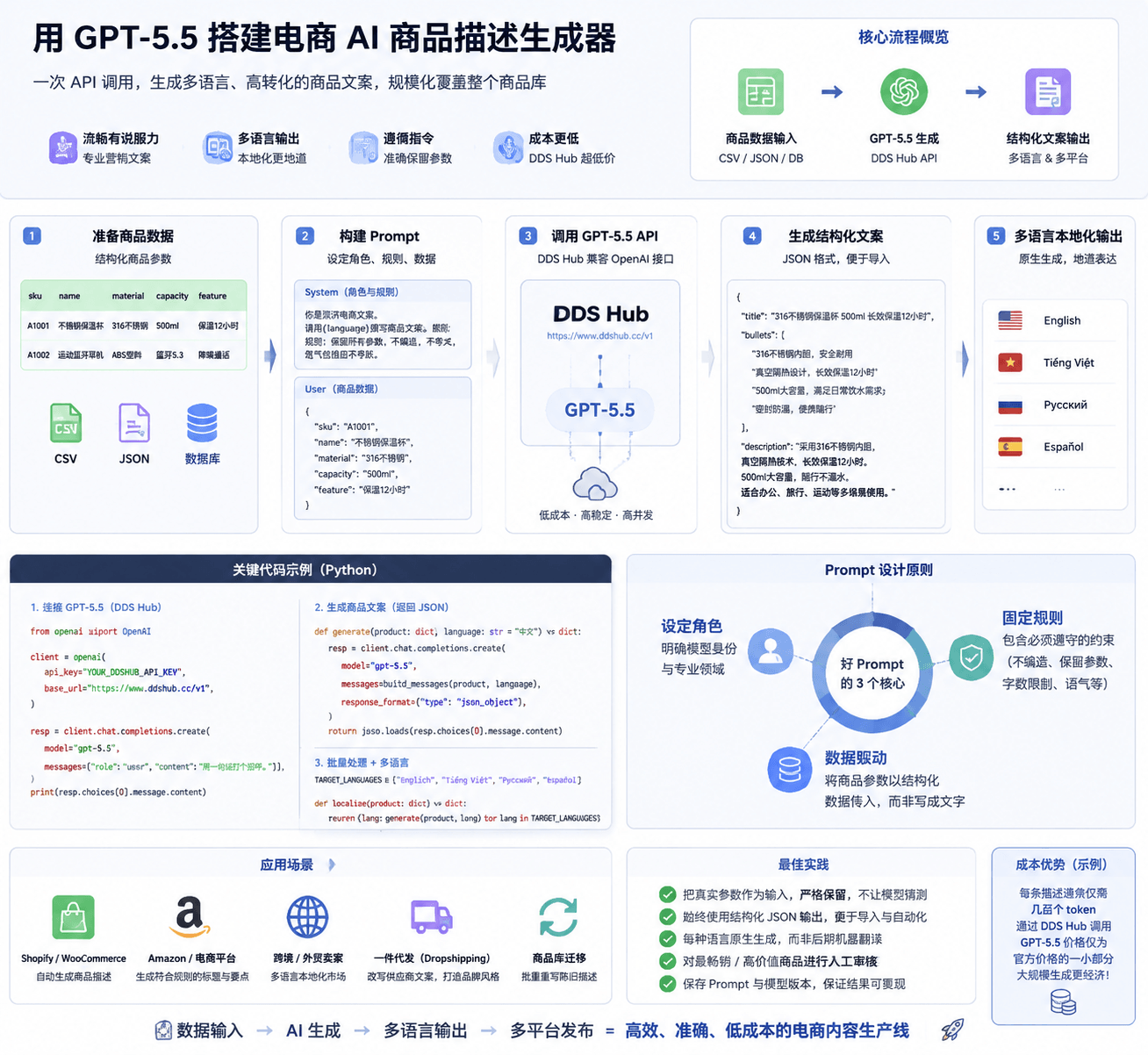
What Is an AI Product Description Generator?
An AI product description generator is a small program that takes structured product data — name, category, materials, features, dimensions — and outputs ready-to-publish marketing copy.
A typical generator produces:
- A search-friendly product title
- Three to five benefit-driven bullet points
- A short, persuasive description paragraph
- Optional SEO meta fields and keywords
Because it runs through an API, it scales from one product to an entire catalog without extra effort, and the same pipeline can output every language you need.
Why Use GPT-5.5 for Product Descriptions
Product copy has specific requirements: it must be fluent, persuasive, factually faithful to the input, and natural in multiple languages. GPT-5.5 is a strong fit because it handles all four at once.
Key Advantages
- Fluent, persuasive writing — copy reads like a human marketer wrote it, not a template
- Strong multilingual output — one prompt, many target languages, with native-sounding results
- Instruction following — it respects rules like "keep these specs", "stay under 60 words", or "match this tone"
- Cost efficiency at scale — through DDS Hub you access the GPT-5.5 API at a fraction of list price, which matters when you're generating thousands of descriptions
For cross-border and 外贸 sellers in particular, the multilingual strength is the differentiator: you can write once in your source language and localize the entire catalog for overseas marketplaces.
What You Need Before Starting
You only need three things:
- A DDS Hub API key
- Python 3.9+ (or any language with an HTTP client — the API is OpenAI-compatible)
- Your product data in any structured form (a CSV, a database export, or a JSON file)
Because the endpoint is OpenAI-compatible, you can reuse the official OpenAI SDK and simply point it at DDS Hub.
Step 1: Connect to the GPT-5.5 API
Install the SDK and configure the client to talk to DDS Hub:
pip install openaifrom openai import OpenAI
client = OpenAI(
api_key="YOUR_DDSHUB_API_KEY",
base_url="https://www.ddshub.cc/v1", # OpenAI-compatible endpoint
)
resp = client.chat.completions.create(
model="gpt-5.5",
messages=[
{"role": "user", "content": "Say hello in one short sentence."},
],
)
print(resp.choices[0].message.content)If you see a reply, your connection works and you're ready to generate descriptions.
Step 2: Write a Product Description Prompt
The quality of the output depends almost entirely on the prompt. A good product-copy prompt does three things: it sets the role, fixes the rules, and passes the real specs as data.
def build_messages(product: dict, language: str = "English") -> list:
    system = (
        "You are an expert e-commerce copywriter. "
        f"Write the product copy in {language}. "
        "Rules: keep every spec exactly as given; never invent features, "
        "sizes, or materials; keep the tone confident but not exaggerated."
    )
    user = (
        "Write product copy as JSON with keys "
        "`title`, `bullets` (array of 4), and `description` (max 70 words).\n\n"
        f"Product data:\n{product}"
    )
    return [
        {"role": "system", "content": system},
        {"role": "user", "content": user},
    ]
Passing the specs as data — rather than baking them into the sentence — is what keeps the model accurate. The model rewrites the *presentation*, not the *facts*.
Step 3: Generate Descriptions at Scale
Once the prompt works for one product, batching across a whole catalog is a simple loop. Here we read products from a CSV and write the generated copy back out:
import csv, json

def generate(product: dict, language: str = "English") -> dict:
    resp = client.chat.completions.create(
        model="gpt-5.5",
        messages=build_messages(product, language),
        response_format={"type": "json_object"},
    )
    return json.loads(resp.choices[0].message.content)

with open("products.csv") as f_in, open("output.csv", "w", newline="") as f_out:
    reader = csv.DictReader(f_in)
    writer = csv.writer(f_out)
    writer.writerow(["sku", "title", "bullets", "description"])
    for row in reader:
        copy = generate(row)
        writer.writerow([
            row["sku"],
            copy["title"],
            " | ".join(copy["bullets"]),
            copy["description"],
        ])
Requesting a JSON object (response_format) makes the output trivial to import into Shopify, Amazon, WooCommerce, or your own database.
Step 4: Localize for Multiple Markets
This is where the approach pays off. The same pipeline produces every language — you only change the language argument:
TARGET_LANGUAGES = ["English", "Vietnamese", "Russian", "Spanish"]

def localize(product: dict) -> dict:
    return {lang: generate(product, lang) for lang in TARGET_LANGUAGES}
Each language is generated natively from the source specs, not machine-translated from the English copy — so the result reads like it was written by a local marketer, with the right idioms and selling points for that market.
Keeping Specs Accurate and On-Brand
AI copy is only useful if it's trustworthy. Three practices keep it reliable:
- Pass real specs as input and instruct the model to preserve them exactly. Never ask it to "guess" missing details.
- Constrain length and tone in the prompt so output stays consistent across the catalog.
- Spot-check high-value SKUs manually before publishing. The long tail can run unattended; flagship products deserve a human read.
A short review step on your top sellers catches the rare hallucination while still saving you the bulk of the writing time.
Estimating Your Costs
A single product description is small — typically a few hundred input tokens and a couple hundred output tokens. At catalog scale the cost is dominated by volume, not by any single call, which is exactly why routing through DDS Hub matters: you pay a fraction of official GPT-5.5 pricing while generating thousands of descriptions.
A practical way to budget: generate 20 representative products, check the token usage reported by the API, and multiply by your catalog size. You'll almost always find the AI cost is far lower than the equivalent copywriting hours.
Common Use Cases
- Shopify and WooCommerce stores — auto-fill descriptions for every new product
- Amazon and marketplace sellers — generate keyword-rich titles and bullets that fit listing limits
- Cross-border / 外贸 sellers — localize a Chinese catalog into English, Vietnamese, Russian and more
- Dropshipping — rewrite generic supplier copy into unique, brand-consistent descriptions
- Catalog migrations — regenerate thousands of stale descriptions in a single batch
Best Practices
- Start with a strong prompt template and reuse it across the catalog
- Always request structured JSON output for easy import
- Generate each language natively instead of translating after the fact
- Keep a human review step for your best-selling products
- Store the prompt and model version so results stay reproducible
Final Thoughts
An AI product description generator turns a slow, manual chore into a single automated pipeline. With GPT-5.5 through DDS Hub, you get fluent, persuasive, multilingual copy at a cost that scales to an entire catalog — and you keep full control over accuracy and tone through the prompt.
Start with one product, refine the prompt until the output is publish-ready, then let the same code handle the rest of your catalog in every language you sell.
FAQ
Which model is best for product descriptions?
GPT-5.5 is a strong choice: it's fluent, persuasive and multilingual, and through DDS Hub it stays affordable at catalog scale.
Can it generate descriptions in multiple languages?
Yes. Set the target language in the prompt and the same pipeline produces native-sounding copy for every market you sell in.
How do I keep the product specs accurate?
Pass the real specs as input data and instruct the model to preserve them exactly. Review your highest-value SKUs before publishing.
Is it expensive to generate thousands of descriptions?
No. Each description uses only a few hundred tokens, and routing through DDS Hub gives you GPT-5.5 access at a fraction of list price.
Do I need to change my code to use DDS Hub?
No. The endpoint is OpenAI-compatible — use the official OpenAI SDK and point base_url at DDS Hub with your API key.