
Build a Multilingual LINE AI Customer-Service Bot with GPT-5.5
LINE is the dominant messaging app across much of Asia — the default channel for customer conversations in Japan, Taiwan, Thailand and beyond. That makes it one of the best places to deploy an AI assistant: your customers are already there, every day.
This guide shows how to build a multilingual LINE AI customer-service bot using the LINE Messaging API and GPT-5.5 through DDS Hub. The same bot answers in Japanese, Chinese, Thai and Vietnamese — automatically, in whatever language the customer writes.
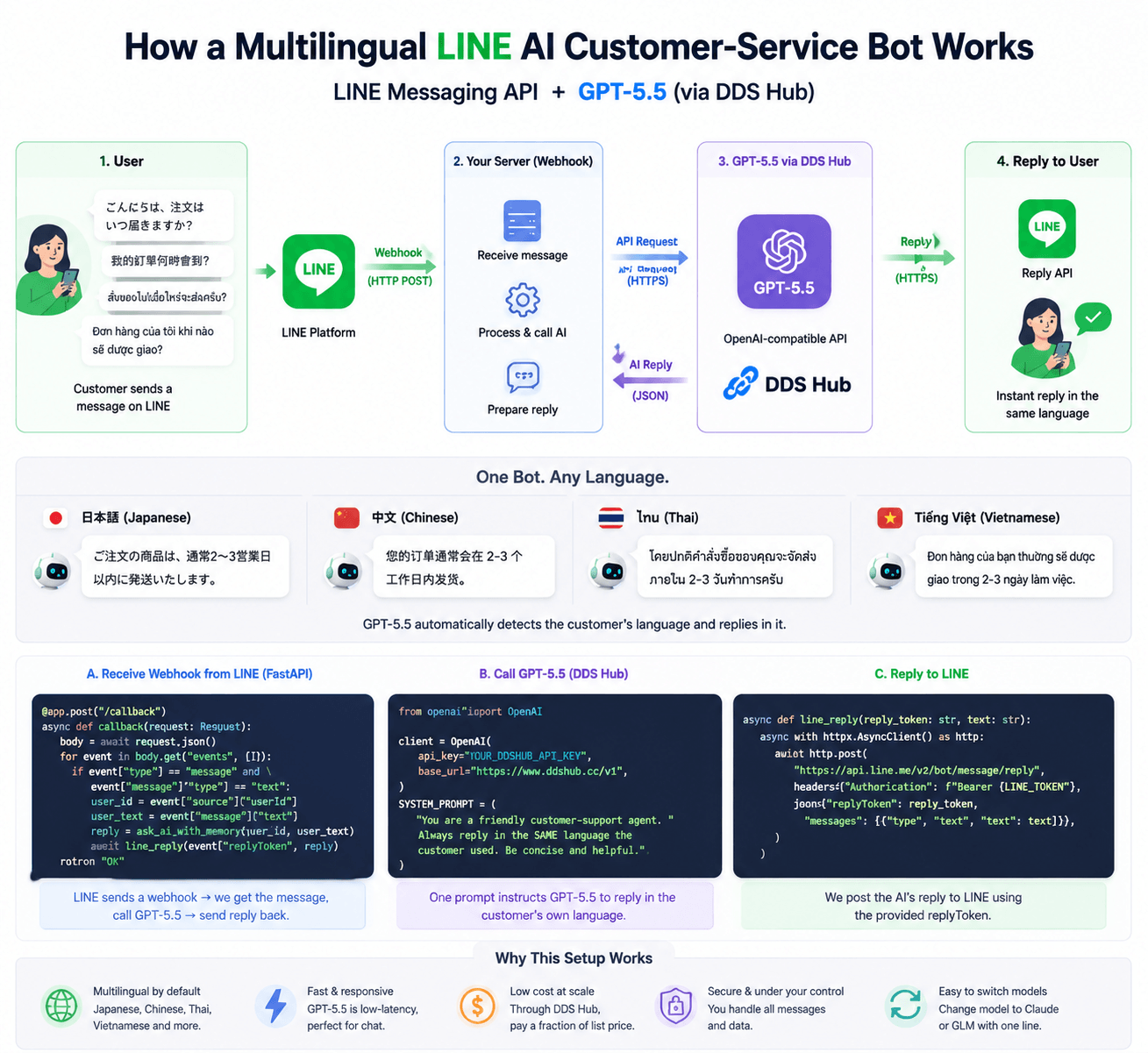
Why LINE + GPT-5.5 for Customer Service
LINE is where Asian customers already are, and customer-service questions are exactly the workload GPT-5.5 handles best: fast, conversational, and multilingual.
Pairing them gives you:
- 24/7 instant replies — no waiting for an agent
- Native multilingual support — Japanese, Chinese, Thai, Vietnamese and more from one bot
- Low latency — GPT-5.5 is fast enough to feel like a real chat
- Low cost — through DDS Hub you pay a fraction of list price per message
If you want the broader picture of what GPT-5.5 is good at beyond LINE, see our GPT-5.5 API guide — this article is the hands-on customer-service build of that "support" use case.
How the Bot Works
The architecture is simple — three moving parts:
- LINE sends every user message to your server as a webhook (an HTTP POST)
- Your server forwards the message text to GPT-5.5 via the OpenAI-compatible API
- Your server sends GPT-5.5's reply back through the LINE reply API
User ──msg──▶ LINE ──webhook──▶ Your server ──▶ GPT-5.5 (DDS Hub)
                                      ▲                  │
                                      └──── reply ◀──────┘
No message ever leaves your control, and swapping the AI model later is a one-line change.
What You Need
- A LINE Official Account with the Messaging API enabled (free to start)
- Your channel access token and channel secret from the LINE Developers console
- A DDS Hub API key
- A small web server — we'll use FastAPI (Python)
Step 1: Connect to GPT-5.5
Because DDS Hub is OpenAI-compatible, you use the official OpenAI SDK and point it at DDS Hub:
pip install openai fastapi uvicornfrom openai import OpenAI
client = OpenAI(
api_key="YOUR_DDSHUB_API_KEY",
base_url="https://www.ddshub.cc/v1", # OpenAI-compatible endpoint
)Step 2: Write the Multilingual Support Prompt
This is the heart of the bot. One instruction tells GPT-5.5 to detect the customer's language and reply in it — no language detection library needed.
SYSTEM_PROMPT = (
    "You are a friendly customer-support agent for an online store. "
    "Always reply in the SAME language the customer used "
    "(Japanese, Chinese, Thai, Vietnamese, English, etc.). "
    "Be concise and helpful. If you don't know an answer, "
    "ask a clarifying question or offer to escalate to a human."
)

def ask_ai(user_message: str) -> str:
    resp = client.chat.completions.create(
        model="gpt-5.5",
        messages=[
            {"role": "system", "content": SYSTEM_PROMPT},
            {"role": "user", "content": user_message},
        ],
        max_tokens=300,  # cap cost per reply
    )
    return resp.choices[0].message.content
Step 3: Handle the LINE Webhook
LINE POSTs each incoming message to your server. You read the message, call ask_ai, and reply using the replyToken LINE provides.
import httpx
from fastapi import FastAPI, Request

app = FastAPI()
LINE_TOKEN = "YOUR_LINE_CHANNEL_ACCESS_TOKEN"

@app.post("/callback")
async def callback(request: Request):
    body = await request.json()
    for event in body.get("events", []):
        if event["type"] == "message" and event["message"]["type"] == "text":
            user_text = event["message"]["text"]
            reply = ask_ai(user_text)
            await line_reply(event["replyToken"], reply)
    return "OK"

async def line_reply(reply_token: str, text: str):
    async with httpx.AsyncClient() as http:
        await http.post(
            "https://api.line.me/v2/bot/message/reply",
            headers={"Authorization": f"Bearer {LINE_TOKEN}"},
            json={"replyToken": reply_token, "messages": [{"type": "text", "text": text}]},
        )
Run it with uvicorn main:app, expose it over HTTPS (LINE requires it), and set that URL as your webhook in the LINE Developers console. Your bot is now live.
Step 4: Add Conversation Memory (Optional)
To make replies context-aware, keep a short per-user history. Trim it aggressively — long histories are the main cost driver.
history = {}  # user_id -> list of messages (use Redis in production)

def ask_ai_with_memory(user_id: str, user_message: str) -> str:
    msgs = history.get(user_id, [])[-6:]  # keep only the last 6 turns
    msgs.append({"role": "user", "content": user_message})
    resp = client.chat.completions.create(
        model="gpt-5.5",
        messages=[{"role": "system", "content": SYSTEM_PROMPT}, *msgs],
        max_tokens=300,
    )
    answer = resp.choices[0].message.content
    msgs.append({"role": "assistant", "content": answer})
    history[user_id] = msgs
    return answer
Controlling Cost
A LINE bot can receive a lot of messages, so cost discipline matters. Two levers do most of the work:
- Trim conversation history — keep only the last few turns, not the whole thread
- Cap `max_tokens` — support replies rarely need to be long; 200–300 tokens is plenty
Because you route through DDS Hub, the per-message price is already a fraction of official GPT-5.5 pricing — so even a busy bot stays affordable.
Best Practices
- Keep the system prompt strict about replying in the customer's language
- Always cap
max_tokensand trim history to control cost - Offer a path to a human agent for anything the bot can't resolve
- Log conversations (with consent) to improve the prompt over time
- Verify the LINE signature in production for security
Final Thoughts
A LINE AI bot puts instant, multilingual support exactly where your Asian customers already are. With GPT-5.5 through DDS Hub, the build is small — a webhook, one prompt, and an OpenAI-compatible call — and the running cost stays low.
Start with a single Official Account, ship the basic reply loop, then add memory and human escalation as you grow. When a task needs heavier reasoning or coding, the same integration can reach Claude or GLM by changing one parameter.
FAQ
Can a LINE bot use the DDS Hub API?
Yes. It's a standard OpenAI chat call with base_url set to https://www.ddshub.cc/v1. Your webhook forwards the user's message and posts the reply back to LINE.
Which model is best for LINE customer support?
GPT-5.5 — it's fast, low-latency and strong at multilingual conversation (Japanese, Chinese, Thai, Vietnamese), which fits LINE's Asian user base.
How do I control the cost of a LINE bot?
Trim conversation history to the last few turns and cap max_tokens on each reply. Routing through DDS Hub also keeps the per-message price low.
Does the bot need separate code for each language?
No. One system prompt instructs GPT-5.5 to reply in whatever language the customer used, so a single bot handles all of them.
Can I switch from GPT-5.5 to Claude or GLM later?
Yes. DDS Hub is OpenAI-compatible across models, so you change the model parameter without rewriting your bot.