
How to Use Claude Code Without Claude Pro or Max: Complete API Setup Guide (2026)
Claude Code has quickly become one of the most capable AI coding assistants available today. It can understand large repositories, edit files, execute terminal commands, and automate many software development tasks that previously required hours of manual work. Because many developers first encounter Claude through the Claude web application, a common misconception is that Claude Code requires a Claude Pro or Claude Max subscription to function.
In reality, that is not the case.
Claude Code supports multiple authentication methods, including direct API access. Developers can authenticate using an Anthropic API key, enterprise cloud providers such as Amazon Bedrock, Google Vertex AI, or Microsoft Foundry, or compatible third-party gateways. This flexibility allows engineering teams to integrate Claude Code into their existing infrastructure without relying exclusively on a consumer subscription.
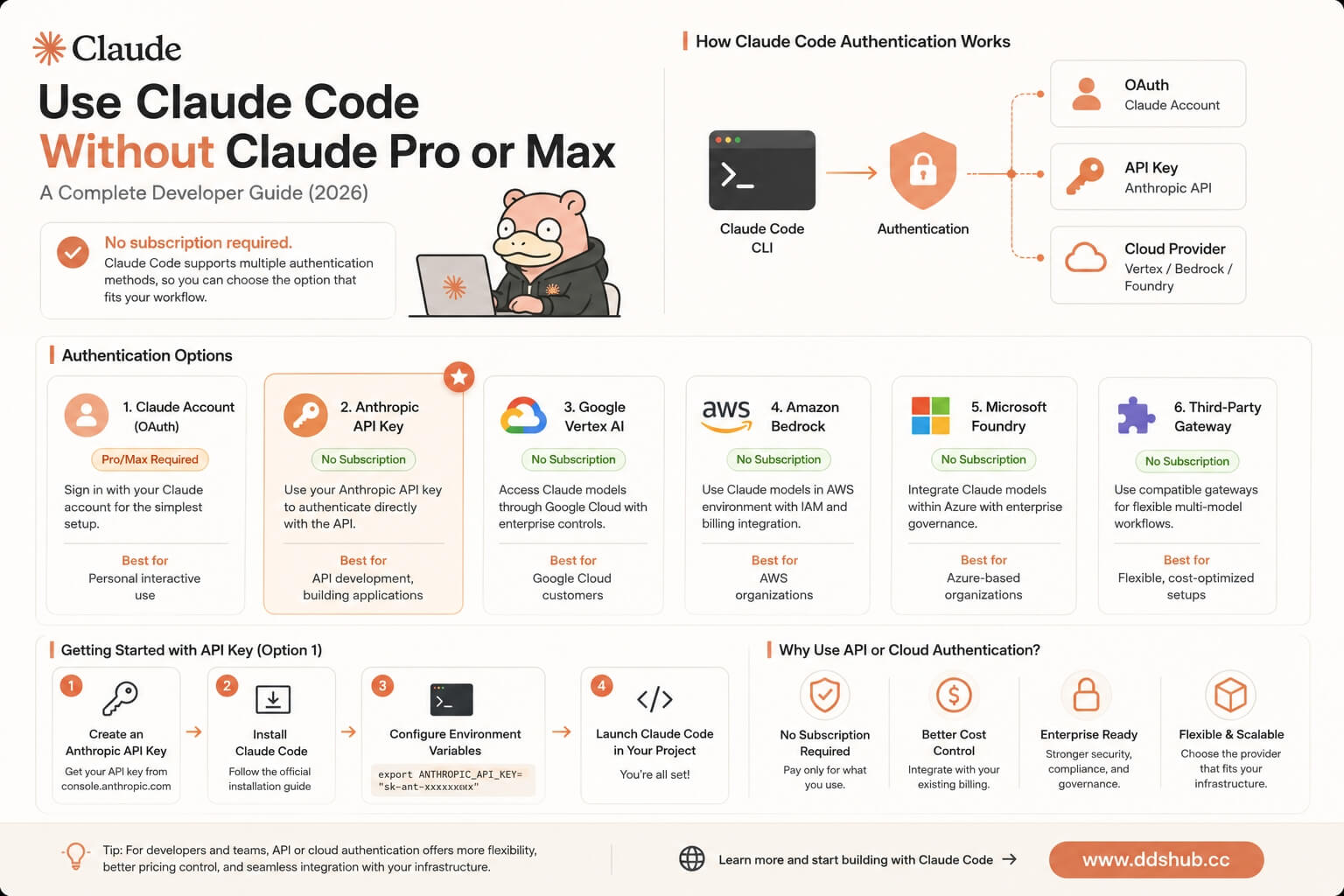
This guide explains how Claude Code authentication works, compares the available options, and shows how developers can choose the approach that best fits their workflow.
Does Claude Code Require a Claude Subscription?
The short answer is no.
According to the official Claude Code documentation, Claude Code supports several authentication methods. While signing in with a Claude account is the simplest option for individual users, developers can also authenticate using API credentials or supported cloud platforms.
The supported methods include:
| Authentication Method | Claude Pro/Max Required | Best For |
|---|---|---|
| Claude Account (OAuth) | Yes | Personal interactive use |
| Anthropic API Key | No | API development |
| Google Vertex AI | No | Enterprise deployments |
| Amazon Bedrock | No | AWS environments |
| Microsoft Foundry | No | Azure-based organizations |
| Compatible Third-Party Gateway | No | Flexible multi-model workflows |
Official documentation: https://code.claude.com/docs/en/authentication
For most software developers building applications or integrating Claude into development workflows, API authentication is often the more flexible approach.
How Claude Code Authentication Works
Claude Code separates the client from the model provider. Instead of being permanently tied to one login method, the CLI authenticates using whichever credentials are configured in your environment.
A simplified architecture looks like this:
Claude Code CLI
        │
        ▼
Authentication
        │
 ┌──────┼──────────────┐
 │      │              │
OAuth  API Key   Cloud Provider
 │      │              │
Claude Anthropic   Vertex / Bedrock / Foundry
Account  API
When environment variables are configured, Claude Code uses those credentials to communicate with the configured backend instead of requiring an interactive subscription login.
Option 1: Use an Anthropic API Key
For most developers, the official Anthropic API is the most straightforward way to use Claude Code without a subscription.
The basic setup involves:
- Creating an Anthropic API key.
- Installing Claude Code.
- Configuring the required environment variables.
- Launching Claude Code from your project.
Example:
export ANTHROPIC_API_KEY="sk-ant-xxxxxxxx"After configuration, Claude Code authenticates directly with the Anthropic API instead of using a Claude Pro or Max subscription.
This method is ideal for developers building internal tools, automations, or production applications.
Option 2: Use Enterprise Cloud Providers
Many organizations already operate within cloud ecosystems and prefer centralized authentication, billing, and governance.
Claude Code supports several enterprise providers, including:
| Platform | Typical Users |
|---|---|
| Google Vertex AI | Google Cloud customers |
| Amazon Bedrock | AWS organizations |
| Microsoft Foundry | Azure enterprises |
These services integrate Claude models into existing cloud infrastructure while providing enterprise-level identity management, security policies, and billing.
They are often the preferred option for larger engineering teams.
Option 3: Use a Compatible AI Gateway
Another increasingly popular option is connecting Claude Code to a compatible AI gateway.
Instead of maintaining separate accounts for every provider, an AI gateway acts as an intermediary between Claude Code and the underlying model infrastructure.
Benefits often include:
- Simplified API management
- Unified billing
- Multiple model providers
- Flexible deployment options
- Lower operational complexity
This approach is particularly useful for developers who work with more than one AI ecosystem.
Using Claude Code with DDS Hub
DDS Hub is a developer-focused AI gateway that supports Claude Code through dedicated Claude model groups. Rather than exposing a universal API key for every model family, DDS Hub uses a group-based architecture, where each API key belongs to a specific model group. This design keeps routing, permissions, and billing predictable while allowing developers to select the model family that matches their workflow.
The connection flow is straightforward:
Claude Code
        │
        ▼
DDS Hub Gateway
        │
        ▼
Claude Model Group
        │
        ▼
Claude Models
To configure Claude Code, developers simply provide their API key together with the DDS Hub Base URL.
Example:
export ANTHROPIC_AUTH_TOKEN="sk-xxxxxxxx"
export ANTHROPIC_BASE_URL="https://www.ddshub.cc"
After these environment variables are configured, Claude Code sends requests through DDS Hub, which routes them to the appropriate Claude resources.
Documentation: https://www.ddshub.cc/docs
Platform: https://www.ddshub.cc
Understanding DDS Hub Model Groups
Unlike some AI gateways that use a single API key for every available model, DDS Hub organizes access through dedicated groups. Each API key is associated with one group, and each group corresponds to a specific model family.
For Claude users, several groups are available depending on the intended workflow.
| Group | Best For |
|---|---|
| Claude Stable Group | Stable API integrations and production workloads |
| Claude Discount Group | Cost-sensitive API usage with occasional routing variations |
| Claude Max Pool Group | Claude Code CLI workflows |
DDS Hub also provides dedicated groups for Codex and GLM, allowing developers to work with multiple AI ecosystems while keeping model access clearly separated.
Which Authentication Method Should You Choose?
There is no single best authentication method for every developer. The right choice depends on how you use Claude Code and the environment in which you are working.
| Scenario | Recommended Method |
|---|---|
| Personal Claude chat experience | Claude Pro or Max |
| Building software with the Anthropic API | Anthropic API Key |
| Enterprise deployment | Vertex AI, Bedrock, or Microsoft Foundry |
| Multi-model development and flexible API access | DDS Hub |
For individual developers experimenting with AI-assisted programming, API-based authentication is often the most flexible approach because it integrates naturally with automated workflows, CI/CD pipelines, and custom tooling.
Frequently Asked Questions
Can I use Claude Code without Claude Pro?
Yes. Claude Code supports API authentication, so a Claude Pro or Max subscription is not required if you authenticate using an API key or a supported cloud provider.
Can I switch between authentication methods?
Yes. Claude Code can be reconfigured by updating your authentication settings or environment variables, making it possible to move between subscription-based access and API-based workflows.
Is API authentication intended only for enterprise users?
No. Individual developers can also use API authentication, especially when building applications, automating development tasks, or integrating Claude Code into existing engineering workflows.
Can I use multiple AI models alongside Claude Code?
Yes. Many developers combine Claude with GPT, Codex, or GLM depending on the task. Platforms such as DDS Hub provide separate model groups for different AI families, making it easier to manage access without mixing credentials across providers.
Conclusion
A Claude Pro or Max subscription is only one way to use Claude Code—it is not the only way. Thanks to official support for API authentication and enterprise cloud platforms, developers can integrate Claude Code into a wide range of workflows without relying on a consumer subscription.
Whether you choose the official Anthropic API, deploy through Vertex AI or Amazon Bedrock, or connect through a compatible gateway such as DDS Hub, the authentication model remains flexible enough to support both individual developers and enterprise engineering teams.
By understanding these options and selecting the authentication method that best fits your development environment, you can build AI-assisted workflows that are scalable, maintainable, and well suited to modern software engineering.