
GPT Image 2 Skill Guide: How to Use AI Image Generation with Claude Code, Codex, and DDS Hub
AI coding tools are changing how developers build software.
Tools like Claude Code and Codex are no longer only used for writing code. Developers are increasingly using AI agents to handle complete workflows: building applications, creating documentation, designing interfaces, and generating marketing assets.
However, traditional coding agents still have a limitation: they are good at creating text and code, but they usually cannot directly create high-quality visual assets.
This is where GPT Image 2 Skills become useful.
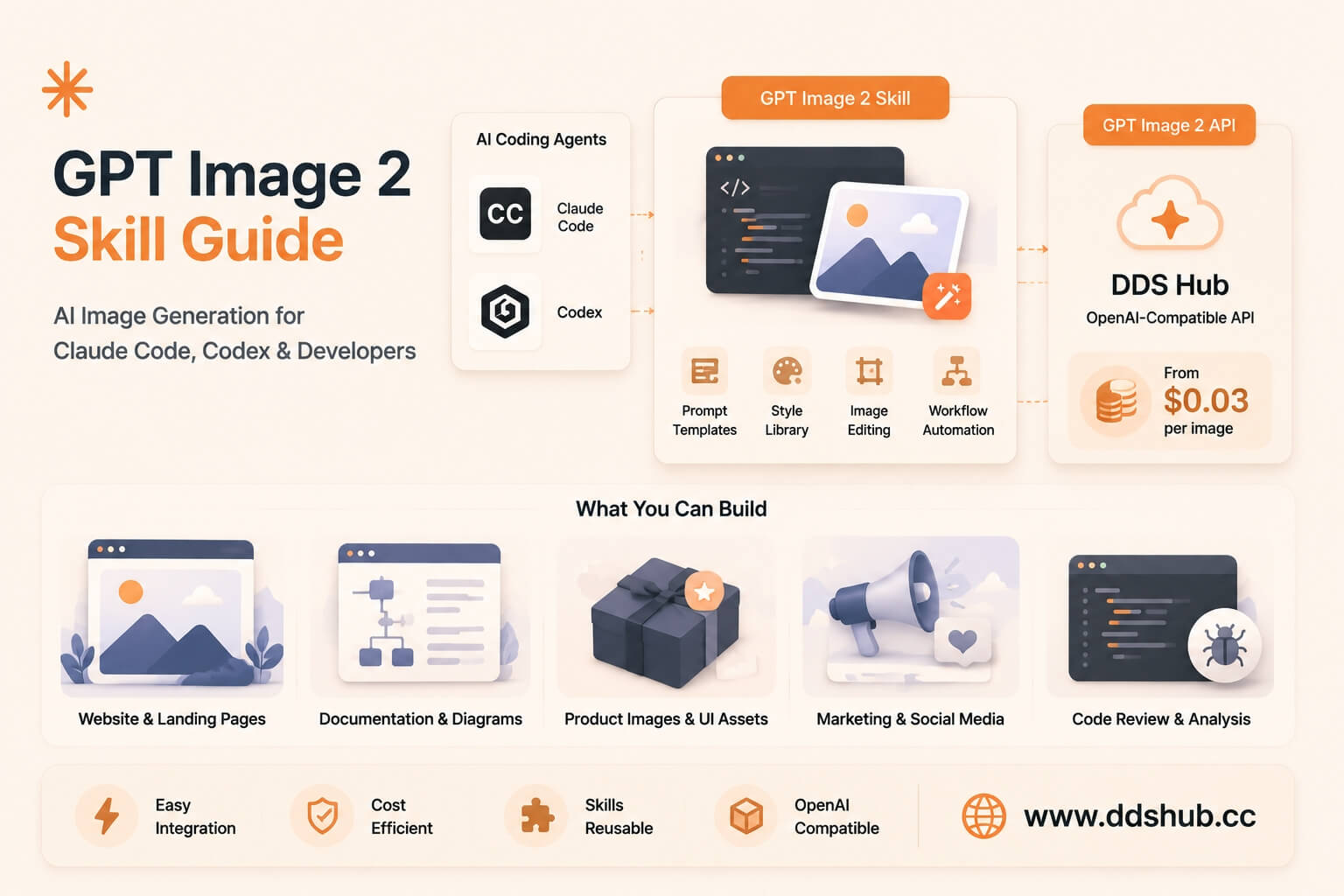
By combining AI Agent Skills with GPT Image 2 API, developers can allow coding assistants to generate website illustrations, product images, UI assets, marketing banners, and technical diagrams.
This article explains what GPT Image 2 Skill is, how prompt engineering improves image quality, and how developers can connect GPT Image 2 API through DDS Hub.
What Is GPT Image 2 Skill?
A Skill is a reusable capability package that extends what an AI agent can do.
Instead of asking an AI coding assistant to manually figure out how to call an image API, how to write image prompts, which style parameters to use, and how to process generated images — a Skill provides predefined instructions and workflows.
The GPT-Image2-Skill project is designed to help AI agents use GPT Image 2 more effectively. It provides image generation capabilities, prompt templates, style references, image editing examples, and CLI-based workflows.
Supported AI environments include Claude Code, Codex, and other AI agent runtimes supporting Skills.
Repository: https://github.com/wuyoscar/GPT-Image2-Skill
Why AI Coding Agents Need Image Generation
Modern software development is no longer only about writing backend logic. Developers often need visual assets during product development.
Website Development
A developer building a SaaS website may need hero images, feature illustrations, product screenshots, and background graphics. Instead of searching stock images, the AI agent can generate custom visuals.
Documentation
Technical projects often require architecture diagrams, API explanations, and workflow illustrations. AI-generated images can make complex concepts easier to understand.
Product Marketing
Startup teams frequently need launch banners, social media images, and announcement graphics. Image generation allows developers to create these assets without switching between multiple design tools.
Installing GPT Image 2 Skill
For AI coding environments that support Skills, developers can install the GPT Image 2 Skill package.
/plugin marketplace add wuyoscar/gpt_image_2_skill

/plugin install gpt-image@wuyoscar-skills
After installation, the AI agent can understand image generation tasks and use GPT Image 2 more effectively.
GPT Image 2 Prompt Engineering Guide
Image quality depends heavily on prompt quality. A common mistake is writing short prompts like Create an AI image. The result is usually unpredictable.
A better image prompt contains several components:
| Component | Purpose |
|---|---|
| Subject | Clearly describe the main object |
| Visual Style | Define the design direction |
| Composition | Describe the layout |
| Color and Branding | Define the color palette |
| Constraints | Avoid unwanted results |
Example 1: SaaS Landing Page
Create a modern SaaS landing page illustration.

Theme: AI coding assistant for developers.

Style: Minimal vector illustration, professional startup design.

Layout: 16:9 website hero banner, main subject on the right,
empty space on the left for headline text.

Colors: Blue and white technology palette.
Example 2: Technical Architecture Diagram
Create a professional technical illustration showing
an AI API platform architecture.

Include: cloud services, API gateway, AI models, developer applications.

Style: Clean developer documentation style, minimal, easy to understand.
Example 3: Product Marketing Banner
Create a futuristic AI product announcement banner.

Style: Premium technology marketing design.

Composition: Large central AI model visualization,
modern gradient background, professional SaaS branding.
Using GPT Image 2 API with DDS Hub
GPT Image 2 Skill is designed around API-based image generation. Developers can connect the Skill to DDS Hub using an OpenAI-compatible API endpoint.
- API Endpoint:
https://www.ddshub.cc/v1 - Model:
gpt-image-2
from openai import OpenAI

client = OpenAI(
    api_key="YOUR_DDSHUB_API_KEY",
    base_url="https://www.ddshub.cc/v1"
)

response = client.images.generate(
    model="gpt-image-2",
    prompt="""
    Create a modern AI coding assistant illustration,
    SaaS style, blue technology theme.
    """
)

print(response)
Full documentation is available at DDS Hub Docs and supported models at DDS Hub Models.
Using GPT Image 2 with Claude Code or Codex
After configuring the API endpoint, developers can combine Claude Code, Codex, GPT Image 2 Skill, and DDS Hub API to create AI-powered development workflows.
Build a Website
Developer: Create a landing page for an AI coding product and generate the hero image.
The AI agent writes frontend code, generates an image prompt, calls GPT Image 2, and inserts the visual asset.
Create Documentation
Developer: Generate API documentation with architecture diagrams.
The AI agent creates the technical explanation, generates diagrams, and adds images into the documentation.
Cost Optimization: Why Use DDS Hub for GPT Image 2
When developers use image generation at scale, cost becomes an important factor. Official API pricing is based on usage factors such as image generation settings, quality, resolution, and token consumption.
DDS Hub provides a simpler image generation pricing model:
- 0.2 credits per image — approximately less than $0.03 per image
This makes it suitable for AI content platforms, SaaS applications, AI agents, and marketing automation tools.
Why Combine GPT Image 2 Skill with DDS Hub?
The combination provides developers with:
- Better Automation — AI agents can generate images automatically
- Better Prompt Consistency — Skills provide reusable prompt structures
- Lower Development Complexity — no need to build image workflows from scratch
- More Predictable Costs — DDS Hub simplifies image API usage for production applications
Final Thoughts
GPT Image 2 is becoming more than an image generation model. Combined with AI coding agents and Skills, it becomes part of a complete developer workflow.
Developers can now use AI agents not only to write code, but also to create product visuals, documentation graphics, marketing materials, and UI assets.
By connecting GPT Image 2 Skill with DDS Hub API, developers can build scalable AI image workflows with simpler integration and lower operating costs.
The future of software development will not only be AI-generated code, but AI-generated products that combine logic, design, and automation.