
GPT Image 2 Prompt Guide: How to Write Better Prompts for AI Image Generation
AI image generation has changed significantly over the past few years. Instead of describing an image with a few keywords and hoping the model understands the intended result, modern image models can interpret much more detailed instructions about composition, subjects, lighting, visual style, text, materials, camera perspective, and even relationships between multiple objects.
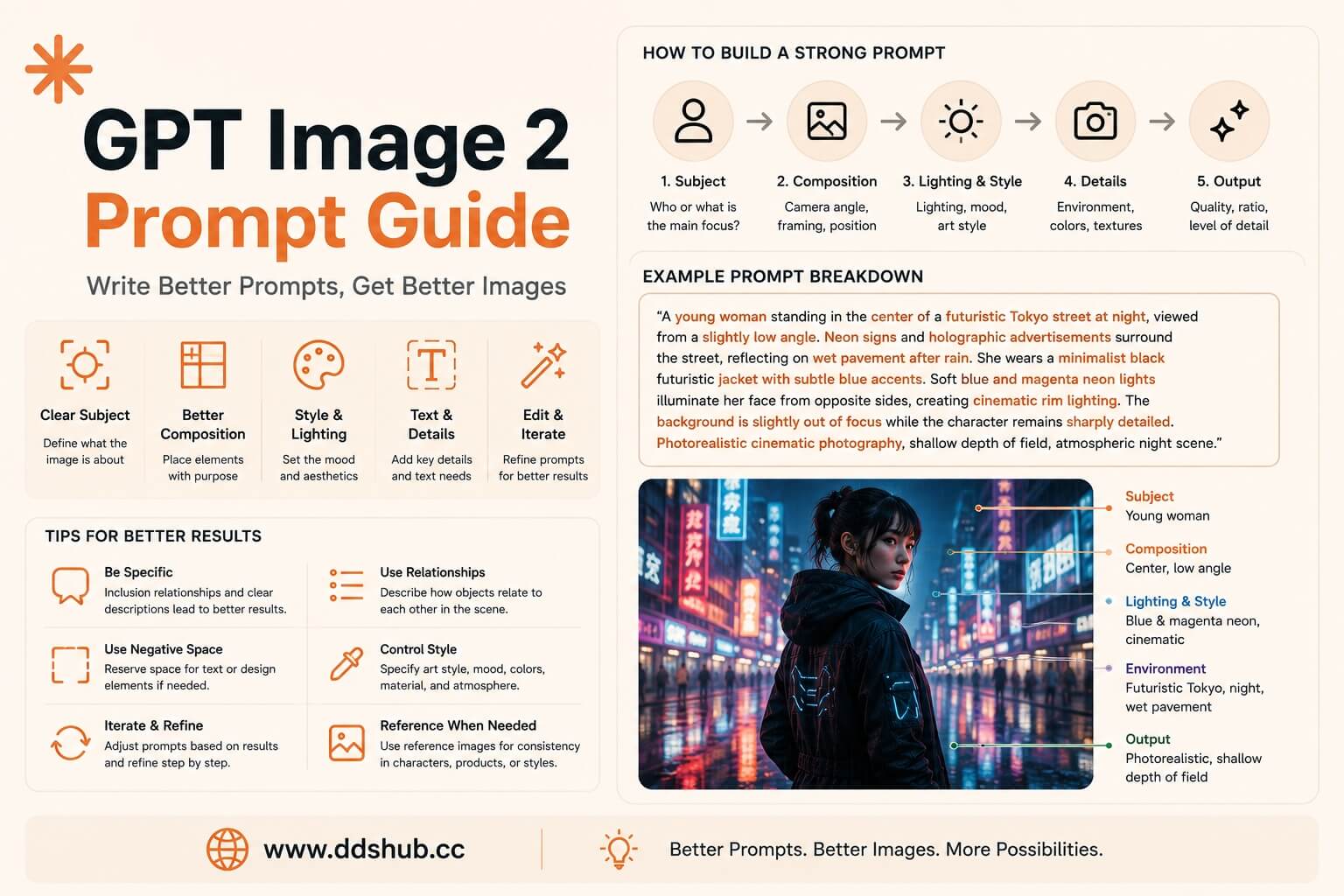
OpenAI describes GPT Image 2 as its state-of-the-art image generation and editing model, with support for flexible image sizes and high-fidelity image inputs. It can be used through the Image Generation API as well as image editing workflows. (OpenAI GPT Image 2)
However, having a more capable image model does not mean that every prompt will automatically produce a good result. In practice, the quality of the prompt still has a major impact on how accurately the model understands the desired composition.
The key is not simply to write a longer prompt. Instead, a good GPT Image 2 prompt should communicate the subject, composition, environment, visual style, lighting, camera perspective, important details, and desired output in a way that is easy for the model to interpret.
Why GPT Image 2 Prompts Need More Structure
A common beginner prompt might look like this:
"A beautiful girl standing in a futuristic city, cinematic, highly detailed, 8K."
This prompt is not necessarily wrong, but it leaves many important decisions to the model. Where is the character positioned? Is the camera close to the face or showing the entire body? What does the city look like? Is the lighting coming from the front or behind the character? What is the time of day? What visual style should dominate the scene?
A stronger prompt provides the model with a clearer visual concept:
"A young woman standing in the center of a futuristic Tokyo street at night, viewed from a slightly low camera angle. Neon signs and holographic advertisements surround the street, reflecting on wet pavement after rain. She wears a minimalist black futuristic jacket with subtle blue accents. Soft blue and magenta neon lights illuminate her face from opposite sides, creating cinematic rim lighting. The background is slightly out of focus while the character remains sharply detailed. Photorealistic cinematic photography, shallow depth of field, atmospheric night scene."
The second prompt does not simply contain more adjectives. It provides relationships between visual elements, which is much more useful for image generation.
Start With the Main Subject
The first part of a prompt should normally establish what the image is about.
Instead of starting with style keywords such as "cinematic, beautiful, 8K, masterpiece," start with the actual subject.
For example:
"A young astronaut exploring an abandoned lunar research station."
This gives the model a clear foundation.
You can then add information about the character's appearance, clothing, pose, environment, and surrounding objects.
For commercial image generation, this approach is particularly useful because it makes the prompt easier to modify later. If you want to replace the astronaut with a robot, you can change the subject without rewriting the entire prompt.
Describe Composition Before Decorative Details
One of the most important improvements you can make to an image prompt is to explain where things are located.
Consider the difference between:
"A product photo of a smartphone on a futuristic desk."
and:
"A smartphone placed slightly to the right of the center of a dark futuristic desk, photographed from a three-quarter front angle. Leave significant negative space on the left side for advertising copy. A soft blue light illuminates the phone from behind while a subtle warm key light highlights the front edges."
The second prompt tells the model how the image should be composed.
This is especially important when generating advertisements, social media graphics, website hero images, thumbnails, and other designs where the position of the subject matters.
If text will be added later, explicitly describe where you want empty space.
For example:
"Keep the upper-left quarter relatively uncluttered so that a headline can be added later."
This is often more useful than simply asking for a "clean composition."
Use Relationships Instead of Keyword Lists
Image prompts often fail because they are written like keyword collections:
"Cyberpunk, girl, Tokyo, neon, rain, cinematic, futuristic, detailed, 8K, anime, blue, pink."
The model receives many concepts but little information about how they relate to one another.
A better prompt connects those concepts:
"A cyberpunk woman walking through a rainy Tokyo street at night. Neon advertisements in blue and magenta reflect across the wet pavement, while distant pedestrians and storefronts create a dense urban background. The character remains the primary subject, sharply focused against a softly blurred cityscape."
The second version communicates relationships between the subject, environment, lighting, and focus.
This principle is particularly useful with GPT Image 2 because the model is designed to follow complex natural-language instructions rather than relying purely on keyword matching.
Be Specific About Lighting
Lighting can dramatically change the appearance of an image, but "good lighting" is not very informative.
Instead, describe the direction, quality, color, and purpose of the lighting.
For example:
"Soft warm sunlight enters through a large window from the left, creating gentle shadows across the subject's face."
or:
"Strong blue rim lighting separates the character from the dark background, while a soft warm key light illuminates the face."
You can also describe environmental lighting:
"The scene takes place shortly after sunset, with cool ambient light from the sky and warm orange light coming from nearby storefronts."
These descriptions give the model a much clearer visual target.
Camera Perspective Changes the Image
Camera instructions can also help establish the intended composition.
A close-up portrait, medium shot, full-body photograph, wide establishing shot, and overhead view can produce completely different results even when the subject remains identical.
For example, if you want a product advertisement, you might write:
"A close three-quarter product shot with the camera positioned slightly above the table."
For a cinematic environment:
"A wide establishing shot viewed from street level, showing the character as a small figure within the larger environment."
For a character portrait:
"A medium close-up portrait with the subject looking directly toward the camera."
The important point is not to include every possible photography term. Use camera language only when it contributes to the visual result you want.
Describe Style With Intent
Style keywords can be useful, but they should support the actual image concept rather than replace it.
Instead of writing:
"Cinematic, realistic, beautiful, detailed, professional."
describe the visual intention:
"Photorealistic editorial photography with natural skin texture, controlled contrast, subtle film grain, and shallow depth of field."
For illustration:
"A clean editorial illustration with simplified geometric shapes, subtle gradients, limited visual clutter, and a modern technology-brand aesthetic."
This gives GPT Image 2 a stronger understanding of the desired visual language.
If you are creating images for a brand, it is also useful to describe the visual identity explicitly instead of repeatedly relying on vague words such as "premium" or "professional."
Control Important Details With Explicit Instructions
When an image contains an important object, describe its characteristics directly.
For example:
"The robot has a compact white ceramic shell, exposed mechanical joints, a single circular blue sensor in the center of its face, and small articulated hands."
This is much more useful than:
"A futuristic robot."
The same principle applies to clothing, products, architecture, vehicles, food, and other visually important subjects.
If a particular element must remain consistent, make it one of the central parts of the prompt rather than mentioning it casually at the end.
Generating Images With Text
Text inside generated images has historically been one of the more difficult parts of AI image generation.
When generating posters, advertisements, UI mockups, product packaging, signs, or social media graphics, specify the text clearly and explain its placement.
For example:
"Create a minimalist technology advertisement. The main headline should read 'BUILD FASTER WITH AI' in large white uppercase letters across the upper-left area. Keep the typography clean and modern, with enough negative space around the headline."
If exact wording is important, treat the text as a specific design requirement rather than simply saying "add some text."
For production workflows, it can also be useful to generate the visual composition first and add final typography in a design tool afterward when pixel-perfect text placement is required.
Use Image Editing Instead of Regenerating Everything
GPT Image 2 supports both image generation and image editing, which means you do not always need to start from scratch when something is wrong.
Suppose the overall composition is excellent but the character's jacket has the wrong color. Instead of generating another image with a completely different composition, use an editing workflow and clearly describe the change:
"Change the character's jacket from black to dark red. Preserve the character's face, pose, lighting, background, camera angle, and overall composition."
This is an important prompting principle for image editing:
Clearly describe what should change and what should remain unchanged.
If you want to preserve most of the original image, explicitly state those preservation requirements.
Don't Make Every Prompt Extremely Long
More words do not automatically produce better images.
An extremely long prompt can contain contradictory requirements. For example, asking for "minimalist composition" while simultaneously requesting "dozens of detailed background objects" creates an inherent conflict.
A better prompt is structured around priority.
Start with the subject and composition, then add the most important visual requirements. Details that do not materially affect the image can be omitted.
A useful test is to ask:
"If I remove this sentence, will the intended image change?"
If the answer is no, that sentence probably does not need to be in the prompt.
A Practical GPT Image 2 Prompt Template
For most image-generation tasks, the following structure works well:
Subject: What is the main object, person, or scene? Composition: Where is the subject located and what perspective should be used? Environment: What surrounds the subject? Appearance: What important visual characteristics should be preserved? Lighting: What is the direction, color, and quality of light? Style: What visual language should the image follow? Important constraints: What must appear, what must not change, and where should negative space remain?
For example:
"A futuristic electric motorcycle parked on a rain-soaked Tokyo street at night. The motorcycle occupies the right side of the frame, viewed from a low three-quarter angle, with enough negative space on the left for advertising copy. Neon blue and magenta signs reflect across the wet pavement. The motorcycle has a matte black body, subtle orange accent lighting, and realistic mechanical details. Soft atmospheric fog surrounds the background while the motorcycle remains sharply focused. Photorealistic commercial automotive photography with cinematic lighting and controlled contrast."
This is already enough information to establish a strong visual direction without turning the prompt into a wall of keywords.
Prompt Optimization for Different Use Cases
The best prompt structure depends on what you are generating.
For AI marketing images, composition and negative space are especially important because the image will often be combined with headlines, logos, and calls to action.
For product photography, describe the product's physical characteristics, camera angle, lighting, materials, background, and surface reflections.
For character design, focus on identity, clothing, pose, facial expression, environment, and visual style.
For concept art, environment and atmosphere may matter more than precise photographic language.
For social media content, composition should account for the final aspect ratio and where captions or UI elements will appear.
The same model can handle all of these scenarios, but the prompt should reflect the actual purpose of the image.
API Considerations for GPT Image 2
If you are generating images programmatically, prompt quality is only one part of the workflow. Developers should also consider image size, quality, latency, error handling, retry strategies, and the cost of generating multiple variations.
OpenAI currently recommends GPT Image 2 for API-based image generation and editing. The model supports flexible image sizes and high-fidelity image inputs. (OpenAI GPT Image 2 API documentation)
For applications that generate many images, the cost of unsuccessful generations can become significant. A better prompt can therefore have a direct economic benefit because it may reduce the number of iterations required to reach an acceptable result.
This is why prompt engineering should not only be viewed as a way to improve image quality. It can also be viewed as a way to improve generation efficiency.
Generate GPT Image 2 Through DDS Hub
For developers who want to integrate AI image generation into applications without managing multiple API providers separately, DDS Hub provides a convenient API access option.
DDS Hub currently offers GPT Image 2 image generation with pay-as-you-go pricing. Each image generation costs 0.2 platform credits, equivalent to approximately $0.03 per generation, making it suitable for developers who want to experiment with different prompts without committing to a subscription.
This is particularly useful when developing an image-generation application because prompt optimization often requires multiple iterations. Instead of paying for a fixed subscription, developers can generate images as needed and control their spending based on actual usage.
You can explore the available image-generation models and API services through the DDS Hub model platform.
For developers building their own AI image applications, the DDS Hub API can also be used as a unified access point for AI model services.
Final Thoughts
The biggest improvement in GPT Image 2 prompting does not come from adding more adjectives. It comes from communicating the image as a visual concept.
Start with the subject, explain the composition, establish the environment, describe important visual characteristics, specify lighting and perspective, and then define the desired style. When something is particularly important, make it explicit instead of assuming that the model will infer it.
For image editing, clearly separate what should change from what should remain unchanged. For commercial graphics, pay particular attention to composition and negative space. For production applications, also consider the cost of repeated generation and the value of writing prompts that produce useful results with fewer iterations.
The most effective GPT Image 2 prompts are therefore not necessarily the longest ones. They are the prompts that communicate the right information in the right order.
As AI image generation becomes increasingly integrated into websites, marketing systems, creative tools, and developer applications, prompt engineering becomes less about finding a magical collection of keywords and more about learning how to communicate visual intent clearly.
And when you combine better prompts with an API that supports flexible pay-as-you-go generation, it becomes much easier to experiment, iterate, and build real image-generation products without unnecessary infrastructure or subscription costs.