
GPT Image 2 Prompt Engineering: Best Practices, Real-World Use Cases, and Cost Optimization
AI image generation has rapidly evolved from creating artistic illustrations to becoming a practical tool for software development, digital marketing, technical documentation, and product design. OpenAI's GPT Image 2 represents this transition by combining high-quality image generation, image editing, improved typography, and strong instruction following into a single production-ready model. Rather than generating visually appealing images alone, GPT Image 2 is designed to create assets that can be used directly in blogs, websites, presentations, social media, and commercial applications.
While the model itself is significantly more capable than previous generations, many developers quickly discover that the quality of the output depends less on finding a "perfect prompt" and more on understanding prompt engineering. A structured prompt consistently produces better layouts, cleaner compositions, and more accurate text than an unstructured description, making prompt engineering one of the most valuable skills for anyone building AI-powered visual workflows.
What Makes GPT Image 2 Different?
GPT Image 2 is OpenAI's latest image generation model, supporting text-to-image generation, image editing, transparent backgrounds, and high-quality text rendering through the Images API. Compared with previous models, it follows detailed instructions more accurately, handles multiple design constraints in a single request, and produces significantly cleaner marketing assets and interface graphics.
Instead of behaving like an artistic image generator, GPT Image 2 functions more like a visual design assistant. It understands composition, layout hierarchy, whitespace, typography, and branding requirements, making it suitable for production environments where consistency matters as much as creativity.
These improvements also change how prompts should be written. Short prompts may still generate attractive images, but structured prompts almost always generate more usable results.
What Is Prompt Engineering for Image Generation?
Prompt engineering is the process of describing an image clearly enough that the model understands not only what should appear, but also why the image is being created and how it should be presented.
A prompt such as:
Create an AI illustration.
provides very little information.
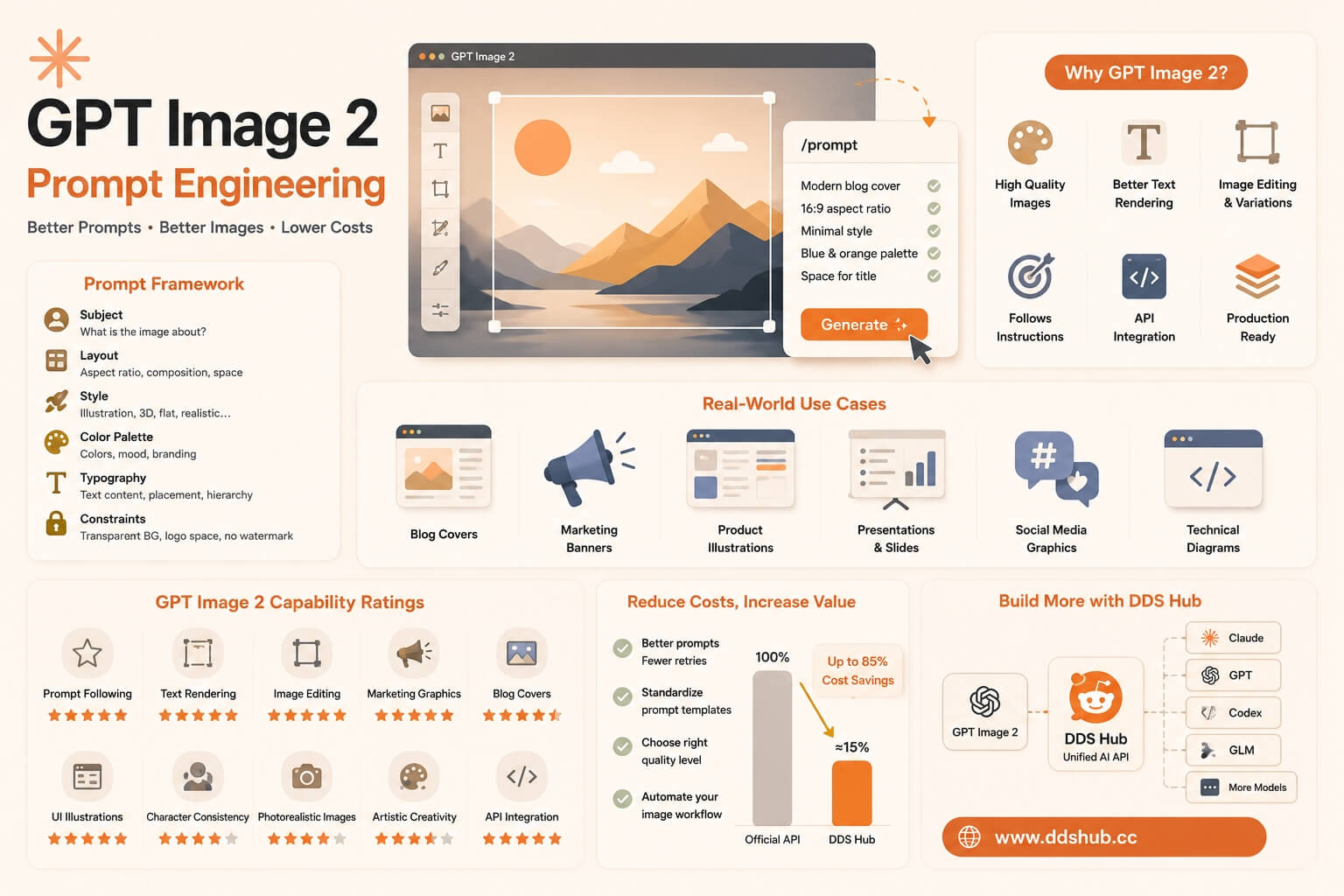
A production-ready prompt instead describes the intended audience, layout, color palette, composition, typography, and visual objective. For example, requesting a 16:9 blog hero image with a minimalist illustration, space for a title, a blue-and-white color palette, and clean modern typography gives GPT Image 2 enough context to generate a much more useful asset.
In practice, prompt engineering is not about writing longer prompts. It is about writing better-structured prompts.
A Prompt Framework That Consistently Produces Better Results
One simple framework works well across most commercial image generation tasks.
| Component | Purpose |
|---|---|
| Subject | What should the image communicate? |
| Layout | Aspect ratio, composition, whitespace, alignment |
| Style | Illustration, realistic, 3D, flat design, sketch |
| Color Palette | Primary colors and branding |
| Typography | Text content, placement, hierarchy |
| Constraints | Transparent background, logo space, no watermark |
This structure reduces ambiguity and allows GPT Image 2 to follow complex instructions much more accurately than a short descriptive sentence.
Practical Prompt Engineering Tips
Successful prompts focus on objectives rather than visual adjectives alone.
Instead of asking for "a beautiful banner," explain that the image is intended for a SaaS product announcement, a technical tutorial, or a blog cover aimed at software developers. GPT Image 2 responds remarkably well when it understands the business purpose behind the image.
Layout also plays an important role. Instructions such as "leave the right third of the image empty for a headline," "center the primary subject," or "maintain generous whitespace" produce more consistent compositions than simply requesting a "modern design."
When text should appear inside the image, enclosing the exact wording in quotation marks generally improves rendering accuracy. Likewise, explicitly specifying constraints such as "transparent background," "minimal decorative elements," or "no watermark" helps the model avoid unnecessary visual noise.
Real-World Use Cases
GPT Image 2 performs particularly well in commercial workflows where design quality and consistency are both important.
Technical bloggers use it to generate article covers and workflow diagrams. SaaS companies create feature graphics, onboarding illustrations, product mockups, and social media assets. Marketing teams produce promotional banners, presentation slides, LinkedIn graphics, and launch announcements, while developers integrate image generation into automated content pipelines that generate visual assets directly from structured prompts.
Because GPT Image 2 produces significantly better typography than previous generations, many of these assets require far less manual editing before publication.
GPT Image 2 Capability Ratings
| Capability | Rating |
|---|---|
| Prompt Following | 5/5 |
| Text Rendering | 5/5 |
| Image Editing | 5/5 |
| Marketing Graphics | 5/5 |
| Blog Covers | 5/5 |
| UI Illustrations | 5/5 |
| Character Consistency | 4/5 |
| Photorealistic Images | 4/5 |
| Artistic Creativity | 4/5 |
| API Integration | 5/5 |
GPT Image 2 excels at structured commercial design and API-driven workflows, while highly stylized artistic imagery remains an area where specialized creative models may still appeal to some users.
Reducing Image Generation Costs
As more teams integrate image generation into production systems, cost becomes almost as important as quality.
Many businesses no longer generate a handful of images manually. Instead, they automatically create blog covers, marketing materials, documentation graphics, product illustrations, and social media assets every day. In these scenarios, image generation costs can quickly become a significant operational expense.
Developers can reduce costs by writing more precise prompts that require fewer regeneration attempts, standardizing prompt templates across projects, and selecting the appropriate quality level for each use case rather than always generating the highest-quality output.
A well-designed prompt often produces the desired result on the first attempt, saving both time and API usage.
Building AI Image Workflows with DDS Hub
For developers, image generation is increasingly part of a broader AI workflow rather than a standalone task. A single application may use Claude for reasoning, Codex for implementation, GPT Image 2 for visual asset generation, and other models for localization or automation.
DDS Hub provides unified API access to multiple leading AI models through a single platform, allowing developers to integrate language models and image generation without maintaining separate accounts or authentication systems for different providers.
For GPT Image 2, image generation on DDS Hub currently starts from 0.2 Platform Credits per image (approximately US$0.03). Compared with the standard official API pricing for comparable image generation settings, this is approximately 15% of the official cost, making it a practical option for teams generating large volumes of commercial graphics such as blog covers, marketing banners, product illustrations, and documentation assets.
Instead of switching between multiple AI providers, developers can build complete AI workflows through a single API endpoint while benefiting from unified billing, simplified integration, and lower operating costs.
Documentation and integration guides are available through the official DDS Hub resources: the DDS Hub Documentation and the DDS Hub Homepage.
Final Thoughts
GPT Image 2 represents a significant step forward in production-ready AI image generation. Its greatest strengths are not only improved visual quality, but also better instruction following, cleaner typography, flexible editing capabilities, and reliable API integration.
As these capabilities continue to improve, prompt engineering becomes one of the most valuable skills for developers, designers, and marketers alike. Structured prompts consistently outperform vague descriptions, resulting in fewer regeneration attempts, lower API costs, and higher-quality outputs.
For teams building AI-powered products, combining effective prompt engineering with an efficient API platform creates a workflow that is faster, more scalable, and significantly more cost-effective. Whether generating technical diagrams, marketing assets, product illustrations, or blog covers, GPT Image 2 has become one of the strongest choices available for commercial AI image generation.