
GPT Image 2 on DDS Hub: A Complete Developer Guide with Prompt Engineering, Popular Styles, and Best Practices
AI image generation has quickly become one of the most practical capabilities in modern AI applications. Developers are no longer using image models only for artistic experiments—they are building automated workflows that generate blog covers, marketing banners, UI illustrations, product mockups, technical diagrams, and social media graphics directly from APIs.
OpenAI's GPT Image 2 is designed for exactly these production scenarios. Compared with earlier image generation models, it offers significantly better instruction following, improved text rendering, powerful image editing, and excellent API integration. Combined with DDS Hub's OpenAI-compatible API, developers can integrate GPT Image 2 into existing applications with minimal changes while benefiting from unified billing and lower image generation costs.
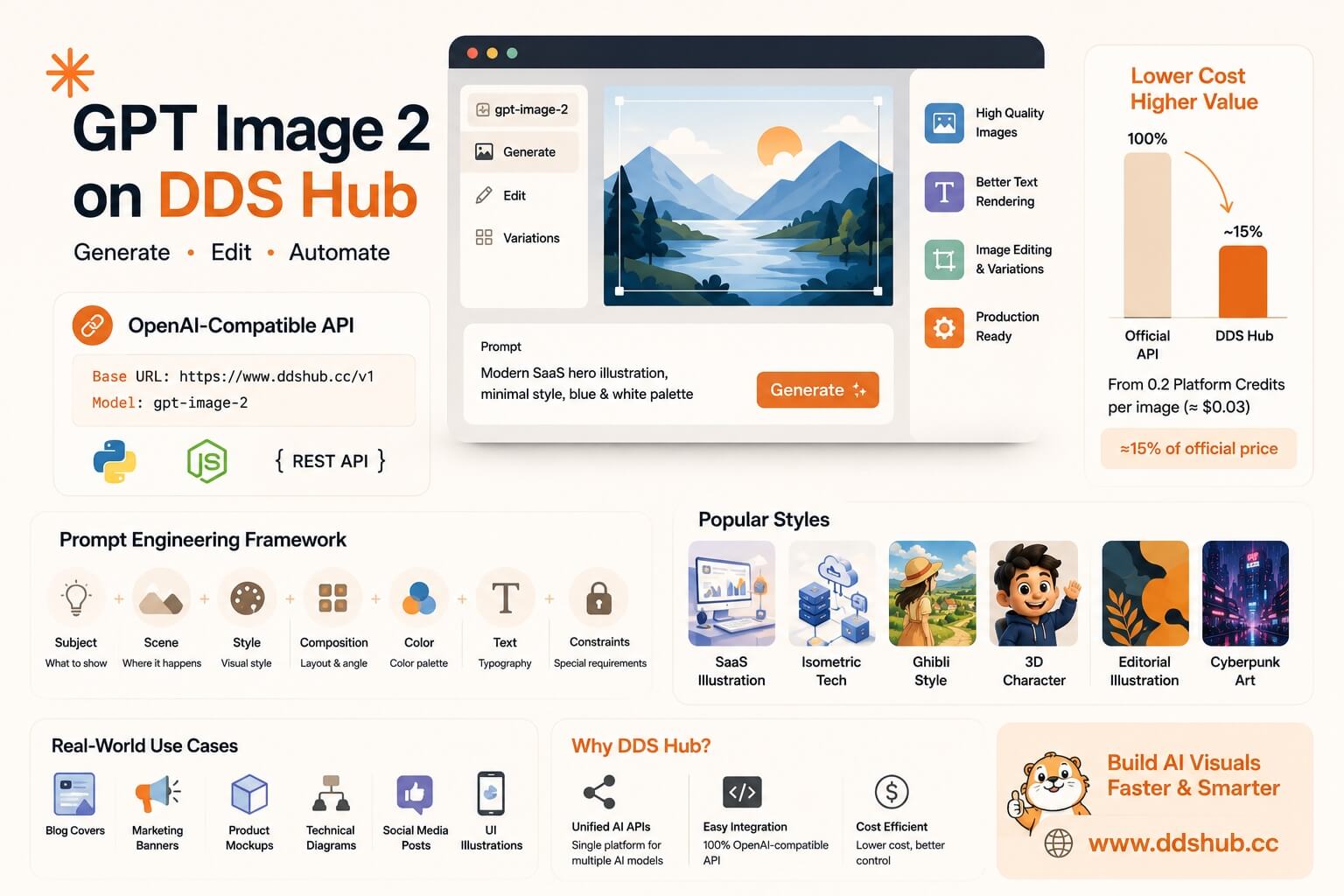
This guide explains how to get started with GPT Image 2 on DDS Hub, introduces practical prompt engineering techniques, showcases some of today's most popular image styles, and shares best practices for producing professional AI-generated images.
Why GPT Image 2?
GPT Image 2 is built for commercial and developer workflows rather than purely artistic image creation. It can generate new images from text prompts, edit existing images, combine multiple reference images, render readable text inside designs, and create transparent PNG assets suitable for websites and applications.
These capabilities make it an excellent choice for developers who need reliable, production-ready visuals instead of manually designing every asset.
Typical use cases include:
- Blog cover illustrations
- SaaS landing page graphics
- Product marketing banners
- Technical documentation
- API architecture diagrams
- Social media posts
- Character and mascot design
- UI and onboarding illustrations
Getting Started with GPT Image 2 on DDS Hub
DDS Hub provides an OpenAI-compatible Images API, allowing developers to use GPT Image 2 with existing OpenAI SDKs.
Simply configure your API endpoint as:
https://www.ddshub.cc/v1and use the model:
gpt-image-2Since DDS Hub follows the OpenAI Images API specification, most existing applications only require changing the Base URL and API Key. Full API documentation, supported parameters, image editing examples, and SDK samples are available in the DDS Hub Documentation.
Prompt Engineering: The Secret to Better Images
Many users believe generating better images requires longer prompts. In reality, GPT Image 2 performs best when prompts are structured rather than verbose.
A useful framework is:
| Component | Purpose |
|---|---|
| Subject | What should appear? |
| Scene | Where does it happen? |
| Style | Illustration, 3D, realistic, watercolor... |
| Composition | Layout, camera angle, whitespace |
| Color Palette | Brand colors or visual mood |
| Typography | Any text that should appear |
| Constraints | Transparent background, logo space, no watermark |
Instead of writing:
Create an AI illustration.
Try:
Create a modern SaaS hero illustration showing an AI assistant helping software developers, minimal flat design, blue and white color palette, soft gradients, 16:9 composition, generous whitespace on the right for a title, clean vector style, no watermark.
The second prompt provides both creative direction and layout requirements, resulting in a far more usable image.
Popular GPT Image 2 Style Prompts
One of GPT Image 2's strengths is its ability to follow detailed stylistic instructions. Below are several styles that are widely used by developers, designers, and content creators.
Modern SaaS Illustration
Perfect for landing pages, product documentation, and AI startup websites.
Prompt
Minimal flat illustration, modern SaaS interface, soft blue and white palette, simple geometric shapes, subtle gradients, clean vector style, friendly AI assistant, large whitespace for headline, premium technology branding.
Isometric Technology Diagram
Ideal for technical blogs, cloud architecture, and API documentation.
Prompt
Isometric illustration of cloud infrastructure, API gateway connecting multiple AI models, clean geometric layout, minimal blue palette, modern technical infographic, high readability, white background.
Studio Ghibli-Inspired Artwork
Suitable for storytelling, educational content, and creative illustrations.
Prompt
Original hand-painted animation style, warm watercolor textures, lush countryside, golden afternoon sunlight, expressive characters, soft brush strokes, nostalgic atmosphere, cinematic composition.
Pixar-Inspired 3D Character
Great for mascots, onboarding graphics, and product branding.
Prompt
Friendly 3D mascot with expressive eyes, rounded proportions, polished rendering, soft studio lighting, colorful yet clean background, premium animated film quality.
Editorial Magazine Illustration
Useful for newsletters, opinion articles, and long-form blogs.
Prompt
Premium editorial illustration, abstract geometric composition, modern magazine style, elegant typography space, sophisticated color palette, minimalist background.
Cyberpunk Concept Art
Suitable for gaming, AI products, and futuristic marketing.
Prompt
Futuristic cyberpunk city at night, neon reflections, cinematic lighting, rainy streets, teal and magenta color palette, highly detailed digital concept art.
Real-World Use Cases
GPT Image 2 is increasingly being integrated into automated workflows rather than used as a standalone creative tool.
Content teams generate blog covers directly from article titles. Marketing departments automatically create social media graphics for product launches. SaaS companies generate landing page illustrations and feature graphics without relying entirely on manual design work. Developers even build internal systems that convert structured product information into promotional images using predefined prompt templates.
Because GPT Image 2 combines image generation with editing capabilities, many workflows involve generating an initial image before making targeted adjustments rather than starting over from scratch.
Cost Optimization
Image generation quality is only part of the equation. For production systems, cost also matters.
DDS Hub allows developers to access GPT Image 2 through a unified API platform, with image generation starting from 0.2 Platform Credits per image (approximately US$0.03). For comparable image generation settings, this is roughly 15% of the standard official API price, making it an attractive option for teams producing images at scale.
Developers can reduce costs even further by using structured prompt templates, selecting the appropriate image quality for each task, and minimizing unnecessary regeneration attempts. In practice, a well-designed prompt often saves more money than repeatedly generating new images.
Why Build Image Workflows on DDS Hub?
Many AI applications no longer rely on a single model. A typical workflow might use Claude for reasoning, Codex for coding, GPT Image 2 for visual generation, and GLM for multilingual tasks.
DDS Hub simplifies this process by providing unified API access to multiple leading AI models through a single platform. Developers can manage one API endpoint, one authentication system, and one billing account while combining language models, coding assistants, and image generation inside the same application.
This unified approach reduces operational complexity and makes it easier to scale AI-powered products.
Final Thoughts
GPT Image 2 has evolved beyond a simple image generator into a production-ready visual creation platform. Its strengths in prompt following, typography, image editing, and API compatibility make it one of the best choices for developers building commercial AI applications.
However, the model alone does not guarantee professional results. Effective prompt engineering, reusable prompt templates, and well-designed workflows have a much greater impact on image quality than simply writing longer prompts.
Combined with DDS Hub's OpenAI-compatible API, unified developer platform, and cost-efficient pricing, GPT Image 2 becomes an excellent solution for generating blog covers, product illustrations, marketing assets, technical diagrams, and AI-powered visual content at scale.