
GPT-5.6 Sol Technical Guide: How to Get Better Results
GPT-5.6 Sol is OpenAI's flagship model in the GPT-5.6 family, designed for complex professional work, reasoning, coding, and agentic workflows. The current API supports a 1.05-million-token context window and up to 128K output tokens, while also supporting capabilities such as function calling, structured outputs, web search, file search, computer use, hosted shell, MCP, Skills, and code execution.
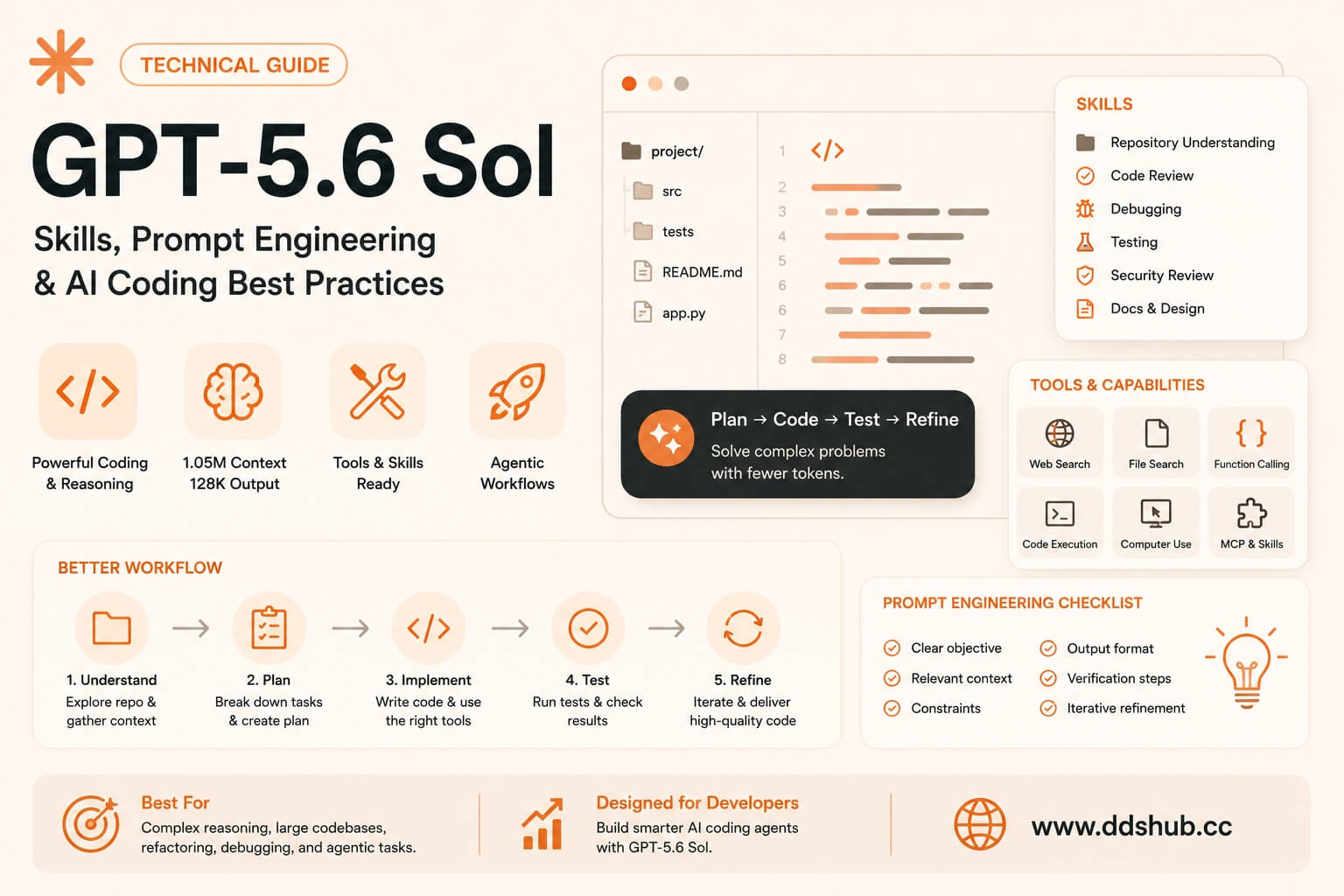
For developers, however, model capability is only one part of the equation. A powerful model can still produce inconsistent results if the prompt is vague, the repository context is poorly organized, or the agent does not have the right tools and validation mechanisms.
The most effective way to use GPT-5.6 Sol is therefore to treat it as part of an AI coding system, rather than as a standalone chatbot. Prompt quality, reusable Skills, tool access, context management, and automated testing can all have a significant impact on the final result.
Why GPT-5.6 Sol Works Differently in Coding Workflows
Traditional AI coding usually follows a simple pattern: a developer describes a function, the model generates code, and the developer manually tests it.
GPT-5.6 Sol is better suited to a more iterative workflow in which the model can inspect the repository, understand existing implementations, modify multiple files, execute tools, analyze test results, and revise its work.
OpenAI's current model guidance specifically recommends GPT-5.6 Sol for complex reasoning and coding, while GPT-5.6 Terra is positioned as the balance between intelligence and cost and GPT-5.6 Luna is optimized for cost-sensitive, high-volume workloads.
This makes Sol particularly useful for complex debugging, large refactoring projects, architecture changes, repository-level development, and AI agents that need to operate tools rather than simply generate text.
Skills: Make GPT-5.6 Sol More Consistent
One of the most useful techniques for advanced AI coding is to introduce reusable Skills.
A Skill can be thought of as a reusable set of instructions, conventions, and procedures for a particular type of engineering task. Instead of putting the same detailed instructions into every prompt, developers can define a repeatable workflow once and allow the agent to apply it when appropriate.
For example, a project might maintain Skills for code review, debugging, database migrations, API development, testing, security review, or documentation.
A weak instruction would be:
"Write high-quality code."
That provides almost no operational guidance.
A better Code Review Skill could tell the agent to inspect existing conventions, identify correctness and security issues, check edge cases, review performance-sensitive code, run the relevant tests, and only recommend changes that can be justified by the repository or requirements.
The important principle is that a Skill should describe how to perform a task, rather than simply describing what good engineering looks like.
OpenAI's GPT-5.6 documentation now explicitly lists Skills among the supported Responses API capabilities, which makes this approach increasingly relevant for production agent workflows.
Recommended Skills for GPT-5.6 Sol
A Repository Understanding Skill is a strong starting point. Before making substantial changes, Sol should inspect the repository structure, identify the relevant entry points, understand existing abstractions, and locate associated tests. This reduces the risk of modifying the wrong component simply because its filename looks relevant.
A Testing Skill is equally valuable. Instead of simply instructing Sol to "run tests," define which tests should be executed for different categories of changes. A database migration, frontend component, authentication change, and API modification may each require different validation.
A Debugging Skill can make complex troubleshooting more systematic. The agent should reproduce the issue where possible, inspect logs and relevant code, form a hypothesis, validate that hypothesis, and only then implement a fix.
For larger engineering teams, a Code Review Skill can also provide a consistent second-pass review covering correctness, security, compatibility, performance, and maintainability.
This approach becomes especially useful when using GPT-5.6 Sol through an API because the same Skills can be reused across different applications and agent workflows.
Prompt Engineering: Give Sol a Clear Objective
The biggest misconception about GPT-5.6 Sol prompting is that a longer prompt automatically produces a better result.
In practice, the prompt should provide the information Sol needs to make good decisions without burying the actual objective under unnecessary instructions.
A useful prompt normally contains four important elements: the goal, relevant context, constraints, and acceptance criteria.
Instead of saying:
"Improve the authentication system."
a better request would be:
"Add rate limiting to the login endpoint. The application uses Node.js, Express, Redis, and PostgreSQL. Preserve the existing API response format and authentication behavior. Reuse the project's current Redis abstraction rather than introducing another client. Add tests covering normal requests, rate-limit violations, expiration, and concurrent requests. Consider the task complete only when the relevant tests pass."
The second prompt is not dramatically longer, but it is much more useful because it defines the expected outcome.
Define What "Done" Means
Acceptance criteria are particularly important when using GPT-5.6 Sol for autonomous coding.
Without explicit criteria, an agent may make a technically reasonable change while still failing to solve the actual business problem.
Instead of:
"Fix the checkout bug."
use:
"The checkout endpoint should no longer return HTTP 500 for expired payment sessions. Existing successful payments must remain unchanged, and a regression test should reproduce the original failure before the fix and pass afterward."
This gives Sol an objective target.
The model can then compare its implementation against measurable conditions rather than relying on a vague interpretation of "fixed."
For complex engineering tasks, acceptance criteria can be more valuable than adding another paragraph of general instructions.
Give Constraints Without Micromanaging
There is another common mistake: trying to control every action the model takes.
Instructions such as "open this file first, then read this function, then modify line 80" can be useful for highly deterministic tasks, but they often prevent the agent from using its reasoning capabilities effectively.
A better prompt communicates architectural boundaries.
For example:
"Follow the existing authentication architecture and reuse the current Redis abstraction. Do not change the public API response format or modify unrelated frontend components."
This tells Sol what must remain stable while allowing it to inspect the repository and determine the appropriate implementation.
The general rule is simple: specify the outcome and constraints, not every keystroke.
Context Management Matters More Than Dumping Information
GPT-5.6 Sol has a very large context window, but that does not mean developers should send the entire repository with every request.
More context can sometimes make an agent's job harder because relevant information becomes mixed with generated files, outdated documentation, unrelated modules, logs, and duplicated configuration.
A better approach is to provide a useful starting point and allow the agent to retrieve additional context.
For example:
"The issue appears to involve authentication middleware. Start with src/auth, the login route, and the related tests. Expand the investigation if those files do not explain the behavior."This gives Sol enough direction to begin without artificially restricting its investigation.
For long-running coding agents, context management should focus on preserving relevant state, rather than preserving every piece of historical information.
Prompting GPT-5.6 Sol for Debugging
Debugging requires a different prompting strategy from feature development.
If you already know the root cause, explain it and ask Sol to implement the fix. If you do not know the cause, ask the model to investigate rather than forcing it toward a predetermined solution.
A strong debugging prompt might say:
"The checkout endpoint occasionally returns HTTP 500. Reproduce the issue if possible, inspect the logs and relevant code paths, identify the most likely root cause, and validate the hypothesis before modifying the implementation. Avoid speculative changes unrelated to the observed behavior. Add a regression test after identifying the root cause."
This encourages a scientific debugging process rather than random code modification.
It also gives Sol permission to investigate before changing the code, which can substantially reduce unnecessary edits.
Use Skills for Process and Prompts for Intent
A useful distinction is to let Skills define recurring processes while prompts define the specific task.
For example, the Code Review Skill might define how the project performs reviews, while the prompt simply says:
"Review the authentication changes in this pull request."
Similarly, a Testing Skill can define the project's preferred validation strategy, while the prompt can focus on:
"Implement the new payment retry logic and validate it using the project's testing conventions."
This separation makes AI coding workflows easier to maintain. When the team's testing process changes, the Skill can be updated without rewriting hundreds of individual prompts.
GPT-5.6 Sol API Pricing and Cost Optimization
GPT-5.6 Sol currently costs $5 per million input tokens and $30 per million output tokens, while cached input is priced at $0.50 per million tokens. OpenAI also supports prompt caching and other mechanisms designed to reduce the cost of repeated context.
For AI coding agents, this matters because a single task can generate a large amount of context. Repository files, tool results, test output, previous instructions, and intermediate agent actions can all contribute to token consumption.
Developers should therefore think about cost per completed task, rather than simply comparing the advertised price per million tokens.
A model that costs more per output token but completes a difficult engineering task in fewer iterations may ultimately be cheaper than a cheaper model that repeatedly fails and requires additional requests.
For production systems, it is useful to track token usage, tool calls, latency, retries, test failures, and successful task completion.
A Lower-Cost Way to Use GPT-5.6 Sol
For developers who want to experiment with GPT-5.6 Sol without immediately building their own billing and API infrastructure, an API gateway can provide another option.
DDS Hub provides access to GPT models alongside other coding and reasoning models, including Claude, Codex, GLM, and Kimi. This allows developers to test different models through a single platform rather than maintaining multiple independent API accounts.
The main advantage is not simply convenience. A multi-model API environment makes it easier to choose the appropriate model for different workloads.
For example, GPT-5.6 Sol can be used for difficult architecture and reasoning tasks, while GPT-5.6 Terra or Luna can handle less demanding and higher-volume workloads. Claude can be used for another coding workflow, while GLM or Kimi can be considered when cost or specific language requirements are more important.
This approach turns model selection into an engineering decision rather than a permanent commitment to a single provider.
Explore GPT-5.6 and other models on DDS Hub
Why Developers May Use DDS Hub for GPT-5.6 Sol
The official OpenAI API is the natural choice for teams that want a direct relationship with OpenAI and full control over their API infrastructure. However, developers who are testing multiple models or looking for a simpler API purchasing workflow may prefer an API gateway.
DDS Hub focuses on this use case by providing a unified environment for multiple AI models. Instead of maintaining separate accounts, billing configurations, and API integrations for every provider, developers can use a common platform and select the model appropriate for the task.
This can be particularly useful for AI coding teams because model requirements often change throughout development.
A developer might use Sol to design an architecture, Claude for an independent code review, Codex-oriented workflows for repository implementation, and a lower-cost model for routine code transformations.
The ability to switch models without redesigning the entire application can reduce both development friction and operational complexity.
GPT-5.6 Sol and the Agent Harness
The model itself is only one component of an AI coding system.
A strong agent harness determines what tools the model can access, how files are retrieved, how commands are executed, how test results are returned, how errors are handled, and when the agent should stop.
This is why the same GPT-5.6 Sol model can behave very differently in two different coding environments.
One environment may give it repository search, shell access, tests, version control, structured tool results, and well-defined Skills.
Another may simply provide a text box.
The underlying model is identical, but the engineering capability is not.
GPT-5.6 supports a broad set of agentic capabilities, including hosted shell, computer use, MCP, Skills, file search, web search, code interpreter, and apply patch.
Developers should therefore evaluate the complete model + tools + Skills + harness combination rather than judging the model from isolated chat responses.
When Should You Use GPT-5.6 Sol?
GPT-5.6 Sol makes the most sense when a task requires substantial reasoning, repository understanding, tool use, or multiple iterations.
Complex debugging, architecture changes, large refactoring projects, security-sensitive code, multi-file implementations, and long-running coding tasks are good examples.
For simple formatting, straightforward documentation changes, repetitive transformations, or basic CRUD modifications, a lower-cost model may be more economical.
OpenAI itself positions GPT-5.6 Terra as a balance between intelligence and cost, while Luna is designed for cost-sensitive, high-volume workloads.
This makes a multi-model architecture particularly attractive for developers who want to optimize their total AI coding budget.
Final Thoughts
The best way to use GPT-5.6 Sol is not to write increasingly complicated prompts. It is to build a better environment around the model.
Use Skills to encode repeatable engineering processes, use prompts to clearly define the current objective, use constraints to protect important parts of the system, and define acceptance criteria so the model knows what success means.
For complex tasks, give Sol enough context to understand the problem without flooding it with irrelevant information. Give the agent access to the tools it actually needs, and let tests and other objective feedback determine whether the implementation works.
The result is a much more reliable AI coding workflow.
GPT-5.6 Sol is powerful on its own, but its real value appears when the model, Skills, prompts, tools, context management, and agent harness work together.
For developers who also need to control API costs or compare GPT with Claude, Codex, GLM, and Kimi, a unified API platform such as DDS Hub provides another practical option. Instead of optimizing for a single model, teams can build a flexible workflow in which expensive frontier models are reserved for tasks where their additional reasoning capability provides measurable value.
Ultimately, the goal should not be "write a better prompt."
The goal should be "build a better system for the model to work in."