
Claude, Codex, GLM, and Kimi API Error Codes: A Complete Troubleshooting Guide
When integrating Claude, Codex, GLM, Kimi, or other large language models into an application, API errors are inevitable. A request that worked perfectly yesterday may suddenly return 400 Bad Request, 429 Too Many Requests, or 502 Bad Gateway, and the error message shown by the client does not always explain what actually went wrong.
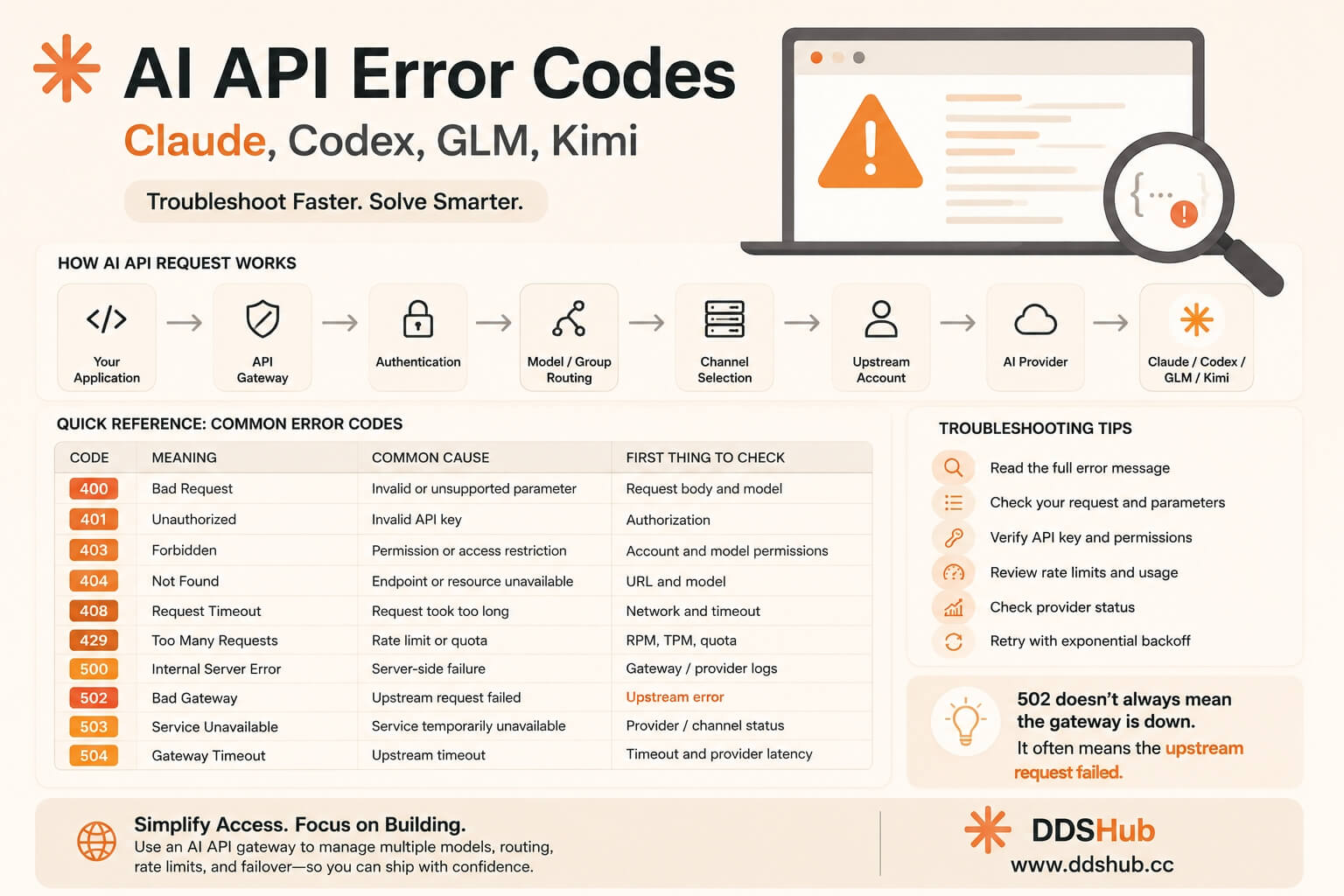
This becomes even more complicated when developers use an API gateway or relay service. A request does not necessarily travel directly from the application to the model provider. Instead, it may pass through several layers responsible for authentication, model routing, account selection, protocol conversion, rate limiting, and upstream failover.
Understanding this request chain is therefore more important than memorizing individual HTTP status codes.
This guide explains the most common Claude API errors, Codex API errors, GLM API errors, and Kimi API errors, including 400, 401, 403, 404, 408, 429, 500, 502, 503, and 504. It also explains why a 502 error does not necessarily mean that the API gateway itself is broken, how to identify the real upstream error, and what developers can do to resolve these problems.
How an AI API Request Actually Works
Before troubleshooting an API error, it helps to understand the complete request path.
A typical direct API request looks like this:
Your Application
      ↓
AI Provider API
      ↓
Claude / Codex / GLM / Kimi
When using an API gateway or relay platform, the architecture becomes more complicated:
Your Application
      ↓
API Gateway
      ↓
Authentication
      ↓
Model / Group Routing
      ↓
Channel Selection
      ↓
Upstream Account
      ↓
AI Provider
      ↓
Claude / Codex / GLM / Kimi
Each layer can introduce a different type of failure.
For example, an invalid API key can generate a 401 before the request ever reaches the model provider. A malformed request can produce a 400 during protocol conversion. A provider-side quota limitation can result in a 429, while an upstream request failure may be exposed to the client as 502.
This is why the HTTP status code alone is often insufficient.
Quick Reference: Common AI API Error Codes
| Code | Meaning | Common Cause | First Thing to Check |
|---|---|---|---|
| 400 | Bad Request | Invalid or unsupported parameter | Request body and model |
| 401 | Unauthorized | Invalid API key | Authorization |
| 403 | Forbidden | Permission or access restriction | Account and model permissions |
| 404 | Not Found | Endpoint or resource unavailable | URL and model |
| 408 | Request Timeout | Request took too long | Network and timeout |
| 429 | Too Many Requests | Rate limit or quota | RPM, TPM, quota |
| 500 | Internal Server Error | Server-side failure | Gateway/provider logs |
| 502 | Bad Gateway | Upstream request failed | Upstream error |
| 503 | Service Unavailable | Service temporarily unavailable | Provider/channel status |
| 504 | Gateway Timeout | Upstream timeout | Timeout and provider latency |
The most important distinction is between client-side request errors and upstream infrastructure errors.
400 Bad Request: Check the Request Before Blaming the Model
A 400 Bad Request generally means that the server received the request but could not process it because something about the request was invalid or unsupported.
For Claude, Codex, GLM, and Kimi APIs, common causes include an invalid model name, unsupported parameters, incorrectly formatted tool calls, malformed message history, or protocol incompatibility.
This is particularly common when developers use OpenAI-compatible APIs because different providers do not necessarily support exactly the same request schema.
For example, a client may send:
{
  "model": "gpt-5.5",
  "metadata": {},
  "input": [...]
}
The public API may support metadata, while an internal upstream endpoint used by a gateway may reject it. A recent Sub2API issue documented exactly this situation: metadata was forwarded to an upstream Codex endpoint that did not accept the field, resulting in an upstream 400, which Sub2API then surfaced as 502.
Another Sub2API issue documented an unsupported user parameter being forwarded through /v1/responses, again causing an upstream 400.
The solution is usually to check the request against the actual upstream API schema rather than assuming that every OpenAI-compatible endpoint supports every OpenAI parameter.
When debugging a 400, start with the model name, endpoint, request parameters, tool definitions, thinking or reasoning fields, message history, and protocol format.
Claude API 400 Errors: Thinking and Signature Problems
Claude-based coding workflows can introduce another class of 400 errors involving thinking blocks and signatures.
A recent Sub2API issue reported:
API Error: 400

Invalid `signature` in `thinking` block
The same request could then produce a generic Upstream request failed message to the client.
This type of error is especially relevant to Claude Code and agent-style applications because conversations are no longer simple sequences of user messages and assistant text. The request may contain thinking blocks, tool calls, tool results, and other structured content.
If a proxy or gateway modifies, drops, or incorrectly reconstructs part of that conversation state, the upstream model may reject the request.
For this reason, when Claude Code suddenly starts returning 400 errors during multi-turn tasks, developers should check whether the problem only occurs with thinking, tools, or long-running conversations rather than immediately assuming that the API key has expired.
401 Unauthorized: Check Your API Key
A 401 error usually means that the server could not authenticate the request.
The first thing to check is the Authorization header:
Authorization: Bearer YOUR_API_KEYIf you are using Claude, Codex, GLM, or Kimi through a gateway, make sure you are using the gateway's API key, not the upstream provider's credential.
This distinction matters because the request may have two completely different authentication layers:
Client API Key
      ↓
Gateway
      ↓
Upstream Account
A valid upstream account does not necessarily mean that the client-side API key is valid.
If every model returns 401, check the client configuration first. If only one group or model returns 401, investigate the gateway's channel or upstream account configuration.
403 Forbidden: Authentication Works, Permission Does Not
A 403 is different from a 401.
With 401, the server does not accept your authentication.
With 403, the request may be authenticated, but the user, API key, account, model, or channel does not have permission to perform the operation.
For example, a gateway may allow a user to call Claude Sonnet but not a particular premium model. A channel may also be configured for a specific group while another model is unavailable.
If a developer reports:
"My API key works, but this particular model returns 403."
the first things to check are the model's availability, group configuration, account permissions, and provider restrictions.
Do not immediately generate another API key.
404 Not Found: Endpoint or Model Problem
A 404 usually means that the requested resource does not exist.
In AI applications, this can mean several things.
The endpoint may be wrong:
/v1/chat/completionsversus:
/v1/responsesThe model may not exist in the selected group, or the upstream provider may not expose the requested endpoint.
This is particularly important for newer models because model names and endpoint compatibility can change.
When troubleshooting 404, verify the Base URL, endpoint, model name, provider, and channel configuration.
A useful test is to call the simplest supported endpoint with the simplest possible request before testing advanced features such as tools, reasoning, image generation, or streaming.
429 Too Many Requests: Rate Limit or Quota?
429 is one of the most common errors developers encounter when working with AI APIs.
The obvious interpretation is:
Too many requests.
But in practice, 429 can represent several different limitations.
The provider may be enforcing requests per minute, tokens per minute, account-level quota, concurrency limits, or temporary capacity restrictions.
This is why reducing request frequency is not always enough.
Suppose a coding agent generates a large amount of context and sends several requests simultaneously. Even if the request count is low, the application may still hit a token-based limit.
The troubleshooting process should therefore consider:
| Possible Limitation | What to Check |
|---|---|
| RPM | Requests per minute |
| TPM | Tokens per minute |
| Concurrency | Number of simultaneous requests |
| Account quota | Remaining provider quota |
| Model capacity | Current provider availability |
| Gateway limits | Platform-level rate limits |
For high-volume applications, retry logic with exponential backoff can also help. However, repeatedly retrying a request immediately can make the situation worse by increasing load.
500 Internal Server Error: Something Failed on the Server
A 500 usually means that the server encountered an unexpected internal error.
When using an API gateway, it is important to determine whether the 500 came from the gateway or the upstream provider.
If the gateway itself generated the error, administrators should inspect application logs, database connectivity, Redis, channel configuration, account selection, and recent deployment changes.
If the upstream provider returned 500, the gateway may simply be forwarding or wrapping the upstream failure.
For customers, the most useful information is therefore not only:
500 Internal Server Errorbut also the associated request ID, model, channel, and timestamp.
502 Bad Gateway: The Error Developers Misunderstand Most
502 deserves special attention because it is extremely common in API gateway architectures.
Many developers see:
502 Bad Gatewayand immediately conclude:
"The API gateway is down."
That is not necessarily true.
A gateway can return 502 because it successfully received the request but failed to obtain a valid response from the upstream service.
A simplified request chain looks like this:
Client
  ↓
Gateway
  ↓
Upstream
  ↓
400
  ↓
Gateway
  ↓
502
  ↓
Client
This behavior has been documented repeatedly in Sub2API issues.
For example, a recent issue showed an upstream 400 caused by an unsupported background parameter, while the client received only:
502 Upstream request failedThe actual cause was visible in the gateway logs as an upstream 400 Unsupported parameter: background.
Another issue involved OpenAI Responses API requests containing system messages in an unsupported form. The upstream rejected the request, while Sub2API returned 502 Bad Gateway to the client.
Therefore, 502 should be treated as a signal to inspect the upstream error, not as the final diagnosis.
Codex and Responses API: Why 502 Can Become Complicated
Codex-style workflows can make gateway troubleshooting particularly difficult because the Responses API supports stateful and multi-turn interactions.
For example, a Sub2API issue documented a situation where the same logical Codex session was routed between different upstream OpenAI accounts. Encrypted context generated by one account could not be verified by another account, causing the upstream to return 400, while the gateway returned 502.
The architecture looked roughly like:
Codex Session
     ↓
Gateway
     ↓
Account A
     ↓
Encrypted Context
     ↓
Retry
     ↓
Account B
     ↓
Cannot decrypt context
     ↓
Upstream 400
     ↓
Gateway 502
This illustrates why simple random account rotation is not always appropriate for stateful APIs.
For applications using Codex, Responses API, encrypted context, tool calls, or multi-turn sessions, the gateway may need session affinity so that related requests remain associated with a compatible upstream account.
502 Can Also Be Caused by Conversation State
Another recent Sub2API issue involved replayed reasoning items in multi-turn Responses API requests. The upstream returned a 404 because a referenced reasoning item was no longer available, while the gateway surfaced the failure as 502.
This is another reason developers should not treat 502 as a generic network error.
The underlying problem could actually be:
400 Invalid Parameteror:
404 Missing Conversation Itemor:
Authentication Failureor:
Upstream TimeoutThe gateway's job is to communicate with the upstream provider, and the exact way an upstream error is exposed depends on the gateway implementation.
503 Service Unavailable
A 503 usually indicates that the service is temporarily unavailable.
This can occur when an upstream provider is experiencing an outage, a gateway has temporarily disabled a channel, or no usable account is currently available.
For a multi-account gateway, an important distinction is whether:
One account → unavailableor:
Entire channel → unavailableIf only one account is failing, automatic failover may solve the problem.
If every account is failing, the problem is more likely to be related to the provider, channel, or infrastructure.
504 Gateway Timeout
A 504 Gateway Timeout usually means that the gateway waited for an upstream response but did not receive one within the configured timeout.
This is especially common with long-running AI requests.
Large reasoning tasks, code generation, image generation, tool calls, and long-context requests can naturally take longer than a conventional web request.
The solution may involve increasing the upstream timeout, improving streaming behavior, checking provider latency, or changing the model or channel.
Developers should be careful not to treat every timeout as a model failure. Sometimes the request is still being processed upstream while the gateway has already stopped waiting.
A Practical Error Troubleshooting Workflow
When an API request fails, do not start by randomly changing API keys, models, or configuration.
A better workflow is to identify the failure layer.
Start with the HTTP status code, then read the complete error message. Next, determine whether the error originated from the client, gateway, or upstream provider.
The following flow works well for most Claude, Codex, GLM, and Kimi API problems:
API Request Failed
       ↓
Check HTTP Status
       ↓
Is it 401 / 403?  → Check API Key / Permission
Is it 400?        → Check Parameters / Protocol / Model
Is it 404?        → Check Endpoint / Model / Resource
Is it 429?        → Check Quota / RPM / TPM / Concurrency
Is it 500?        → Check Gateway / Provider Logs
Is it 502?        → Check Upstream Error
Is it 503 / 504?  → Check Provider / Channel / Timeout
For gateway operators, the most useful debugging information usually includes the request ID, model, endpoint, channel, upstream account, upstream status code, error message, and request latency.
How to Reduce API Errors
The best way to reduce API errors is not simply to add retries.
A robust AI application should use the correct endpoint and model, validate request parameters, implement reasonable retry and backoff logic, maintain appropriate timeout settings, and avoid sending provider-specific parameters to an incompatible upstream.
Applications that use tools, reasoning, thinking, or multi-turn Responses API requests should also preserve the relevant conversation state correctly.
For multi-provider systems, model-specific request transformation is particularly important. Claude, Codex, GLM, and Kimi may expose similar APIs, but that does not mean their request schemas and behavioral requirements are identical.
A reliable gateway therefore needs to handle protocol differences rather than simply forwarding every field unchanged.
Why an AI API Gateway Can Make Error Handling Easier
Building direct integrations with multiple AI providers can become complicated very quickly.
A development team might need to separately manage Claude API, OpenAI/Codex API, GLM API, Kimi API, authentication credentials, model names, provider-specific parameters, rate limits, retries, account availability, and service status.
An API gateway can centralize part of this infrastructure.
Instead of maintaining several independent integrations, developers can use a unified API interface and select the required model or group.
This is particularly useful for AI coding applications where developers may want Claude for reasoning, Codex for software engineering, Kimi for large-context tasks, and GLM for cost-sensitive workloads.
Using DDShub When You Don't Want to Troubleshoot Everything Yourself
For developers using AI APIs through a gateway, an error is not always something that can be solved from the client side.
Sometimes the actual problem is upstream. Sometimes the channel needs to be switched. Sometimes an account needs to be removed from rotation. Sometimes a request needs protocol conversion. Sometimes the provider has changed its API behavior.
This is where DDShub can be useful.
DDShub provides API access to multiple AI models, including Claude, Codex, GLM, and Kimi, through a unified platform. Instead of individually managing multiple upstream providers and troubleshooting every provider-specific integration, developers can use DDShub as the API access layer.
More importantly, DDShub provides customer support for API troubleshooting. When an error cannot be solved simply by changing the client configuration, users can provide the error message, model, endpoint, and request information to the support team so the issue can be investigated from the gateway and upstream side.
This is particularly useful for developers using Claude Code, Codex, Cursor, VS Code, OpenClaw, or other AI coding tools where an API failure can interrupt an active development workflow.
You can explore the available models and current API options on the DDShub website: DDShub AI Models
For API integration information: DDShub API Documentation
Final Thoughts
API errors are a normal part of working with modern AI infrastructure, but they become much easier to solve once developers understand the request chain.
A 400 usually means that the request needs to be examined. A 401 points toward authentication, while 403 generally indicates a permission problem. A 404 usually means that an endpoint or resource cannot be found, and 429 requires investigation of rate limits, quota, concurrency, or model capacity.
The most important error to investigate carefully is often 502.
A 502 Bad Gateway does not necessarily mean that the gateway is broken. As real Sub2API issues demonstrate, an upstream 400, 404, unsupported parameter, invalid conversation state, or account-routing problem can ultimately appear to the client as 502.
For developers working with Claude, Codex, GLM, or Kimi, the most useful troubleshooting habit is therefore to look beyond the status code and identify where in the request chain the failure actually occurred.
If you do not want to spend hours investigating provider-specific errors, protocol differences, upstream accounts, and gateway logs yourself, an API platform such as DDShub can provide another layer of support, with multiple models available through a unified API environment and customer service available when an issue requires investigation beyond the client configuration.
In AI development, a reliable API is not only about whether a request succeeds. It is also about how quickly you can understand and resolve the request when it fails.