
Claude Code Token Optimization Guide: Reduce API Costs with Skills, Prompt Engineering and Context Management
AI coding assistants have significantly changed the way developers build software. Tools like Claude Code can analyze repositories, modify files, execute commands, and assist with complex engineering tasks. However, as AI coding workflows become more advanced, token consumption has become one of the biggest concerns for developers and engineering teams.
Large context windows provide powerful capabilities, but they also introduce a hidden cost. Every file loaded into context, every unnecessary instruction, repeated conversation history, unused plugin, and inefficient prompt structure can increase token usage and reduce overall efficiency.
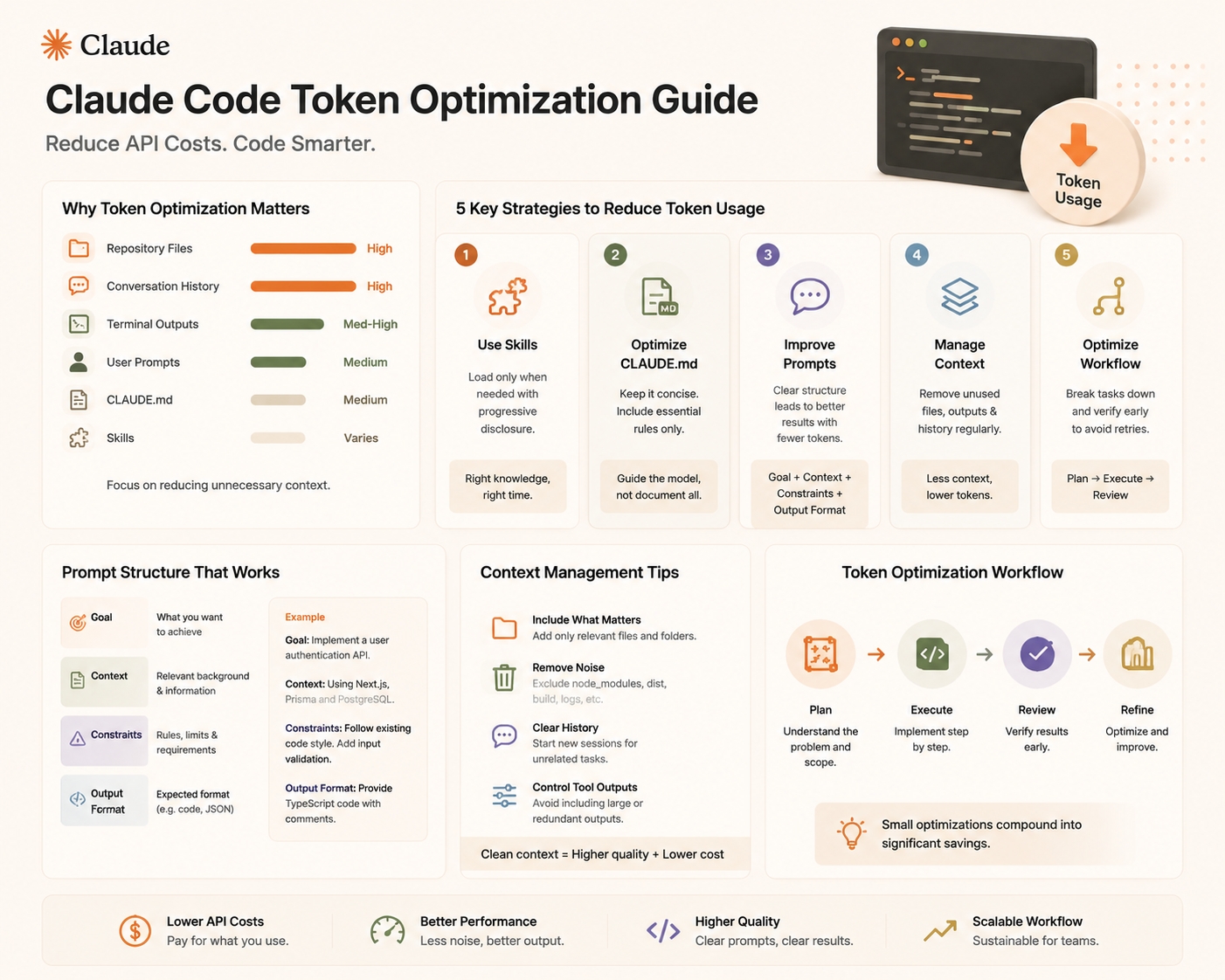
The key to controlling AI coding costs is not simply choosing a cheaper model. A better approach is optimizing how information is provided to the model. By improving project structure, using Skills correctly, writing better prompts, and managing Claude Code sessions efficiently, developers can significantly reduce unnecessary token consumption while maintaining output quality.
This article explains practical ways to optimize Claude Code token usage and build a more cost-efficient AI coding workflow.
Why Token Optimization Matters in Claude Code
Claude Code operates differently from a traditional chatbot. Instead of only processing the latest user message, it continuously maintains context from multiple sources, including instructions, repository files, previous responses, tool outputs, memory files, and loaded Skills. Anthropic explains that Claude Code's context window contains everything Claude needs during a session, and context usage grows as more files and tool results are added.
A typical Claude Code session may include:
| Context Source | Token Impact |
|---|---|
| User prompts | Medium |
| Repository files | High |
| Terminal outputs | Medium to High |
| CLAUDE.md instructions | Medium |
| Skills metadata and instructions | Depends on configuration |
| Previous conversation history | High |
Many developers focus only on prompt length, but in real-world coding workflows, repository context and accumulated conversation history often consume much more than the initial instructions.
Therefore, reducing unnecessary context is usually the fastest way to lower token usage.
1. Use Skills Instead of Large Permanent Instructions
One of the most effective ways to reduce context waste is replacing large system instructions with Skills.
Anthropic introduced Skills as reusable capability packages containing instructions, scripts, and resources. Instead of loading all detailed instructions into every session, Skills use a progressive disclosure approach: Claude first identifies relevant Skills, then loads additional instructions only when needed.
This is especially useful for developers who maintain large collections of coding rules.
A common inefficient approach:
Always load:

- Frontend coding standards
- Backend architecture rules
- Database conventions
- Testing guidelines
- Deployment instructions
- Security checklist
Every session starts with thousands of unnecessary tokens.
A better approach:
Skill: Frontend Development

Load only when:
- Creating React components
- Modifying UI files
- Reviewing frontend code
The model receives the right knowledge at the right time instead of carrying everything in every conversation.
2. Optimize Your CLAUDE.md File
CLAUDE.md is one of the most important files in a Claude Code project. It provides persistent project instructions, but poorly designed files can become a major source of unnecessary token consumption.
A good CLAUDE.md should contain:
| Include | Avoid |
|---|---|
| Project architecture overview | Full documentation |
| Important commands | Long tutorials |
| Coding conventions | Repeated explanations |
| Testing requirements | Historical project notes |
| Important constraints | Information Claude can discover itself |
For example:
Good:
# Project Rules

Framework: Next.js + TypeScript
Testing: Run npm test before submitting changes.
Style: Use existing component patterns.
Bad:
This project was created in 2021.
The original developer decided...
The team previously discussed...
The goal of CLAUDE.md is not to document the entire project. Its purpose is to provide the minimum information Claude needs to make better decisions.
Anthropic also recommends keeping persistent rules in CLAUDE.md rather than relying on long conversations, because conversation history may be compacted over time.
3. Improve Prompt Structure
Many developers assume longer prompts produce better results. In reality, inefficient prompts often increase token usage without improving output quality.
A strong coding prompt usually contains four elements:
| Component | Example |
|---|---|
| Role | "Act as a senior backend engineer" |
| Context | "This is a FastAPI application" |
| Task | "Optimize database queries" |
| Output requirement | "Provide code changes with explanation" |
For example:
You are a senior Python engineer.

Review this FastAPI endpoint.

Identify performance issues.

Provide optimized code and explain the changes.
This is usually better than:
Please carefully analyze everything about this project and think deeply about all possible improvements...The second version consumes more tokens but provides less useful direction.
4. Avoid Sending Entire Repositories Unnecessarily
One of the biggest causes of high token consumption is loading files that are unrelated to the current task.
For example, a developer asks:
Fix authentication middleware.But Claude loads frontend components, documentation, test snapshots, build files, and database migrations. Most of this information is irrelevant.
A better workflow is:
- Analyze auth middleware first.
- Only inspect related files.
- Expand context if needed.
Modern AI coding agents are good at exploration, but developers should still guide the exploration process. The goal is not giving Claude everything. The goal is giving Claude the right information.
5. Manage Long Sessions with /compact and /clear
Long coding sessions naturally accumulate context. Claude Code provides built-in commands to manage this:
| Command | Purpose |
|---|---|
| /compact | Summarize current conversation and reduce context |
| /clear | Start a fresh conversation |
| /context | Inspect context usage |
Anthropic documents /compact as a way to free context while preserving important information, while /clear starts a new session with empty context.
A practical workflow:
Start task → Implement feature → Review changes → /compact → Continue developmentInstead of allowing thousands of irrelevant previous messages to remain active, periodically compress the conversation.
6. Remove Unnecessary MCP Servers and Plugins
MCP and plugins can greatly extend Claude Code capabilities, but every enabled tool adds additional context overhead.
A common mistake is enabling multiple database tools, multiple search tools, and multiple unused integrations even when a project only needs one or two.
Recommended approach:
| Situation | Recommendation |
|---|---|
| Daily coding | Keep essential tools only |
| Specific project | Enable project-specific MCP |
| Temporary task | Disable after completion |
A smaller tool environment usually produces clearer model decisions and reduces unnecessary context usage.
7. Choose the Right Model for the Task
Token optimization is not only about reducing input. Choosing the correct model also affects cost efficiency.
A practical approach:
| Task | Recommended Model Type |
|---|---|
| Architecture design | Advanced reasoning model |
| Daily coding | Balanced model |
| Simple refactoring | Lightweight model |
| Documentation | Cost-efficient model |
Using the most powerful model for every request often creates unnecessary expenses. A simple bug fix does not always require the same reasoning capability as designing a distributed system.
Using DDS Hub to Reduce AI Coding Costs
For developers using Claude Code frequently, API costs can become significant, especially during long coding sessions. DDS Hub provides access to multiple AI models through dedicated model groups, allowing developers to select different resources based on their workflow requirements.
Instead of using one expensive configuration for every task, developers can choose different groups depending on stability, workload, and budget requirements.
| DDS Hub Group | Suitable Scenario |
|---|---|
| Claude Stable Group | Production development |
| Claude Discount Group | Cost-sensitive workloads |
| Claude Max Pool Group | Claude Code CLI usage |
| Codex Groups | Alternative coding workflows |
| GLM Groups | OpenAI-compatible development |
Developers can combine token optimization techniques with DDS Hub's flexible model access to reduce overall AI development expenses while maintaining productivity.
Learn more through the official DDS Hub resources: the DDS Hub Documentation and the DDS Hub Homepage.
Final Checklist: Reduce Claude Code Token Usage
Before starting a large coding session, developers should check:
| Optimization | Impact |
|---|---|
| Remove unused Skills | Reduce unnecessary context |
| Optimize CLAUDE.md | Lower startup tokens |
| Use structured prompts | Improve output efficiency |
| Avoid loading unrelated files | Reduce context growth |
| Use /compact regularly | Maintain clean sessions |
| Disable unused MCP tools | Reduce tool overhead |
| Select appropriate models | Reduce unnecessary cost |
Conclusion
Reducing Claude Code token usage is not about limiting what the model can access. It is about improving how information is organized and delivered.
The most effective developers do not simply provide more context. They provide better context.
By combining Skills, optimized CLAUDE.md files, structured prompts, session management, and intelligent model selection, teams can significantly reduce unnecessary token consumption while improving coding quality.
As AI coding workflows continue to scale, efficient context management will become just as important as model capability itself. Developers who master these optimization techniques will be able to build faster, reduce API expenses, and get more value from every AI-assisted development session.