
How to Connect Claude Code to Third-Party AI Providers Using CC Switch (DDS Hub Guide)
Claude Code has quickly become one of the most popular AI coding assistants because it offers a clean command-line experience, powerful code generation, and deep repository understanding. What many developers don't realize, however, is that Claude Code is not limited to Anthropic's own infrastructure. According to Anthropic's official documentation, Claude Code supports custom API endpoints through the ANTHROPIC_BASE_URL environment variable, allowing requests to be routed through compatible AI gateways instead of connecting directly to Anthropic.
This flexibility opens the door to a much more efficient development workflow. Rather than maintaining separate accounts and configurations for different AI providers, developers can use an AI gateway such as DDS Hub together with CC Switch to manage multiple providers, switch environments with minimal effort, and continue using the familiar Claude Code interface. If you're new to DDS Hub, its official documentation provides a good overview of the platform and supported integrations: DDS Hub Documentation.
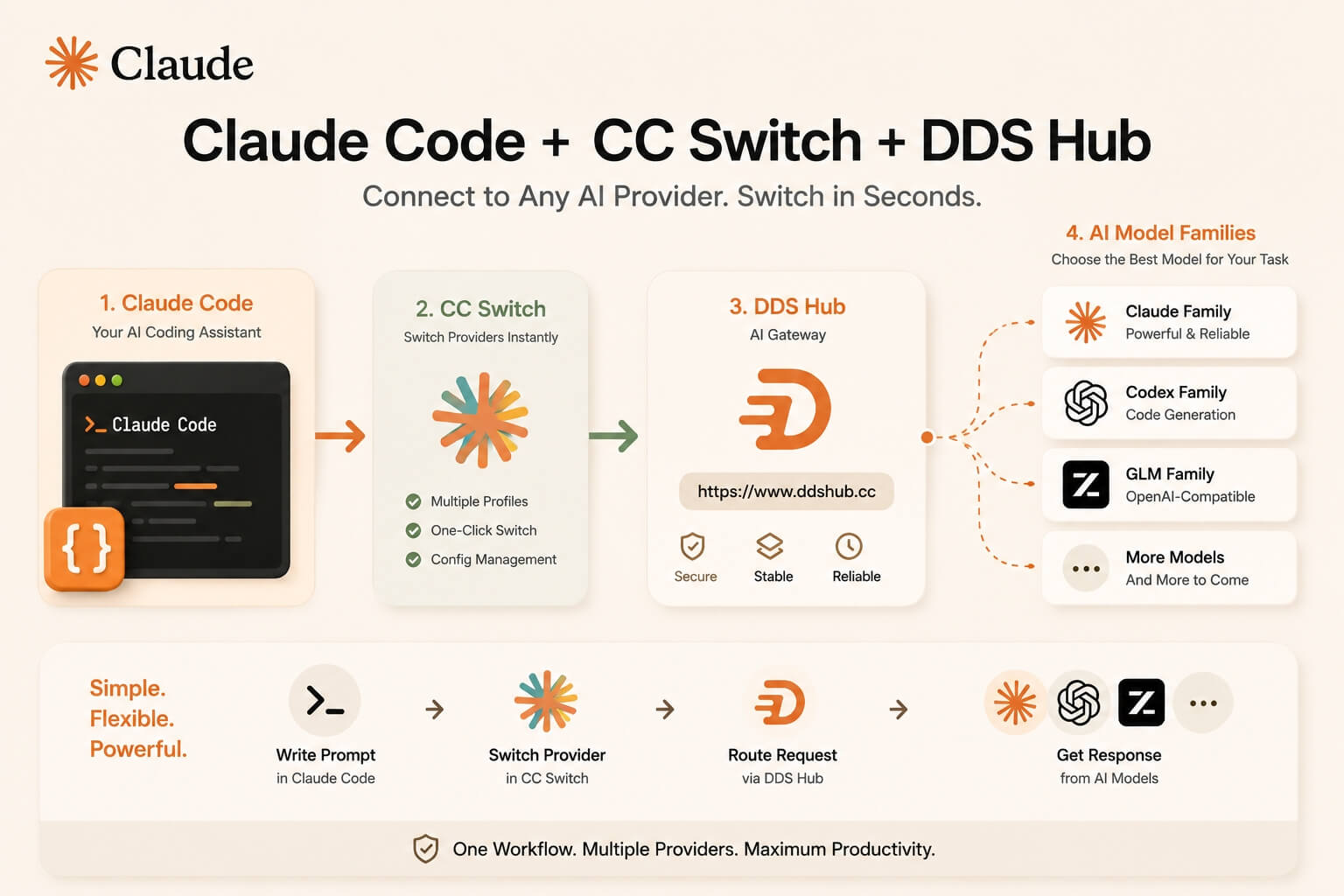
How Claude Code Supports Third-Party AI Providers
Claude Code authenticates using environment variables before sending requests to an API endpoint. By default, those requests go to Anthropic, but the endpoint can be overridden by setting ANTHROPIC_BASE_URL. Anthropic also documents that API-based authentication takes priority over subscription authentication, making it suitable for enterprise deployments and third-party gateways.
The overall request flow is straightforward:
Claude Code
        │
        ▼
Authentication
(API Key)
        │
        ▼
ANTHROPIC_BASE_URL
        │
        ▼
AI Gateway
        │
        ▼
AI Model
Because the routing happens at the API layer, developers continue using exactly the same Claude Code commands without changing their daily workflow.
Why CC Switch Makes the Workflow Better
Although Claude Code already supports custom Base URLs, manually changing environment variables every time you switch providers quickly becomes inconvenient. This is exactly the problem CC Switch was designed to solve.
CC Switch is an open-source desktop application that manages AI coding providers from a single interface. Instead of repeatedly editing configuration files, developers can save multiple provider profiles, switch between them instantly, manage routing, and centralize provider settings for tools such as Claude Code, Claude Desktop, Codex, Gemini CLI, OpenCode, and others.
Official project: CC Switch GitHub Repository.
Instead of constantly modifying local environment variables, your workflow becomes much simpler:
Claude Code
        │
        ▼
CC Switch
        │
        ▼
Selected Provider
        │
        ▼
AI Gateway
        │
        ▼
AI Model
For developers who frequently test multiple AI providers, this approach is significantly more efficient than maintaining several configuration files.
Why DDS Hub Fits Naturally into This Workflow
DDS Hub is designed as an AI gateway that supports multiple model ecosystems while remaining compatible with developer tools such as Claude Code. Unlike platforms that provide one universal API key for every available model, DDS Hub uses a group-based architecture.
Each API key belongs to one specific model group, and each group corresponds to one model family. For example:
| DDS Hub Group | Available Models | Recommended Usage |
|---|---|---|
| Claude Stable | Claude family | Stable API & Claude Code |
| Claude Discount | Claude family | Lower-cost API workloads |
| Claude Max Pool | Claude family | Claude Code CLI only |
| Codex External | Codex family | Stable API |
| Codex CC | Codex family | Claude Code |
| GLM | GLM family | OpenAI-compatible API |
| GLM CC | GLM family | Claude Code |
This means a Claude group API key can access Claude models only, while a Codex group API key is dedicated to Codex models. Rather than managing permissions at the individual model level, DDS Hub keeps authentication organized around model families, making routing and billing much easier to understand.
More details about API keys, model groups, and supported integrations are available in the official DDS Hub Documentation.
Configuring DDS Hub with CC Switch
After creating your DDS Hub API key, configuring CC Switch is straightforward. Create a new provider and enter the following information:
| Setting | Value |
|---|---|
| Provider Name | DDS Hub |
| Base URL | https://www.ddshub.cc |
| API Key | Your DDS Hub API Key |
| API Format | Anthropic-compatible |
The complete architecture now looks like this:
Claude Code
      │
      ▼
CC Switch
      │
      ▼
DDS Hub
https://www.ddshub.cc
      │
      ▼
Selected Model Group
      │
      ▼
Claude / Codex / GLM
Once the provider is saved, simply select it within CC Switch and continue working in Claude Code as usual. There is no need to repeatedly modify your terminal configuration or maintain separate shell profiles for different providers.
Why This Architecture Scales Better
As AI-assisted development becomes increasingly multi-model, developers rarely rely on a single model for every task. Claude may be preferred for long-context code review, Codex for implementation, and GLM for OpenAI-compatible applications. Managing these environments manually quickly becomes difficult as projects grow.
Combining Claude Code, CC Switch, and DDS Hub creates a much cleaner workflow. Claude Code remains the development interface, CC Switch manages provider profiles and routing, and DDS Hub provides organized access to different model families through dedicated groups. Because each DDS Hub API key belongs to a single model group, switching between Claude, Codex, or GLM becomes a matter of selecting a different provider profile rather than rebuilding your development environment.
Conclusion
Claude Code's support for custom API endpoints makes it considerably more flexible than many developers initially expect. By combining this capability with CC Switch, developers gain a centralized way to manage multiple providers without repeatedly editing environment variables or configuration files. Anthropic officially documents support for custom Base URLs and authentication through environment variables, making this workflow fully compatible with Claude Code's intended deployment model.
DDS Hub complements this workflow with its group-based architecture, where every API key belongs to a dedicated model family rather than acting as a universal credential. Whether you are using Claude for large-scale software engineering, Codex for implementation, or GLM for OpenAI-compatible development, DDS Hub keeps routing, permissions, and billing straightforward while CC Switch makes moving between providers effortless.
To get started, visit the DDS Hub Documentation or explore the platform at the DDS Hub Homepage. For CC Switch, the latest releases and setup instructions are available on the official GitHub repository.