
How to Build AI Agents with Claude API: Architecture, Tools, and Best Practices
Large language models have changed the way developers build software, but the next evolution of AI applications is no longer focused only on generating text. Developers are increasingly building AI agents that can understand complex goals, interact with external systems, remember information, and complete multi-step tasks with limited human intervention.
A traditional LLM application usually follows a simple interaction model where users provide input and the model generates an answer. While this approach works well for conversational applications, it becomes limited when users expect AI systems to perform real-world actions, such as checking databases, modifying files, calling APIs, or completing software development tasks.
AI agents extend the capabilities of language models by combining reasoning ability with external tools, memory systems, and execution environments. Instead of acting only as a response generator, the model becomes the decision-making component inside a larger software architecture.
Anthropic has highlighted that effective AI agents do not necessarily require complicated frameworks. In many cases, reliable agents are built using simple and composable designs where the model, tools, and execution logic are clearly separated. This approach improves reliability, debugging ability, and scalability.
Source: Anthropic — Building Effective Agents
For developers who want to build AI agents with Claude API, understanding agent architecture, tool integration, context management, and cost optimization is essential.
DDS Hub provides developers with access to Claude API together with other advanced AI models, including Kimi K3, GLM, and Codex, allowing teams to experiment with different models and build flexible multi-model AI applications.
Learn more: https://www.ddshub.cc
What Is a Claude API Agent?
A Claude API agent is not simply a chatbot powered by Claude.
A chatbot typically receives a question and returns an answer. A Claude agent is designed to accomplish a broader objective by reasoning about the task, deciding what information is required, selecting available tools, executing actions, and using the results to continue working toward a final solution.
For example, a customer support chatbot may answer a question based only on previous training data. A customer support agent built with Claude API can instead analyze the user's request, retrieve customer information from a CRM system, check order status through an external API, and generate a response based on real-time information.
Similarly, a coding agent powered by Claude can understand a software project, read existing files, modify implementation details, execute tests, analyze errors, and continue improving the solution.
The key difference is that an agent does not only generate content. It interacts with the world through controlled actions.
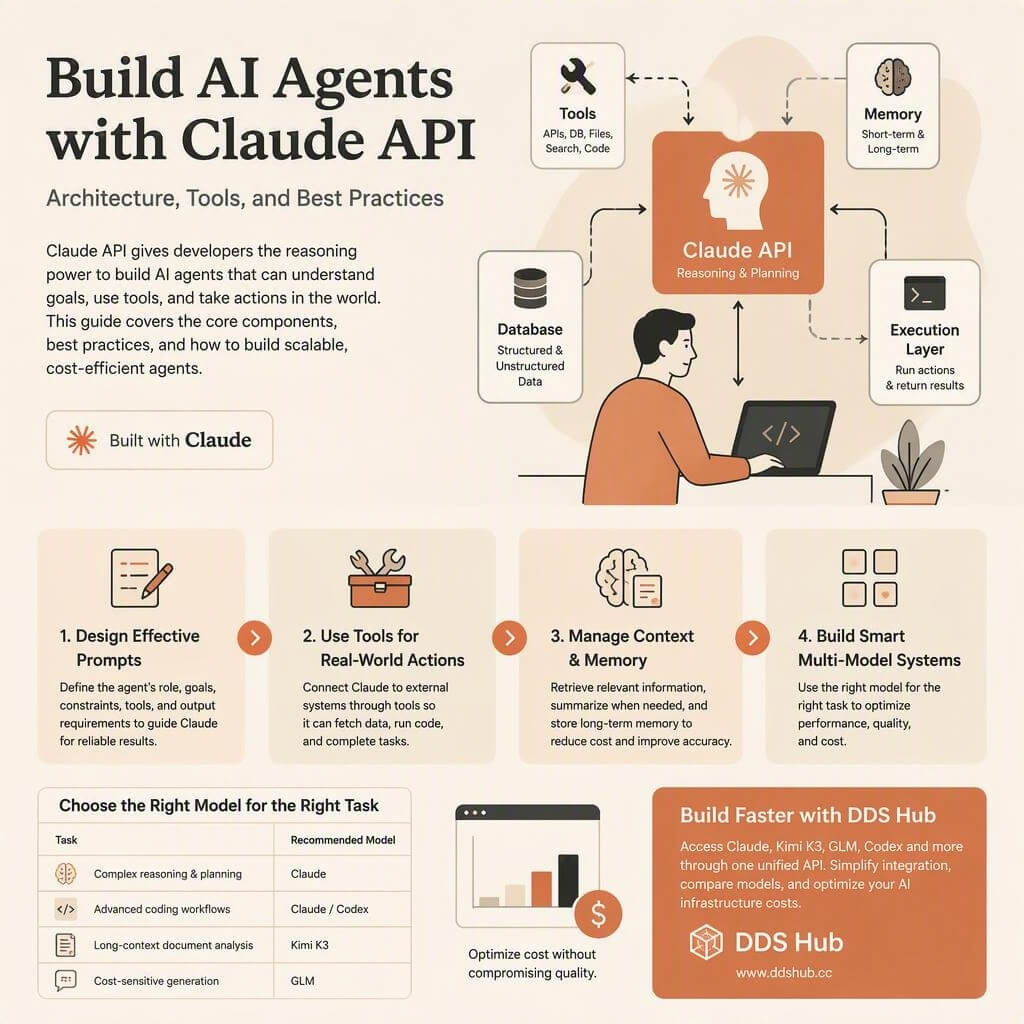
A typical Claude API agent contains several important components:
| Component | Role in Agent Architecture |
|---|---|
| Claude API | Provides reasoning, planning, and decision-making capabilities |
| Tools | Allow Claude to interact with external systems and applications |
| Memory | Stores important information across conversations or sessions |
| Database | Provides persistent knowledge and structured data |
| Execution Layer | Handles tool execution and returns results to Claude |
Together, these components create an AI system that can perform meaningful tasks instead of only answering questions.
Understanding Claude API Agent Architecture
The architecture of a Claude agent is built around the idea that the model should focus on reasoning while the application controls execution.
Claude does not directly access a company's internal systems. Instead, developers define specific tools that expose limited capabilities. These tools may allow Claude to search a database, retrieve information from an API, read files, or execute approved actions.
Anthropic's official tool-use documentation explains that Claude can use developer-defined tools through structured tool calls. The model determines when a tool is necessary, generates the required parameters, and waits for the application to return the result before continuing the reasoning process.
Source: Anthropic Tool Use Documentation
This architecture provides several advantages. Developers maintain control over what actions the AI can perform, security boundaries remain clear, and the behavior of the agent becomes easier to monitor.
For enterprise applications, this design is especially important because companies usually cannot allow an AI model unrestricted access to internal systems.
Step 1: Designing Effective Prompts for Claude Agents
Prompt design is one of the most important factors when building a Claude API agent.
Many beginner implementations start with a simple instruction such as:
"You are an AI assistant."
However, this does not provide enough guidance for an agent that needs to complete complex tasks.
A production-quality agent prompt should clearly define the agent's role, objectives, available tools, limitations, and expected output format.
For example, a customer support agent should not only know that it is a support assistant. It should understand whether its goal is resolving customer issues, collecting information, escalating problems, or performing specific actions.
A well-designed agent prompt usually includes:
| Prompt Element | Purpose |
|---|---|
| Role Definition | Explains the identity and responsibility of the agent |
| Goal Definition | Describes what outcome the agent should achieve |
| Constraints | Defines limitations and safety requirements |
| Tool Instructions | Explains available actions and when to use them |
| Output Requirements | Controls response structure and quality |
Anthropic's prompt engineering guidance emphasizes that clear instructions and structured prompts improve reliability, especially when models are used with tools and complex workflows.
Source: Anthropic Prompt Engineering Documentation
A good agent prompt should not simply describe what the AI is. It should define how the AI should think and operate within the application.
Step 2: Using Claude API Tools for External Actions
The ability to use tools is what separates an AI agent from a traditional chatbot.
Claude API tools allow developers to connect the model with external services, including databases, APIs, internal software systems, and development environments.
Consider a customer support scenario. When a user asks about an order, Claude does not know the latest order status from its own knowledge. Instead, the application provides a customer lookup tool. Claude identifies that additional information is required, calls the tool, receives the result, and then generates a response based on real customer data.
The same principle applies to coding agents.
A developer can provide Claude with tools that allow it to access project files, search code, execute tests, and analyze results. Claude becomes the reasoning engine while the surrounding application controls what actions are available.
Anthropic's Claude Agent SDK extends these concepts further by providing capabilities for building more advanced agents that can work with files, commands, and development environments.
Source: Claude Agent SDK Documentation
Step 3: Managing Context and Memory in Claude Agents
One of the biggest challenges in AI agent development is not model intelligence but context management.
Every additional token increases API cost and latency. Sending complete conversation histories, unnecessary documents, or irrelevant information can quickly make an AI agent expensive and inefficient.
A scalable Claude agent usually needs a strategy for deciding what information should be included in each request.
Instead of storing everything inside the active context window, developers often combine summarization, retrieval systems, and long-term memory storage.
For example, an enterprise assistant may store thousands of company documents in a database. When a user asks a question, the system retrieves only the relevant information and provides that context to Claude.
This approach improves both performance and cost efficiency because Claude receives the information needed for the current task rather than the entire knowledge base.
Effective context management directly affects:
| Area | Impact |
|---|---|
| API Cost | Fewer unnecessary tokens reduce expenses |
| Response Speed | Smaller context improves latency |
| Accuracy | Relevant information reduces confusion |
| Scalability | More users can be supported efficiently |
Step 4: Building Multi-Model AI Agent Systems
Although Claude is one of the strongest models for reasoning and coding workflows, modern AI applications increasingly use multiple models instead of relying on one model for every task.
Different models have different strengths, and assigning each model the right responsibility can significantly improve both performance and cost.
A production AI system may use Claude for planning and complex reasoning, Kimi K3 for processing extremely long documents, Codex for specialized coding tasks, and GLM for cost-efficient high-volume operations.
| Task | Suitable Model Choice |
|---|---|
| Complex reasoning and planning | Claude |
| Advanced coding workflows | Claude / Codex |
| Long-context document analysis | Kimi K3 |
| Cost-sensitive generation | GLM |
This multi-model strategy is becoming increasingly common because AI applications are no longer built around one universal model. Instead, developers optimize the entire system based on task requirements.
Claude API Cost Optimization Strategies
A common mistake when building AI applications is using the most expensive model for every request.
For example, many simple tasks such as classification, summarization, or basic generation do not require the highest reasoning capability. Using a premium model for every request can significantly increase operational costs.
A better approach is intelligent model selection.
Developers can route complex tasks to stronger Claude models while assigning simpler tasks to more cost-efficient models.
Additional optimization methods include improving prompts, reducing unnecessary context, using retrieval systems, and storing long-term information outside the active conversation.
The goal is not simply reducing API usage. The goal is creating an efficient AI system where every task receives the appropriate level of intelligence.
Building Claude API Agents with DDS Hub
Building production AI agents often requires access to multiple models.
A customer support agent may need Claude for reasoning, another model for high-volume responses, and a long-context model such as Kimi K3 for document analysis.
Managing multiple AI providers separately can increase engineering complexity because each provider has different API formats, billing systems, and integration methods.
DDS Hub provides a unified API platform that allows developers to access multiple AI models through one service.
Developers can use DDS Hub for applications including AI agents, AI coding assistants, enterprise automation systems, and multi-model AI workflows.
The platform provides access to models including Claude, Kimi K3, GLM, and Codex, helping developers compare models and optimize AI infrastructure costs.
Learn more: https://www.ddshub.cc
Best Practices for Building Claude API Agents
The most effective AI agents are usually not the ones with the most complicated architecture.
Successful agents typically start with a clear objective, carefully designed tools, reliable context management, and controlled execution.
Developers should focus on making agents predictable and maintainable rather than adding unnecessary complexity.
A strong Claude API agent should always have clear answers to three questions:
- What task is the agent responsible for completing?
- What tools does the agent need to achieve that goal?
- How does the system determine that the task has been successfully completed?
By answering these questions, developers can create AI agents that are easier to improve, monitor, and scale.
Conclusion: Building AI Agents Requires More Than Just a Powerful Model
The future of AI applications will not be defined only by larger language models. It will be defined by how developers combine models with tools, memory systems, and reliable software architecture.
Claude API provides powerful capabilities for building AI agents, including reasoning, tool calling, and integration with external systems.
However, successful agent development requires a complete strategy that includes prompt design, context management, model selection, and cost optimization.
As AI applications become more complex, developers will increasingly rely on multi-model architectures and flexible API platforms.
With solutions like DDS Hub, developers can access Claude and other leading AI models through a unified platform and build scalable AI agents more efficiently.
Start building: https://www.ddshub.cc
FAQ
What is a Claude API agent?
A Claude API agent is an AI application that uses Claude as a reasoning engine combined with tools, memory, and execution systems to complete complex tasks.
How do I build an AI agent with Claude API?
Developers typically combine Claude API with structured prompts, tool calling, memory management, and external integrations.
What are Claude API tools?
Claude API tools allow Claude to interact with external systems such as databases, APIs, files, and software environments.
What is Claude Agent SDK?
Claude Agent SDK provides development capabilities for building advanced Claude-powered agents with access to tools, files, and execution environments.