
AI Coding Tips for Beginners: How to Get Better Results From Claude, Codex, Kimi K3, and GLM
AI coding has quickly become one of the most accessible ways for developers to build software. You no longer need to write every function manually or understand every part of an unfamiliar repository before making your first contribution. With models such as Claude, Codex, Kimi K3, and GLM, developers can ask an AI coding assistant to explain an existing project, generate code, find bugs, write tests, and even complete multi-step software engineering tasks.
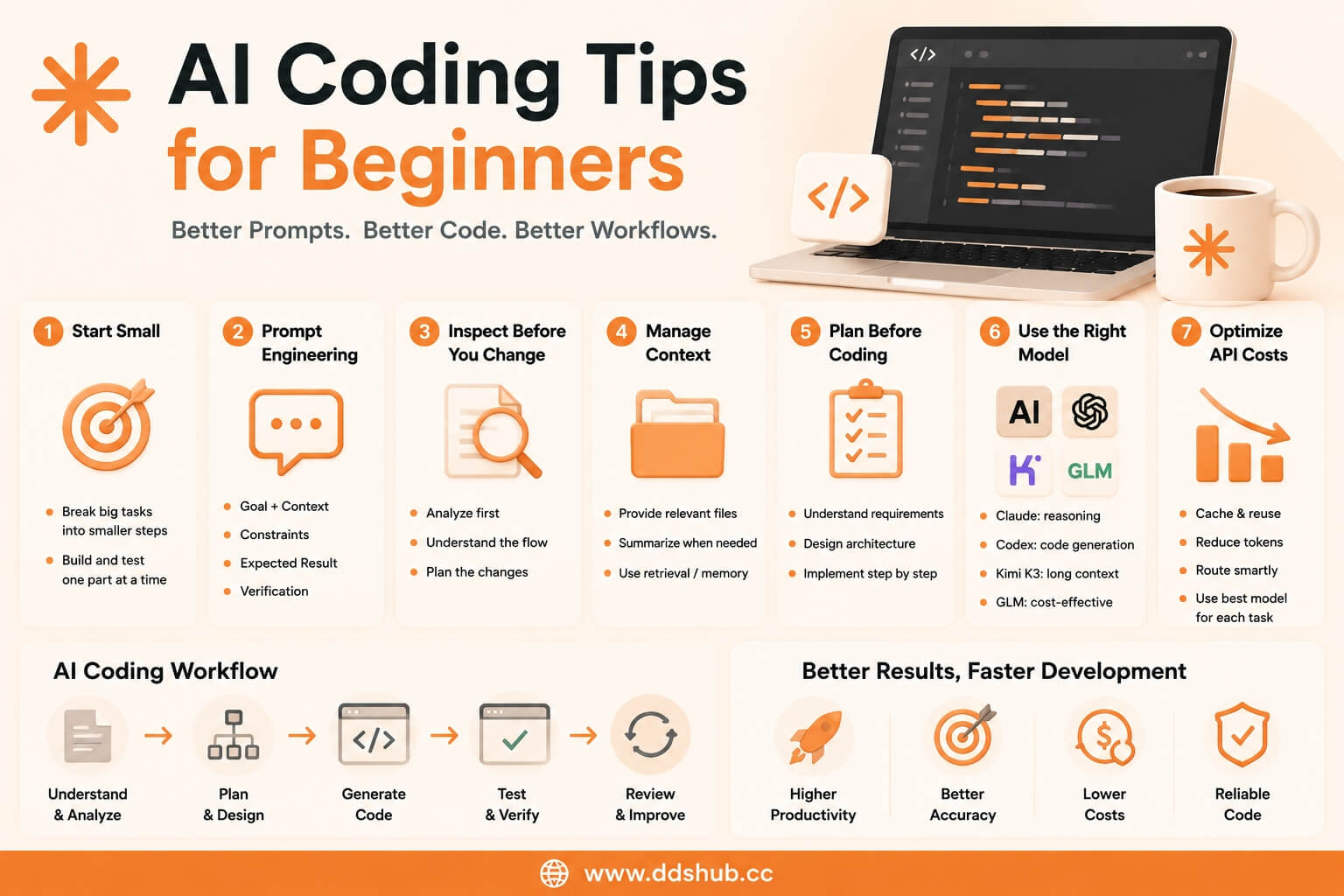
However, getting started with AI coding is not simply a matter of choosing a powerful model and sending it a prompt. Beginners often discover that the same coding model can produce excellent results in one situation and frustrating results in another. The difference usually comes from how the task is described, how much context is provided, how the model can interact with the development environment, and how the API is configured.
This guide introduces some of the most useful AI coding techniques for beginners, with a particular focus on prompt engineering, context management, API usage, model selection, and practical workflows.
What Is AI Coding?
AI coding refers to using large language models to assist with software development. Instead of treating an AI model as a simple code generator, developers can use it as an interactive engineering assistant that understands requirements, analyzes existing code, proposes solutions, writes implementations, and helps verify the final result.
For example, a developer working on an unfamiliar repository could start with a request such as:
"Please analyze this repository and explain the overall architecture before making any changes."
After understanding the project, the developer could continue with:
"Find the authentication flow and explain how login requests are processed."
Only after the architecture and relevant files are understood should the developer ask the model to implement a change.
This approach is generally more reliable than immediately asking the model to rewrite large sections of an unfamiliar project.
Start Small When You Are New to AI Coding
One of the easiest mistakes for beginners is giving an AI coding model an extremely large task on the first attempt.
A request such as "Build a complete SaaS application" contains too many independent decisions. The model must determine the architecture, database design, authentication system, API structure, frontend framework, deployment strategy, and many other details simultaneously.
A better approach is to divide the project into smaller engineering tasks. Start by asking the model to understand the existing requirements, then design the architecture, implement one component, test it, and move on to the next component.
This does not mean that AI coding agents cannot handle large tasks. Modern models are increasingly capable of autonomous development, but beginners generally get more predictable results when they understand how to control the scope of each task.
Prompt Engineering: Tell the Model What Success Looks Like
Prompt engineering is one of the most important AI coding skills to learn.
A weak coding prompt might look like this:
"Fix the login problem."
The model has no information about what is actually broken, what the expected behavior should be, or which parts of the application it is allowed to modify.
A stronger prompt gives the model enough information to understand the objective:
"Users are redirected to the login page after successfully authenticating. Please investigate the authentication flow, identify the cause, make the smallest necessary change, and add a regression test. Do not modify the database schema."
The second prompt gives the model a clear objective, a symptom, a constraint, and a verification requirement.
Good prompts do not necessarily need to be extremely long. The goal is to provide the information that affects the engineering decision while avoiding irrelevant context.
A useful mental model is:
Goal + Context + Constraints + Expected Result + Verification
This structure works well with Claude, Codex, Kimi K3, GLM, and other coding models.
Ask the Model to Inspect Before It Changes Code
Another useful technique is separating analysis from implementation.
When working on an existing project, developers should often ask the model to inspect relevant files and explain what it has found before allowing it to make changes.
For example:
"Find the files responsible for user authentication. Do not modify anything yet. Explain how the authentication flow works and identify the most likely source of the issue."
Once the model provides its analysis, the next request can be more precise:
"Based on that analysis, implement the smallest fix and add a test for the reported behavior."
This technique is particularly useful when working with large repositories because it reduces unnecessary modifications and gives developers an opportunity to correct the model's assumptions before implementation begins.
Context Is More Important Than Prompt Length
Modern coding models support increasingly large context windows, but that does not mean developers should send everything they have.
Sending an entire repository, complete conversation history, and unrelated documentation to every API request can increase costs and sometimes make the model's reasoning less focused.
Instead, provide the context that is relevant to the current task.
For a bug involving a payment endpoint, the model may need the API route, service implementation, related database model, and relevant tests. It probably does not need the entire frontend application.
This becomes especially important when using API-based coding agents because unnecessary context directly increases token consumption.
For large projects, repository search, retrieval, summarization, and external memory can be used to provide relevant information without repeatedly sending the entire codebase.
API Tip: Do Not Send the Same Context Repeatedly
One of the easiest ways to increase AI API costs is repeatedly sending the same large context.
Imagine an AI coding agent working with a large system prompt, coding standards document, repository instructions, and project documentation. If all of this information is transmitted again for every request, the application may process a significant number of repeated input tokens.
Where supported, prompt caching can reduce the cost of repeated context and improve performance.
Anthropic provides prompt caching capabilities for Claude API users, making it particularly useful for applications that repeatedly process stable instructions or large pieces of context.
Developers building their own Claude-based coding agents should therefore consider which parts of their prompts remain unchanged and structure requests so that reusable context can be cached efficiently.
Official Claude API documentation: https://platform.claude.com/docs
API Tip: Choose the Model According to the Task
Not every coding request needs the most expensive model.
This is one of the most important principles for developers building AI coding applications.
Claude is often a strong choice for complex reasoning, architecture analysis, debugging, and code review. Codex is designed around software engineering and code generation workflows. Kimi K3 is attractive for large-context coding and repository analysis, while GLM can be useful when cost efficiency and high-volume workloads are important.
A practical model strategy might look like this:
| Coding Task | Suitable Model |
|---|---|
| Complex architecture analysis | Claude |
| Code implementation | Codex |
| Large repository understanding | Kimi K3 |
| High-volume or cost-sensitive tasks | GLM |
The exact choice depends on the application, but the principle is straightforward: use premium reasoning capability where it creates meaningful value instead of sending every request to the most expensive model.
API Tip: Keep Output Requirements Explicit
Developers often focus heavily on the input prompt and forget to define what the model should return.
For coding applications, output requirements can make a significant difference.
Instead of asking:
"Improve this function."
you can specify:
"Refactor this function without changing its public interface. Return the updated implementation, explain the key changes, and include the tests that should be added."
This gives the model a clearer definition of the expected result.
When building an API-based coding assistant, structured outputs can also make it easier for your application to process model responses automatically.
For example, your application might ask the model to return a patch, a list of modified files, a test plan, or a structured implementation proposal rather than an unrestricted block of text.
API Tip: Give the Model Tools, Not Just More Context
This is where AI coding begins to move from simple prompting toward harness engineering.
A model becomes much more useful when it can interact with its environment.
Instead of placing every file into the prompt, a coding agent can be given tools for searching the repository, reading files, editing code, running tests, checking Git status, and executing commands.
This creates a much more effective development environment because the model can obtain information when it needs it.
The basic idea is simple: the model should not have to know everything in advance if it has reliable tools for finding what it needs.
This principle is particularly important for Claude Code, Codex-based agents, and other autonomous coding environments.
Use Tests as a Feedback Loop
AI-generated code should not be treated as automatically correct.
One of the most effective AI coding techniques is allowing the model to verify its own work through tests and tooling.
Instead of:
"Write the feature."
a stronger workflow is:
"Implement the feature, run the existing tests, identify any failures caused by the change, fix them, and summarize the final result."
This creates a feedback loop between the model and the development environment.
The model writes code, the environment provides evidence, and the model uses that evidence to improve its implementation.
For production applications, this can be combined with unit tests, integration tests, type checking, linting, and CI pipelines.
Use Git to Keep AI Coding Safe
Beginners should also treat version control as part of their AI coding workflow.
Before allowing an AI coding agent to make substantial changes, make sure the repository is committed or otherwise easy to restore.
This gives you a safe recovery point if the model makes unexpected changes.
Git also makes it easier to review exactly what an AI coding agent changed rather than relying on the model's own summary.
For larger tasks, reviewing the diff after each logical step is often much safer than allowing an agent to make dozens of unrelated modifications before checking the result.
Avoid Long Conversations When the Context Becomes Messy
Long AI coding sessions can become increasingly difficult to manage.
As a conversation grows, the model may need to process large amounts of previous context, including outdated assumptions, failed approaches, and earlier implementation decisions that are no longer relevant.
When a task becomes confusing, starting a fresh context with a concise summary can sometimes produce better results than continuing indefinitely.
A useful summary might explain the current architecture, what has already been changed, which tests are passing, and what remains to be completed.
This gives the new session a clean starting point without forcing it to process the entire history.
When Should You Use Claude, Codex, Kimi K3, or GLM?
The answer depends heavily on what you are building.
For a developer who spends most of their time working through complex architecture problems, debugging difficult issues, or reviewing large changes, Claude may provide the greatest value.
For applications focused primarily on software implementation and coding workflows, Codex is a natural option.
For large repositories and applications where long-context understanding is particularly important, Kimi K3 can be attractive.
For high-volume workloads where controlling inference costs is a major concern, GLM can provide another option.
The best AI coding stack therefore does not necessarily have to revolve around one model. A multi-model architecture can provide better cost and performance characteristics than forcing every task through a single API.
API Cost Tip: Optimize the Workflow Before Switching Models
When an AI coding application becomes expensive, developers often immediately look for a cheaper model.
That can help, but it should not always be the first step.
Before changing models, examine how many tokens the application is consuming and why.
Repeated context, unnecessarily long prompts, excessive conversation history, inefficient agent loops, and unnecessary tool calls can all increase costs.
A better architecture can sometimes reduce API consumption without changing the underlying model.
For example, caching stable context, retrieving only relevant files, summarizing completed work, and routing simple requests to lower-cost models can significantly reduce total usage.
This is particularly important for AI agents because a single user request may trigger many model calls behind the scenes.
Using Multiple Coding APIs Through DDShub
Developers who want to experiment with different coding models can also use a unified API platform instead of maintaining separate integrations for every provider.
DDShub provides access to Claude, Codex, Kimi, GLM, and other AI models through its API platform, allowing developers to compare different models and select the appropriate model for each workload.
This can be useful when building an AI coding product because the application does not necessarily need to depend on one model forever. Developers can test different models for architecture analysis, code generation, repository understanding, and high-volume automation while managing API access through one platform.
You can explore the available models through the DDShub model directory: https://www.ddshub.cc/models
For developers who want to integrate these models into their own applications, the DDShub API documentation provides the relevant API information: https://www.ddshub.cc/docs
A Simple AI Coding Workflow for Beginners
If you are completely new to AI coding, you do not need to start by building a sophisticated autonomous agent.
A practical starting point is to choose a small existing project and use an AI coding model to understand it. Ask the model to explain the architecture, identify the main entry points, and describe how the important components interact.
Once you understand how the model works with your repository, give it a small implementation task. Ask it to inspect the relevant files, propose a solution, make the change, and run the appropriate tests.
After becoming comfortable with this workflow, you can gradually introduce repository search, tool calling, automated testing, prompt caching, memory, and model routing.
This progression is usually more useful than trying to build a fully autonomous coding agent from the beginning.
Final Thoughts
AI coding is not simply about finding the strongest coding model and asking it to write software. The quality of the surrounding workflow often determines how useful the model actually becomes.
For beginners, the most important skills are learning how to write clear coding prompts, provide relevant context, ask the model to inspect before modifying code, and use tests and Git as safeguards.
Once those fundamentals are understood, API-level techniques become increasingly valuable. Prompt caching can reduce repeated context costs, model routing can match different tasks with different models, and tool-enabled harnesses can allow coding agents to interact with repositories instead of relying entirely on information placed inside prompts.
Claude, Codex, Kimi K3, and GLM each offer different strengths, and developers do not necessarily need to choose only one. With the right workflow and API infrastructure, multiple coding models can work together to create a development environment that is more capable, more flexible, and more cost-efficient.
For developers just getting started, the best advice is simple: start with small tasks, give the model the right context, verify every important change, and optimize the workflow as you scale.