
AI Coding Model Best Practices: How Developers Get Better Results From Claude, Codex, and Kimi K3
AI coding models have changed the way developers build software. Modern coding assistants can generate functions, review code, understand repositories, debug complex issues, and even operate as autonomous software engineering agents.
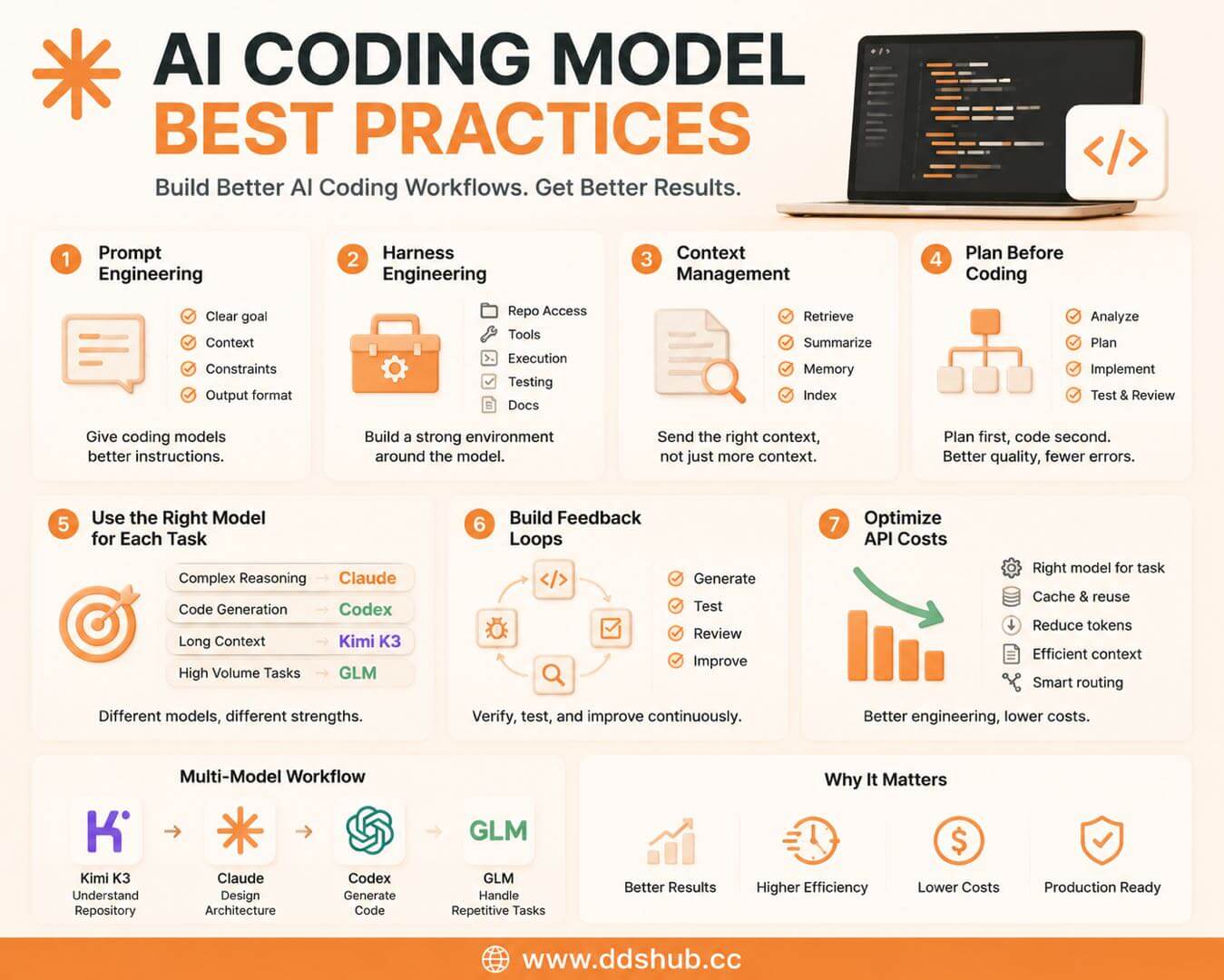
However, simply connecting an API and asking an AI model to "write code" rarely produces reliable results.
The difference between a basic AI coding assistant and a professional AI development workflow is usually not the model itself. It comes from how developers design prompts, structure repositories, manage context, and build the surrounding engineering environment.
As Claude, Codex, Kimi K3, and other coding models become more powerful, developers are increasingly focusing on a new question:
How can we build workflows that allow AI coding models to perform at their full potential?
This article explores practical techniques including prompt engineering, harness engineering, context management, tool integration, and multi-model workflows.
1. Prompt Engineering: Give Coding Models Better Instructions
Prompt engineering remains one of the most important skills when working with AI coding models.
Many developers start with simple instructions:
"Build a login system."
Although the request is understandable, it leaves many important decisions undefined. The AI does not know the technology stack, security requirements, coding style, testing expectations, or project constraints.
A better coding prompt provides context and constraints:
"Implement an authentication system using Node.js and PostgreSQL. Follow the existing project architecture, include input validation, add unit tests, and explain the security considerations."
The difference is not the length of the prompt. The difference is the quality of information provided.
Effective coding prompts usually define:
- The goal of the task
- Existing technical context
- Required constraints
- Expected output format
- Testing requirements
For example, when working with Claude or Codex, asking the model to first analyze the current architecture before writing code often produces significantly better results than immediately requesting implementation.
2. Harness Engineering: Build the Environment Around the Model
Prompt engineering focuses on communication with the model.
Harness engineering focuses on everything around the model.
A coding model does not work alone. Its performance depends heavily on the environment it operates in.
A professional AI coding harness may include:
- Repository access
- File search capabilities
- Code execution tools
- Testing environments
- Documentation retrieval
- Version control integration
Instead of expecting the model to memorize everything, developers build systems where the model can inspect information when needed.
For example, an AI coding agent working on a large application should not receive the entire repository inside every prompt. A better approach is providing tools that allow the model to search files, understand dependencies, modify code, run tests, and verify results.
This is why tools such as Claude Code, Codex-based coding agents, and other AI development environments focus heavily on tool usage and execution workflows.
The model provides reasoning ability, while the harness provides the working environment.
3. Context Management: More Tokens Do Not Always Mean Better Results
Large context windows are one of the biggest advantages of modern coding models.
Kimi K3, Claude, and other advanced models can process significantly larger amounts of information than previous generations.
However, sending more context does not always improve performance.
Large amounts of irrelevant information can confuse models and increase API costs.
Professional AI coding systems usually manage context through:
- Retrieval
- Summarization
- Memory systems
- Repository indexing
For example, instead of sending an entire codebase to Claude or Kimi K3, an AI agent can first identify relevant files and only provide the necessary context.
This improves both accuracy and cost efficiency.
4. Use Planning Before Coding
One common mistake developers make is asking AI models to immediately write code.
Complex software tasks usually require planning before implementation.
A better workflow is:
- Requirement analysis
- Architecture discussion
- Implementation plan
- Code generation
- Testing and review
For example, instead of:
"Rewrite this payment system."
A stronger approach is:
"Analyze the current payment system, identify potential risks, propose an implementation plan, and wait for approval before modifying code."
This approach reduces unnecessary changes and allows developers to maintain control over important decisions.
5. Let Different Models Handle Different Tasks
Modern AI development is moving toward multi-model workflows.
Different models have different strengths.
Claude is often preferred for reasoning-heavy tasks such as architecture design, debugging, and code review.
Codex is optimized for software engineering workflows and code generation.
Kimi K3 is valuable when developers need large context windows for repository understanding and technical documentation.
GLM can provide cost-efficient inference for high-volume tasks.
A practical AI coding workflow might look like this:
| Task | Recommended Model |
|---|---|
| Understand a large repository | Kimi K3 |
| Design architecture | Claude |
| Generate implementation code | Codex |
| Handle repetitive coding tasks | GLM |
This approach improves both performance and cost efficiency.
6. Build Feedback Loops Into AI Coding Workflows
One of the biggest differences between human developers and current AI coding systems is verification.
AI models can generate excellent code, but they can also introduce subtle bugs.
Professional workflows therefore include feedback loops:
- Generate code
- Run tests
- Review errors
- Improve implementation
Tools such as automated testing, linting, and continuous integration help AI coding agents verify their own work.
The goal is not simply generating code faster, but creating a system where AI can continuously improve its output.
7. Optimize API Costs Through Better Engineering
AI coding costs are becoming an important consideration for companies.
A poorly designed coding agent may repeatedly send unnecessary context, duplicate instructions, and consume large amounts of tokens.
Cost optimization techniques include:
- Using the right model for each task
- Reusing cached context
- Reducing unnecessary prompts
- Managing repository context efficiently
- Routing simple tasks to cheaper models
For example, a team may use Claude for complex architectural decisions while using Codex, Kimi K3, or GLM for other parts of the workflow.
The goal is not using the cheapest model everywhere, but using each model where it provides the highest value.
Building AI Coding Workflows With Multiple APIs
As coding models continue to improve, developers increasingly combine multiple AI providers instead of relying on one model.
Managing Claude API, Codex API, Kimi K3 API, and GLM API separately can create unnecessary complexity.
DDShub provides access to multiple AI coding models through a unified API platform, allowing developers to experiment with different models and build flexible AI coding workflows.
Developers can access:
- Claude models
- Codex models
- Kimi models
- GLM models
through one platform while optimizing cost, performance, and model selection.
- DDShub: https://www.ddshub.cc
- Models: https://www.ddshub.cc/models
- Documentation: https://www.ddshub.cc/docs
Final Thoughts
The future of AI coding is not only about having access to the most powerful model.
The best results come from combining strong models with effective engineering practices.
Prompt engineering helps developers communicate better with AI.
Harness engineering creates the right environment for models to operate.
Context management improves accuracy and reduces costs.
Multi-model strategies allow teams to select the right model for every task.
As AI coding evolves from simple assistants into autonomous engineering systems, developers who understand these workflows will be able to build faster, more reliable, and more cost-efficient software systems.