
AI API Error Codes Explained: A Complete Troubleshooting Guide for Claude, OpenAI, Codex & GLM
Anyone who regularly works with AI APIs will eventually encounter an error message. Whether you are integrating Claude into an application, building an AI coding workflow with Codex, calling GLM through an OpenAI-compatible API, or using an AI gateway platform, error responses are simply part of the development process. The good news is that most of these errors are not unique to a specific provider. In fact, many platforms return nearly identical error messages because they share similar authentication methods, routing mechanisms, and upstream infrastructure.
For many developers, the biggest challenge is not the error itself but understanding what it actually means. A "403 Forbidden" may indicate an incorrect client, while a "429 Too Many Requests" could be caused by concurrency limits rather than exhausted credits. Likewise, a "502 Bad Gateway" often points to an upstream provider issue instead of a problem with your own code.
This guide explains the most common AI API error codes, why they occur, and how to troubleshoot them efficiently. Although the examples are based on common AI gateway architectures, including DDS Hub, the same troubleshooting principles apply to many AI platforms that provide access to Claude, OpenAI, Codex, GLM, and other large language models.
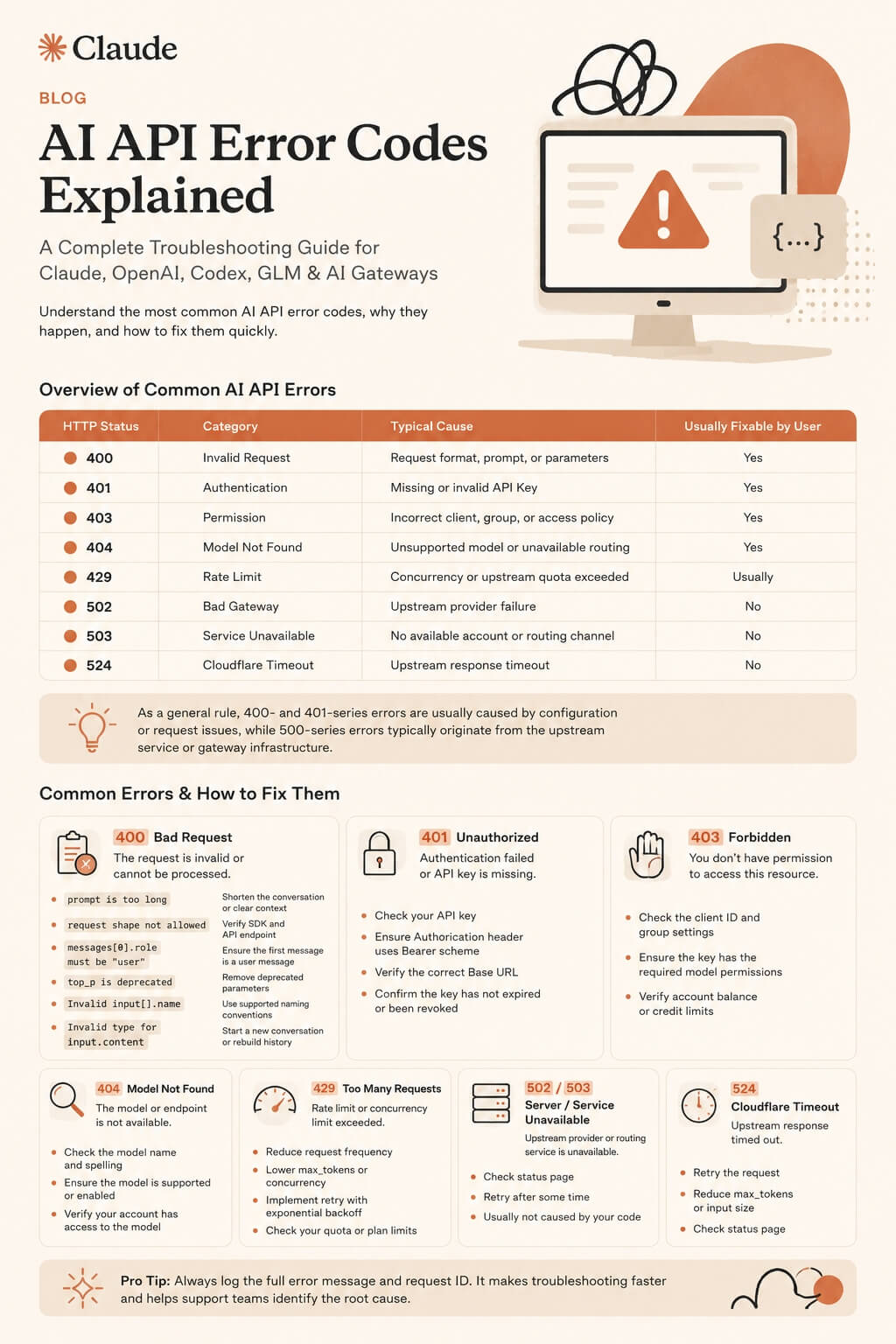
Understanding Common AI API Errors
Before diving into individual examples, it helps to understand what an HTTP status code generally represents. While the detailed error message provides the specific cause, the HTTP status code usually indicates which part of the request has failed.
| HTTP Status | Category | Typical Cause | Usually Fixable by User |
|---|---|---|---|
| 400 | Invalid Request | Request format, prompt, or parameters | Yes |
| 401 | Authentication | Missing or invalid API Key | Yes |
| 403 | Permission | Incorrect client, group, or access policy | Yes |
| 404 | Model Not Found | Unsupported model or unavailable routing | Yes |
| 429 | Rate Limit | Concurrency or upstream quota exceeded | Usually |
| 502 | Bad Gateway | Upstream provider failure | No |
| 503 | Service Unavailable | No available account or routing channel | No |
| 524 | Cloudflare Timeout | Upstream response timeout | No |
As a general rule, 400- and 401-series errors are usually caused by configuration or request issues, while 500-series errors typically originate from the upstream service or gateway infrastructure.
400 Bad Request: When the Request Cannot Be Processed
HTTP 400 errors are among the most common issues developers encounter because they indicate that the server understood the request but rejected it due to invalid parameters, unsupported formats, or malformed input.
Several common examples include oversized prompts, unsupported request fields, deprecated parameters, invalid message structures, or incompatible SDK configurations. While the exact wording varies between providers, the underlying problem is usually straightforward once the error is identified.
| Common Error | Meaning | Recommended Action |
|---|---|---|
| prompt is too long | Prompt exceeds the model's context window | Shorten the conversation or clear previous context |
| request shape not allowed | Incorrect request format or endpoint | Verify SDK and API endpoint |
| messages[0].role must be "user" | Invalid message order | Ensure the first message is a user message |
| top_p is deprecated | Unsupported parameter | Remove deprecated parameters |
| Invalid input[].name | Invalid tool name format | Use supported naming conventions only |
| Invalid type for input.content | Invalid message structure | Start a new conversation or rebuild the message history |
Unlike infrastructure failures, these problems are almost always resolved by correcting the request rather than waiting for the service to recover.
401 Unauthorized: Authentication Problems
Authentication errors occur before your request even reaches the AI model. The most common example is:
API key is required in Authorization header (Bearer scheme)
This message usually indicates that the request does not include a valid API key, the Authorization header is incorrectly formatted, or the application is sending requests to the wrong Base URL.
In most situations, the solution is relatively simple. Developers should verify that the API key is still valid, confirm that the Authorization header uses the standard Bearer format, and ensure the client is pointing to the correct API endpoint. Since authentication happens before model routing begins, resolving a 401 error rarely requires assistance from the service provider.
403 Forbidden: Permission and Client Restrictions
Unlike authentication errors, a 403 response means the server successfully recognized your identity but determined that the request is not permitted under the current permissions.
This is especially common on AI gateway platforms where different API keys are associated with different model groups or client types.
| Common Error | What It Usually Means |
|---|---|
| This group does not allow /v1/messages dispatch | Incorrect API endpoint or group configuration |
| This group is restricted to Claude Code clients | The selected group only supports Claude Code CLI |
| This account only allows Codex official clients | Official Codex client required |
| Your request was blocked | Upstream security or risk control triggered |
For example, DDS Hub uses dedicated model groups rather than a single universal API key. Each API key belongs to a specific model group, such as Claude, Codex, or GLM, ensuring that routing rules, permissions, and billing remain consistent. If a Claude-specific API key is used to access a Codex-only endpoint, or if a Claude Code–exclusive group is called through a standard REST client, the platform will reject the request with a permission-related error instead of forwarding it upstream.
Understanding which model group your API key belongs to is therefore one of the quickest ways to resolve many 403 errors.
404 Not Found: Unsupported Models
A 404 error rarely means the API server itself is missing. Instead, it usually indicates that the requested model cannot be found within the current routing group.
A common example is:
Model "claude-haiku-4-5" is not supported by any configured account in this group
This may happen because the model name is misspelled, the selected model has not yet been deployed, or the current API group simply does not include that model family.
Before assuming that the service is unavailable, verify both the model name and the API key being used, since many AI gateways organize different model families into separate routing groups.
429 Too Many Requests: Rate Limits Are Not Always About Credits
Many developers immediately assume that a 429 response means they have run out of balance. In reality, rate limiting can be triggered by several completely different factors.
The request may exceed concurrency limits, upstream providers may temporarily throttle requests, or an exceptionally large context may consume too many processing resources.
| Common Error | Typical Cause |
|---|---|
| Concurrency limit exceeded | Too many simultaneous requests |
| Upstream rate limit exceeded | Provider-side throttling |
| Large conversation context | Excessive token consumption |
In most situations, waiting a short period before retrying or reducing the size of the conversation resolves the issue without requiring any configuration changes.
502, 503 and 524: Understanding Infrastructure Errors
Unlike request validation errors, server-side failures usually indicate that your request has already passed authentication and routing but encountered a problem while communicating with the upstream AI provider.
These errors often confuse developers because the request itself is completely valid.
| Error | Typical Cause |
|---|---|
| 502 Bad Gateway | Upstream provider returned an unexpected error |
| 503 Service Unavailable | No available account or routing channel |
| 524 Timeout | Upstream inference exceeded the timeout limit |
A simplified request flow helps explain where these errors originate.
Application
      │
      ▼
AI Gateway
      │
      ▼
Model Router
      │
      ▼
Upstream Provider
      │
      ▼
Claude / OpenAI / GLM
If the request successfully reaches the upstream provider but the provider experiences high load, routing failures, or unusually long inference times, the gateway may return a 502, 503, or 524 response even though your own application is functioning correctly. In these situations, retrying later is often more effective than modifying the request itself.
Which Errors Can You Resolve Yourself?
One of the easiest ways to speed up troubleshooting is to determine whether the problem originates from your own configuration or from the upstream service.
| Error Type | User Action |
|---|---|
| Authentication (401) | Check API key and Authorization header |
| Invalid Request (400) | Review parameters, prompt, and request format |
| Permission (403) | Verify client type and model group |
| Model Not Found (404) | Check model name and routing group |
| Rate Limit (429) | Retry later or reduce request size |
| Gateway Errors (502/503/524) | Usually wait or contact the provider |
This distinction prevents unnecessary debugging and helps developers focus on issues they can actually resolve.
Simplifying AI API Management with DDS Hub
As AI ecosystems continue to expand, developers increasingly work with multiple model families instead of relying on a single provider. Managing different authentication methods, API formats, and routing rules across several platforms can quickly become difficult, particularly for teams building production applications.
DDS Hub addresses this challenge by organizing access through dedicated model groups rather than a unified API key. Developers simply create an API key for the model family they intend to use, whether that is Claude, Codex, or GLM, allowing each workflow to maintain clear permissions while benefiting from optimized routing and simplified account management. Because each model group is managed independently, switching between different AI ecosystems becomes more predictable without introducing unnecessary configuration complexity.
Learn more at www.ddshub.cc.
Conclusion
Although AI API error messages may appear intimidating at first, most of them follow predictable patterns. Authentication errors typically point to API keys, permission errors usually involve client or routing configuration, rate-limit responses indicate temporary resource constraints, and gateway errors are often caused by upstream providers rather than application code.
Learning to distinguish between these categories dramatically reduces troubleshooting time and allows developers to focus on building software instead of repeatedly debugging the same configuration issues. Whether you are integrating Claude, Codex, OpenAI, GLM, or using an AI gateway such as DDS Hub, understanding these common error codes will help you identify problems more quickly and keep your development workflow running smoothly.